> ## Documentation Index
> Fetch the complete documentation index at: https://auth0-docs-event-stream-action-templates.mintlify.site/llms.txt
> Use this file to discover all available pages before exploring further.

# React Nativeアプリケーションにログインを追加する

> このチュートリアルは、Auth0を使用して、React Nativeアプリケーションにユーザーログインを追加する方法について説明します。

export const LoggedInForm = ({sampleApp}) => {
  const LS_APPS_KEY = "auth_demo_apps";
  const LS_APP_CFG_KEY = "auth_demo_app_cfg";
  const CHANNEL = "auth_flows_sync_v1";
  const mkChannel = () => new BroadcastChannel(CHANNEL);
  function uid() {
    return Math.random().toString(36).slice(2) + Date.now().toString(36);
  }
  function loadApps() {
    const raw = localStorage.getItem(LS_APPS_KEY);
    if (raw) return JSON.parse(raw);
    const seeded = [{
      id: "{yourClientId}",
      name: "Default App"
    }];
    localStorage.setItem(LS_APPS_KEY, JSON.stringify(seeded));
    return seeded;
  }
  function saveApps(apps) {
    localStorage.setItem(LS_APPS_KEY, JSON.stringify(apps));
  }
  function loadCfg() {
    const raw = localStorage.getItem(LS_APP_CFG_KEY);
    return raw ? JSON.parse(raw) : {};
  }
  function saveCfg(cfg) {
    localStorage.setItem(LS_APP_CFG_KEY, JSON.stringify(cfg));
  }
  const RightChevron = ({className = "w-5 h-5", ...props}) => <svg xmlns="http://www.w3.org/2000/svg" viewBox="0 0 24 24" stroke="currentColor" fill="none" strokeWidth="2" strokeLinecap="round" strokeLinejoin="round" className={className} {...props}>
      <polyline points="9 18 15 12 9 6" />
    </svg>;
  const LightningIcon = () => <svg width="24" height="24" viewBox="0 0 48 48" fill="none" xmlns="http://www.w3.org/2000/svg">
      <path fillRule="evenodd" clipRule="evenodd" className="fill-[#3F59E4] dark:fill-[#99A7F1]" d="M24.971 30.152H7.088c-1.786 0-2.745-2.103-1.574-3.453l19.07-21.988c1.33-1.532 3.835-.4 3.569 1.607L24.97 30.152z" />
      <path fillRule="evenodd" clipRule="evenodd" className="fill-[#3F59E4] dark:fill-[#99A7F1]" d="M23.201 17.885h17.885c1.787 0 2.746 2.102 1.575 3.453l-19.073 21.99c-1.33 1.532-3.835.4-3.568-1.607L23.2 17.885z" />
    </svg>;
  const LayersIcon = () => <svg width="24" height="24" viewBox="0 0 48 48" fill="none" xmlns="http://www.w3.org/2000/svg">
      <path className="fill-[#3F59E4] dark:fill-[#99A7F1]" d="M34.54 29.135l6.373 3.183c1.566.782 1.566 3.017 0 3.8l-14.815 7.396a4.623 4.623 0 01-4.125 0L7.174 36.12c-1.565-.782-1.565-3.017 0-3.798l6.532-3.214" />
      <path className="fill-[#AAB6F3] dark:fill-[#3449BA]" d="M34.54 18.86l6.373 3.183c1.566.782 1.566 3.016 0 3.8L26.098 33.24a4.623 4.623 0 01-4.125 0L7.174 25.843c-1.565-.781-1.565-3.016 0-3.798l6.33-3.164" />
      <path className="fill-[#CFD6F8] dark:fill-[#22307C]" d="M21.94 23.058L7.306 15.745c-1.62-.81-1.62-3.123 0-3.932l14.631-7.319a4.693 4.693 0 014.194 0l14.648 7.319c1.622.81 1.62 3.124 0 3.932L26.13 23.058c-1.321.66-2.873.66-4.191 0z" />
    </svg>;
  const GithubIcon = () => <svg xmlns="http://www.w3.org/2000/svg" viewBox="0 0 24 24" fill="none" stroke="currentColor" strokeWidth="2" strokeLinecap="round" strokeLinejoin="round" className="w-5 h-5">
      <path d="M9 19c-5 1.5-5-2.5-7-3m14 6v-3.87a3.37 3.37 0 0 0-.94-2.61c3.14-.35 6.44-1.54 6.44-7A5.44 5.44 0 0 0 20 4.77 5.07 5.07 0 0 0 19.91 1S18.73.65 16 2.48a13.38 13.38 0 0 0-7 0C6.27.65 5.09 1 5.09 1A5.07 5.07 0 0 0 5 4.77a5.44 5.44 0 0 0-1.5 3.78c0 5.42 3.3 6.61 6.44 7A3.37 3.37 0 0 0 9 18.13V22"></path>
    </svg>;
  function IconTile({children}) {
    return <div className="
          shrink-0 grid place-items-center w-10 h-10 rounded-lg
          bg-indigo-50 ring-1 ring-indigo-200/60
          dark:bg-indigo-950/40 dark:ring-white/10
        ">
        {children}
      </div>;
  }
  function Card({className = "", children}) {
    return <div className={`rounded-2xl shadow-sm ring-1 ring-zinc-200 dark:ring-zinc-800 ${className}`}>{children}</div>;
  }
  function Button({variant = "primary", type = "button", onClick, children}) {
    const base = "inline-flex items-center justify-center gap-2 h-10 px-4 rounded-xl font-medium transition";
    let styles = "";
    if (variant === "primary") {
      styles = "mint-bg-indigo-600 text-white hover:mint-bg-indigo-700";
    } else if (variant === "outline") {
      styles = "border border-zinc-300 dark:border-zinc-700 mint-bg-transparent hover:mint-bg-zinc-50 dark:hover:mint-bg-zinc-800";
    } else if (variant === "ghost") {
      styles = "hover:mint-bg-zinc-100 dark:hover:mint-bg-zinc-800";
    }
    return <button type={type} onClick={onClick} className={`${base} ${styles}`}>
        {children}
      </button>;
  }
  function Input({id, label, value, onChange, placeholder, name}) {
    return <label className="block space-y-1">
        <span className="text-sm text-zinc-700 dark:text-zinc-300">{label}</span>
        <input id={id} name={name} className="w-full h-11 px-3 rounded-xl border border-zinc-300 dark:border-zinc-700 bg-white dark:bg-zinc-900 text-zinc-900 dark:text-zinc-100 focus:outline-none focus:ring-2 focus:ring-indigo-500" placeholder={placeholder} value={value} onChange={e => onChange(e.target.value)} />
      </label>;
  }
  function Select({label, value, onChange, options}) {
    return <label className="block space-y-1 max-w-[300px]">
        <span className="text-sm text-zinc-700 dark:text-zinc-300">{label}</span>
        <div className="relative">
          <select className="w-full h-11 appearance-none px-3 pr-9 rounded-xl border border-zinc-300 dark:border-zinc-700 bg-white dark:bg-zinc-900 text-zinc-900 dark:text-zinc-100 focus:outline-none focus:ring-2 focus:ring-indigo-500" value={value} onChange={e => onChange(e.target.value)}>
            <optgroup label="Generic Applications">
              {options.map(o => <option key={o.id} value={o.id}>
                  {o.name}
                </option>)}
            </optgroup>
          </select>
          <svg className="pointer-events-none absolute right-3 top-1/2 -translate-y-1/2 w-5 h-5 text-zinc-500" viewBox="0 0 24 24">
            <path d="M7 10l5 5 5-5z" fill="currentColor" />
          </svg>
        </div>
      </label>;
  }
  function Toast({open, onClose, children}) {
    useEffect(() => {
      if (!open) return;
      const t = setTimeout(onClose, 2200);
      return () => clearTimeout(t);
    }, [open, onClose]);
    return <div className={`fixed right-4 top-4 z-50 transition ${open ? "opacity-100 translate-y-0" : "opacity-0 -translate-y-2 pointer-events-none"}`}>
        <div className="flex items-center gap-2 rounded-xl shadow ring-1 ring-emerald-200 bg-white dark:bg-zinc-900 px-4 py-2">
          <span className="w-1.5 h-8 rounded-l bg-emerald-500" />
          <svg className="w-5 h-5 text-emerald-600" viewBox="0 0 24 24" fill="none" stroke="currentColor" strokeWidth="2">
            <path d="M20 6L9 17l-5-5" />
          </svg>
          <span className="text-sm text-zinc-900 dark:text-zinc-100">{children}</span>
        </div>
      </div>;
  }
  function Flows() {
    const [route, setRoute] = useState("menu");
    const [apps, setApps] = useState(loadApps());
    const [cfg, setCfg] = useState(loadCfg());
    const [selected, setSelected] = useState(apps[0]?.id || "");
    const [toast, setToast] = useState(false);
    const [bc] = useState(() => mkChannel());
    useEffect(() => {
      if (!apps.find(a => a.id === selected)) {
        setSelected(apps[0]?.id || "");
      }
    }, [apps, selected]);
    useEffect(() => {
      const onMsg = e => {
        const {type, payload} = e.data || ({});
        switch (type) {
          case "NAV":
            setRoute(payload.route);
            break;
          case "SELECT":
            setSelected(payload.appId);
            break;
          case "APPS_UPDATED":
            setApps(loadApps());
            break;
          case "CFG_UPDATED":
            setCfg(loadCfg());
            setToast(true);
            break;
          default:
            break;
        }
      };
      bc.addEventListener("message", onMsg);
      return () => bc.removeEventListener("message", onMsg);
    }, [bc]);
    const nav = nextRoute => {
      setRoute(nextRoute);
      bc.postMessage({
        type: "NAV",
        payload: {
          route: nextRoute
        }
      });
    };
    const selectApp = appId => {
      setSelected(appId);
      bc.postMessage({
        type: "SELECT",
        payload: {
          appId
        }
      });
    };
    const onCreate = name => {
      const id = uid();
      const next = [...apps, {
        id,
        name: name || "Untitled"
      }];
      setApps(next);
      saveApps(next);
      bc.postMessage({
        type: "APPS_UPDATED"
      });
      selectApp(id);
      nav("integrate");
    };
    const onSaveCfg = (appId, data) => {
      const next = {
        ...cfg,
        [appId]: data
      };
      setCfg(next);
      saveCfg(next);
      setToast(true);
      bc.postMessage({
        type: "CFG_UPDATED"
      });
    };
    return <div>
        {route === "menu" && <Menu onCreate={() => nav("create")} onIntegrate={() => nav("integrate")} />}

        {route === "create" && <CreateForm onCancel={() => nav("menu")} onSave={onCreate} />}

        {route === "integrate" && <IntegrateForm apps={apps} selected={selected} onSelect={selectApp} saved={cfg[selected]} onSave={data => onSaveCfg(selected, data)} onCancel={() => nav("menu")} />}

        <Toast open={toast} onClose={() => setToast(false)}>
          Successfully saved your changes.
        </Toast>
      </div>;
  }
  function Menu({onCreate, onIntegrate}) {
    return <ul className="space-y-4 list-none login_list">
        <li className="list-none !px-0">
          <button onClick={onCreate} className="w-full text-left">
            <Card className="p-5 hover:shadow-md transition">
              <div className="flex items-center justify-between">
                <div className="flex items-center gap-4">
                  <IconTile>
                    <LightningIcon />
                  </IconTile>
                  <h2 className="text-lg">Create a new application</h2>
                </div>
                <RightChevron className="w-4 h-4 text-zinc-500" />
              </div>
            </Card>
          </button>
        </li>
        <li className="list-none !px-0">
          <button onClick={onIntegrate} className="w-full text-left">
            <Card className="p-5 hover:shadow-md transition">
              <div className="flex items-center justify-between">
                <div className="flex items-center gap-4">
                  <IconTile>
                    <LayersIcon />
                  </IconTile>
                  <h2 className="text-lg">Integrate with an existing application</h2>
                </div>
                <RightChevron className="w-4 h-4 text-zinc-500" />
              </div>
            </Card>
          </button>
        </li>
        <li className="list-none !px-0">
          <a className="no_external_icon block" href={sampleApp ? sampleApp : "/"} target="_blank" rel="noreferrer">
            <Card className="p-5 hover:shadow-md transition">
              <div className="flex items-center justify-between">
                <div className="flex items-center gap-4">
                  <IconTile>
                    <GithubIcon />
                  </IconTile>
                  <h2 className="text-lg">View a sample application</h2>
                </div>
                <RightChevron className="w-4 h-4 text-zinc-500" />
              </div>
            </Card>
          </a>
        </li>
      </ul>;
  }
  function CreateForm({onSave, onCancel}) {
    const [name, setName] = useState("");
    return <div className="space-y-6">
        <Input id="app-name" label="Application Name" placeholder="My App" value={name} onChange={setName} />
        <p className="text-sm text-zinc-500">You can change this later in the application settings.</p>
        <div className="flex gap-3">
          <Button onClick={() => onSave(name)}>Save</Button>
          <Button variant="outline" onClick={onCancel}>
            Cancel
          </Button>
        </div>
      </div>;
  }
  function IntegrateForm({apps, selected, onSelect, saved, onSave, onCancel}) {
    const [callbacks, setCallbacks] = useState(saved?.callbacks ?? "");
    const [logouts, setLogouts] = useState(saved?.logouts ?? "");
    const [origins, setOrigins] = useState(saved?.origins ?? "");
    useEffect(() => {
      setCallbacks(loadCfg()[selected]?.callbacks ?? "");
      setLogouts(loadCfg()[selected]?.logouts ?? "");
      setOrigins(loadCfg()[selected]?.origins ?? "");
    }, [selected]);
    return <div className="space-y-6">
        <div>
          <span className="block text-sm text-zinc-600 dark:text-zinc-300 mb-1">Select your Application</span>
          <Select label="" value={selected} onChange={onSelect} options={apps} />
        </div>

        <form className="space-y-4" onSubmit={e => {
      e.preventDefault();
      onSave({
        callbacks,
        logouts,
        origins
      });
    }}>
          <Input id="callbacks" name="callbacks" label="Callback URLs" placeholder="http://localhost:3000" value={callbacks} onChange={setCallbacks} />
          <Input id="logout" name="allowed_logout_urls" label="Logout URLs" placeholder="http://localhost:3000" value={logouts} onChange={setLogouts} />
          <Input id="origins" name="web_origins" label="Allowed Web Origins" placeholder="http://localhost:3000" value={origins} onChange={setOrigins} />

          <div className="flex gap-3 pt-2">
            <Button type="submit">Save</Button>
            <Button variant="outline" type="button" onClick={onCancel}>
              Cancel
            </Button>
          </div>
        </form>
      </div>;
  }
  return <div className="w-full mx-auto py-8">
      <Flows />
    </div>;
};

export const SignUpForm = () => {
  const [isAuthenticated, setIsAuthenticated] = useState(false);
  const [storeReady, setStoreReady] = useState(false);
  useEffect(() => {
    let unsubscribe = null;
    function init() {
      setStoreReady(true);
      unsubscribe = window.autorun(() => {
        const authenticated = window.rootStore?.sessionStore?.isAuthenticated || false;
        setIsAuthenticated(authenticated);
      });
    }
    if (window.rootStore) {
      init();
    } else {
      window.addEventListener("adu:storeReady", init);
    }
    return () => {
      window.removeEventListener("adu:storeReady", init);
      unsubscribe?.();
    };
  }, []);
  function LoggedInForm({sampleApp}) {
    const LS_APPS_KEY = "auth_demo_apps";
    const LS_APP_CFG_KEY = "auth_demo_app_cfg";
    const CHANNEL = "auth_flows_sync_v1";
    const mkChannel = () => new BroadcastChannel(CHANNEL);
    function uid() {
      return Math.random().toString(36).slice(2) + Date.now().toString(36);
    }
    function loadApps() {
      const raw = localStorage.getItem(LS_APPS_KEY);
      if (raw) return JSON.parse(raw);
      const seeded = [{
        id: "{yourClientId}",
        name: "Default App"
      }];
      localStorage.setItem(LS_APPS_KEY, JSON.stringify(seeded));
      return seeded;
    }
    function saveApps(apps) {
      localStorage.setItem(LS_APPS_KEY, JSON.stringify(apps));
    }
    function loadCfg() {
      const raw = localStorage.getItem(LS_APP_CFG_KEY);
      return raw ? JSON.parse(raw) : {};
    }
    function saveCfg(cfg) {
      localStorage.setItem(LS_APP_CFG_KEY, JSON.stringify(cfg));
    }
    const RightChevron = ({className = "w-5 h-5", ...props}) => <svg xmlns="http://www.w3.org/2000/svg" viewBox="0 0 24 24" stroke="currentColor" fill="none" strokeWidth="2" strokeLinecap="round" strokeLinejoin="round" className={className} {...props}>
        <polyline points="9 18 15 12 9 6" />
      </svg>;
    const LightningIcon = () => <svg width="24" height="24" viewBox="0 0 48 48" fill="none" xmlns="http://www.w3.org/2000/svg">
        <path fillRule="evenodd" clipRule="evenodd" className="fill-[#3F59E4] dark:fill-[#99A7F1]" d="M24.971 30.152H7.088c-1.786 0-2.745-2.103-1.574-3.453l19.07-21.988c1.33-1.532 3.835-.4 3.569 1.607L24.97 30.152z" />
        <path fillRule="evenodd" clipRule="evenodd" className="fill-[#3F59E4] dark:fill-[#99A7F1]" d="M23.201 17.885h17.885c1.787 0 2.746 2.102 1.575 3.453l-19.073 21.99c-1.33 1.532-3.835.4-3.568-1.607L23.2 17.885z" />
      </svg>;
    const LayersIcon = () => <svg width="24" height="24" viewBox="0 0 48 48" fill="none" xmlns="http://www.w3.org/2000/svg">
        <path className="fill-[#3F59E4] dark:fill-[#99A7F1]" d="M34.54 29.135l6.373 3.183c1.566.782 1.566 3.017 0 3.8l-14.815 7.396a4.623 4.623 0 01-4.125 0L7.174 36.12c-1.565-.782-1.565-3.017 0-3.798l6.532-3.214" />
        <path className="fill-[#AAB6F3] dark:fill-[#3449BA]" d="M34.54 18.86l6.373 3.183c1.566.782 1.566 3.016 0 3.8L26.098 33.24a4.623 4.623 0 01-4.125 0L7.174 25.843c-1.565-.781-1.565-3.016 0-3.798l6.33-3.164" />
        <path className="fill-[#CFD6F8] dark:fill-[#22307C]" d="M21.94 23.058L7.306 15.745c-1.62-.81-1.62-3.123 0-3.932l14.631-7.319a4.693 4.693 0 014.194 0l14.648 7.319c1.622.81 1.62 3.124 0 3.932L26.13 23.058c-1.321.66-2.873.66-4.191 0z" />
      </svg>;
    const GithubIcon = () => <svg xmlns="http://www.w3.org/2000/svg" viewBox="0 0 24 24" fill="none" stroke="currentColor" strokeWidth="2" strokeLinecap="round" strokeLinejoin="round" className="w-5 h-5">
        <path d="M9 19c-5 1.5-5-2.5-7-3m14 6v-3.87a3.37 3.37 0 0 0-.94-2.61c3.14-.35 6.44-1.54 6.44-7A5.44 5.44 0 0 0 20 4.77 5.07 5.07 0 0 0 19.91 1S18.73.65 16 2.48a13.38 13.38 0 0 0-7 0C6.27.65 5.09 1 5.09 1A5.07 5.07 0 0 0 5 4.77a5.44 5.44 0 0 0-1.5 3.78c0 5.42 3.3 6.61 6.44 7A3.37 3.37 0 0 0 9 18.13V22"></path>
      </svg>;
    function IconTile({children}) {
      return <div className="
            shrink-0 grid place-items-center w-10 h-10 rounded-lg
            bg-indigo-50 ring-1 ring-indigo-200/60
            dark:bg-indigo-950/40 dark:ring-white/10
          ">
          {children}
        </div>;
    }
    function Card({className = "", children}) {
      return <div className={`rounded-2xl shadow-sm ring-1 ring-zinc-200 dark:ring-zinc-800 ${className}`}>{children}</div>;
    }
    function Button({variant = "primary", type = "button", onClick, children}) {
      const base = "inline-flex items-center justify-center gap-2 h-10 px-4 rounded-xl font-medium transition";
      let styles = "";
      if (variant === "primary") {
        styles = "mint-bg-indigo-600 text-white hover:mint-bg-indigo-700";
      } else if (variant === "outline") {
        styles = "border border-zinc-300 dark:border-zinc-700 mint-bg-transparent hover:mint-bg-zinc-50 dark:hover:mint-bg-zinc-800";
      } else if (variant === "ghost") {
        styles = "hover:mint-bg-zinc-100 dark:hover:mint-bg-zinc-800";
      }
      return <button type={type} onClick={onClick} className={`${base} ${styles}`}>
          {children}
        </button>;
    }
    function Input({id, label, value, onChange, placeholder, name}) {
      return <label className="block space-y-1">
          <span className="text-sm text-zinc-700 dark:text-zinc-300">{label}</span>
          <input id={id} name={name} className="w-full h-11 px-3 rounded-xl border border-zinc-300 dark:border-zinc-700 bg-white dark:bg-zinc-900 text-zinc-900 dark:text-zinc-100 focus:outline-none focus:ring-2 focus:ring-indigo-500" placeholder={placeholder} value={value} onChange={e => onChange(e.target.value)} />
        </label>;
    }
    function Select({label, value, onChange, options}) {
      return <label className="block space-y-1 max-w-[300px]">
          <span className="text-sm text-zinc-700 dark:text-zinc-300">{label}</span>
          <div className="relative">
            <select className="w-full h-11 appearance-none px-3 pr-9 rounded-xl border border-zinc-300 dark:border-zinc-700 bg-white dark:bg-zinc-900 text-zinc-900 dark:text-zinc-100 focus:outline-none focus:ring-2 focus:ring-indigo-500" value={value} onChange={e => onChange(e.target.value)}>
              <optgroup label="Generic Applications">
                {options.map(o => <option key={o.id} value={o.id}>
                    {o.name}
                  </option>)}
              </optgroup>
            </select>
            <svg className="pointer-events-none absolute right-3 top-1/2 -translate-y-1/2 w-5 h-5 text-zinc-500" viewBox="0 0 24 24">
              <path d="M7 10l5 5 5-5z" fill="currentColor" />
            </svg>
          </div>
        </label>;
    }
    function Toast({open, onClose, children}) {
      useEffect(() => {
        if (!open) return;
        const t = setTimeout(onClose, 2200);
        return () => clearTimeout(t);
      }, [open, onClose]);
      return <div className={`fixed right-4 top-4 z-50 transition ${open ? "opacity-100 translate-y-0" : "opacity-0 -translate-y-2 pointer-events-none"}`}>
          <div className="flex items-center gap-2 rounded-xl shadow ring-1 ring-emerald-200 bg-white dark:bg-zinc-900 px-4 py-2">
            <span className="w-1.5 h-8 rounded-l bg-emerald-500" />
            <svg className="w-5 h-5 text-emerald-600" viewBox="0 0 24 24" fill="none" stroke="currentColor" strokeWidth="2">
              <path d="M20 6L9 17l-5-5" />
            </svg>
            <span className="text-sm text-zinc-900 dark:text-zinc-100">{children}</span>
          </div>
        </div>;
    }
    function Flows() {
      const [route, setRoute] = useState("menu");
      const [apps, setApps] = useState(loadApps());
      const [cfg, setCfg] = useState(loadCfg());
      const [selected, setSelected] = useState(apps[0]?.id || "");
      const [toast, setToast] = useState(false);
      const [bc] = useState(() => mkChannel());
      useEffect(() => {
        if (!apps.find(a => a.id === selected)) {
          setSelected(apps[0]?.id || "");
        }
      }, [apps, selected]);
      useEffect(() => {
        const onMsg = e => {
          const {type, payload} = e.data || ({});
          switch (type) {
            case "NAV":
              setRoute(payload.route);
              break;
            case "SELECT":
              setSelected(payload.appId);
              break;
            case "APPS_UPDATED":
              setApps(loadApps());
              break;
            case "CFG_UPDATED":
              setCfg(loadCfg());
              setToast(true);
              break;
            default:
              break;
          }
        };
        bc.addEventListener("message", onMsg);
        return () => bc.removeEventListener("message", onMsg);
      }, [bc]);
      const nav = nextRoute => {
        setRoute(nextRoute);
        bc.postMessage({
          type: "NAV",
          payload: {
            route: nextRoute
          }
        });
      };
      const selectApp = appId => {
        setSelected(appId);
        bc.postMessage({
          type: "SELECT",
          payload: {
            appId
          }
        });
      };
      const onCreate = name => {
        const id = uid();
        const next = [...apps, {
          id,
          name: name || "Untitled"
        }];
        setApps(next);
        saveApps(next);
        bc.postMessage({
          type: "APPS_UPDATED"
        });
        selectApp(id);
        nav("integrate");
      };
      const onSaveCfg = (appId, data) => {
        const next = {
          ...cfg,
          [appId]: data
        };
        setCfg(next);
        saveCfg(next);
        setToast(true);
        bc.postMessage({
          type: "CFG_UPDATED"
        });
      };
      return <div>
          {route === "menu" && <Menu onCreate={() => nav("create")} onIntegrate={() => nav("integrate")} />}

          {route === "create" && <CreateForm onCancel={() => nav("menu")} onSave={onCreate} />}

          {route === "integrate" && <IntegrateForm apps={apps} selected={selected} onSelect={selectApp} saved={cfg[selected]} onSave={data => onSaveCfg(selected, data)} onCancel={() => nav("menu")} />}

          <Toast open={toast} onClose={() => setToast(false)}>
            Successfully saved your changes.
          </Toast>
        </div>;
    }
    function Menu({onCreate, onIntegrate}) {
      return <ul className="space-y-4 list-none login_list">
          <li className="list-none !px-0">
            <button onClick={onCreate} className="w-full text-left">
              <Card className="p-5 hover:shadow-md transition">
                <div className="flex items-center justify-between">
                  <div className="flex items-center gap-4">
                    <IconTile>
                      <LightningIcon />
                    </IconTile>
                    <h2 className="text-lg">Create a new application</h2>
                  </div>
                  <RightChevron className="w-4 h-4 text-zinc-500" />
                </div>
              </Card>
            </button>
          </li>
          <li className="list-none !px-0">
            <button onClick={onIntegrate} className="w-full text-left">
              <Card className="p-5 hover:shadow-md transition">
                <div className="flex items-center justify-between">
                  <div className="flex items-center gap-4">
                    <IconTile>
                      <LayersIcon />
                    </IconTile>
                    <h2 className="text-lg">Integrate with an existing application</h2>
                  </div>
                  <RightChevron className="w-4 h-4 text-zinc-500" />
                </div>
              </Card>
            </button>
          </li>
          <li className="list-none !px-0">
            <a className="no_external_icon block" href={sampleApp ? sampleApp : "/"} target="_blank" rel="noreferrer">
              <Card className="p-5 hover:shadow-md transition">
                <div className="flex items-center justify-between">
                  <div className="flex items-center gap-4">
                    <IconTile>
                      <GithubIcon />
                    </IconTile>
                    <h2 className="text-lg">View a sample application</h2>
                  </div>
                  <RightChevron className="w-4 h-4 text-zinc-500" />
                </div>
              </Card>
            </a>
          </li>
        </ul>;
    }
    function CreateForm({onSave, onCancel}) {
      const [name, setName] = useState("");
      return <div className="space-y-6">
          <Input id="app-name" label="Application Name" placeholder="My App" value={name} onChange={setName} />
          <p className="text-sm text-zinc-500">You can change this later in the application settings.</p>
          <div className="flex gap-3">
            <Button onClick={() => onSave(name)}>Save</Button>
            <Button variant="outline" onClick={onCancel}>
              Cancel
            </Button>
          </div>
        </div>;
    }
    function IntegrateForm({apps, selected, onSelect, saved, onSave, onCancel}) {
      const [callbacks, setCallbacks] = useState(saved?.callbacks ?? "");
      const [logouts, setLogouts] = useState(saved?.logouts ?? "");
      const [origins, setOrigins] = useState(saved?.origins ?? "");
      useEffect(() => {
        setCallbacks(loadCfg()[selected]?.callbacks ?? "");
        setLogouts(loadCfg()[selected]?.logouts ?? "");
        setOrigins(loadCfg()[selected]?.origins ?? "");
      }, [selected]);
      return <div className="space-y-6">
          <div>
            <span className="block text-sm text-zinc-600 dark:text-zinc-300 mb-1">Select your Application</span>
            <Select label="" value={selected} onChange={onSelect} options={apps} />
          </div>

          <form className="space-y-4" onSubmit={e => {
        e.preventDefault();
        onSave({
          callbacks,
          logouts,
          origins
        });
      }}>
            <Input id="callbacks" name="callbacks" label="Callback URLs" placeholder="http://localhost:3000" value={callbacks} onChange={setCallbacks} />
            <Input id="logout" name="allowed_logout_urls" label="Logout URLs" placeholder="http://localhost:3000" value={logouts} onChange={setLogouts} />
            <Input id="origins" name="web_origins" label="Allowed Web Origins" placeholder="http://localhost:3000" value={origins} onChange={setOrigins} />

            <div className="flex gap-3 pt-2">
              <Button type="submit">Save</Button>
              <Button variant="outline" type="button" onClick={onCancel}>
                Cancel
              </Button>
            </div>
          </form>
        </div>;
    }
    return <div className="w-full mx-auto py-8">
        <Flows />
      </div>;
  }
  ;
  function SignUpFormInternal() {
    return <div className="flex flex-col gap-2 items-center h-full">
        <img noZoom src="/docs/img/quickstarts/action_hero_dashboard.svg" alt="Sign up for an Auth0 account" style={{
      width: "250px",
      height: "250px"
    }} />
        <span className="text-center" style={{
      width: "400px"
    }}>
          Sign up for an{" "}
          <a href="https://auth0.com/signup" target="_blank" rel="noopener noreferrer">
            Auth0 account
          </a>{" "}
          or{" "}
          <span className="font-semibold text-primary dark:text-white cursor-pointer" onClick={() => console.log("log in")}>
            log in
          </span>{" "}
          to your existing account to integrate directly with your own tenant.
        </span>
        <button onClick={() => console.log("sign up")} className="bg-primary dark:bg-primary-light text-white dark:text-black px-4 py-2 rounded-md mt-4 font-medium" style={{
      width: "140px"
    }}>
          Sign up
        </button>
      </div>;
  }
  ;
  return <></>;
};

export const SideMenuSectionItem = ({id, children}) => {
  return <div id={`side-menu-item-${id}`} className="recipe-side-menu-item flex flex-col w-full h-full">
      {children}
    </div>;
};

export const SideMenu = ({sections, children}) => {
  const [visibleSection, setVisibleSection] = useState(sections[0]?.id ?? null);
  const checkVisibility = () => {
    let currentVisible = null;
    const viewportHeight = window.innerHeight;
    const scrollY = window.scrollY;
    sections.forEach(({id}) => {
      const section = document.getElementById(id);
      if (section) {
        const rect = section.getBoundingClientRect();
        const sectionTop = rect.top + scrollY;
        const sectionBottom = sectionTop + rect.height;
        const multiplier = viewportHeight > 1600 ? 0.34 : 0.22;
        if (scrollY + viewportHeight * multiplier >= sectionTop && scrollY <= sectionBottom) {
          currentVisible = id;
        }
      }
    });
    if (currentVisible && currentVisible !== visibleSection) {
      setVisibleSection(currentVisible);
    }
  };
  useEffect(() => {
    const throttledCheck = () => {
      setTimeout(checkVisibility, 100);
    };
    checkVisibility();
    window.addEventListener("scroll", throttledCheck);
    return () => {
      window.removeEventListener("scroll", throttledCheck);
    };
  }, [sections, visibleSection]);
  useEffect(() => {
    sections.forEach(({id}) => {
      const section = document.getElementById(id);
      const sideMenuItem = document.getElementById(`side-menu-item-${id}`);
      if (section) {
        if (id === visibleSection) {
          section.classList.add("active-section");
        } else {
          section.classList.remove("active-section");
        }
      }
      if (sideMenuItem) {
        if (id === visibleSection) {
          sideMenuItem.classList.add("active-side-menu-item");
        } else {
          sideMenuItem.classList.remove("active-side-menu-item");
        }
      }
    });
  }, [visibleSection, sections]);
  return <div className="recipe-side-menu sticky px-2 py-1" style={{
    height: "calc(100vh - 7rem)",
    top: "7rem",
    scrollMarginTop: "var(--scroll-mt)"
  }}>
      {children.map(child => {
    if (child.props.id === visibleSection) {
      return child;
    }
    return null;
  })}
    </div>;
};

export const Section = ({id, title, stepNumber, children, isSingleColumn = false}) => {
  return <div id={id} className={`recipe-section flex flex-col transition-opacity duration-200`}>
      {}
      <Step title={title} stepNumber={stepNumber} titleSize="h3">
        {children}
      </Step>
    </div>;
};

export const Content = ({title, children}) => {
  return <div className="recipe-content flex flex-col">
      {title && <h1 className="text-3xl">{title}</h1>}
      {children}
    </div>;
};

export const Recipe = ({children, isSingleColumn = false}) => {
  return <div className={`pl-4 recipe-container mx-auto grid grid-cols-1 gap-10 relative ${isSingleColumn ? "md:grid-cols-1" : "md:grid-cols-2"}`}>
      {children}
    </div>;
};

export const sections = [{
  id: "auth0を構成する",
  title: "Auth0を構成する"
}, {
  id: "依存関係をインストールする",
  title: "依存関係をインストールする"
}, {
  id: "auth0をアプリケーションに統合する",
  title: "Auth0をアプリケーションに統合する"
}, {
  id: "auth0providerコンポーネントを構成する",
  title: "Auth0Providerコンポーネントを構成する"
}, {
  id: "アプリケーションにログインを追加する",
  title: "アプリケーションにログインを追加する"
}, {
  id: "アプリケーションにログアウトを追加する",
  title: "アプリケーションにログアウトを追加する"
}, {
  id: "ユーザープロファイル情報を表示する",
  title: "ユーザープロファイル情報を表示する"
}];

<Recipe>
  <Content>
    このクイックスタートは、React Nativeフレームワーク用です。ExpoアプリケーションにAuth0を統合するには、「[Expoクイックスタート](/docs/ja-jp/quickstart/native/react-native-expo/interactive)」参照してください。

    <Section id={sections[0].id} title={sections[0].title} stepNumber="1">
      Auth0のサービスを利用するには、Auth0 Dashboadに設定済みのアプリケーションがある必要があります。Auth0アプリケーションは、プロジェクトに認証を構成する場所です。

      ### アプリケーションを構成する

      対話型のセレクターを使ってAuth0アプリケーションを新規作成するか、統合したいプロジェクトを表す既存のアプリケーションを選択します。Auth0のすべてのアプリケーションには英数字からなる一意のクライアントIDが割り当てられており、アプリケーションのコードがSDKを通じてAuth0 APIを呼び出す際に使用されます。

      このクイックスタートを使って構成されたすべての設定は、[Dashboard](https://manage.auth0.com/#/)のアプリケーションを自動更新します。今後、アプリケーションの管理もDashboardで行えます。

      完成した構成を詳しく見るには、Dashboardのサンプルアプリケーションをご覧ください。

      ### Callback URLとログアウトURLを構成する

      Auth0はCallback URLとログアウトURLを呼び出して、ユーザーをアプリケーションにリダイレクトで戻します。Auth0は、ユーザーを認証した後にCallback URLを呼び出し、セッションのクッキーを削除した後にログアウトURLを呼び出します。Callback URLとログアウトURLを設定しないと、ユーザーはアプリにログインやログアウトが行えなくなり、アプリケーションにエラーが発生します。

      アプリのプラットフォームに合わせて、対応するURLを**Callback URL** と**ログアウトURL** に追加します。カスタムドメインを使っている場合は、Auth0テナントのドメインではなく、カスタムドメインの値を使用してください。

      #### iOS

      ```
      BUNDLE_IDENTIFIER.auth0://{yourDomain}/ios/BUNDLE_IDENTIFIER/callback
      ```

      #### Android

      ```
      PACKAGE_NAME.auth0://{yourDomain}/android/PACKAGE_NAME/callback
      ```

      <Info>
        サンプルプロジェクトに沿って進めている場合は、次の設定を行ってください：

        * **iOS** ：

          `com.auth0samples.auth0://labs-fundtraining.us.auth0.com/ios/com.auth0samples/callback`
        * **Android** ：

          `com.auth0samples.auth0://labs-fundtraining.us.auth0.com/android/com.auth0samples/callback`
      </Info>
    </Section>

    <Section id={sections[1].id} title={sections[1].title} stepNumber="2">
      このセクションでは、React Native Auth0モジュールをインストールします。

      <Info>
        React Nativeの追加情報については[公式ドキュメント](https://facebook.github.io/react-native/)をご覧ください。
      </Info>

      ### Yarn

      ```bash theme={null}
      yarn add react-native-auth0
      ```

      <Info>
        Yarnの詳細については、[公式ドキュメント](https://yarnpkg.com/en/docs)をご覧ください。
      </Info>

      ### npm

      ```bash theme={null}
      npm install react-native-auth0 --save
      ```

      ### 追加のiOS手順：モジュールPodをインストールする

      SDKの必須最低iOSデプロイメントターゲットは13.0です。プロジェクトの「ios/Podfile」でプラットフォームのターゲットが13.0になっていることを確認してください。

      ```
      platform :ios '13.0'
      ```

      CocoaPodsは、React Nativeフレームワークがプロジェクトに自己をインストールするために使うiOSパッケージ管理ツールです。iOSネイティブモジュールがiOSアプリで動作するように、最初にライブラリーPodをインストールします。古いReact Native SDKバージョンの知識がある方には、以前のLinking a Nativeモジュールに似ています。プロセスが簡略化されました：

      ディレクトリを`ios`フォルダーに変更して`pod install`を実行します。

      ```
      cd ios
      pod install
      ```
    </Section>

    <Section id={sections[2].id} title={sections[2].title} stepNumber="3">
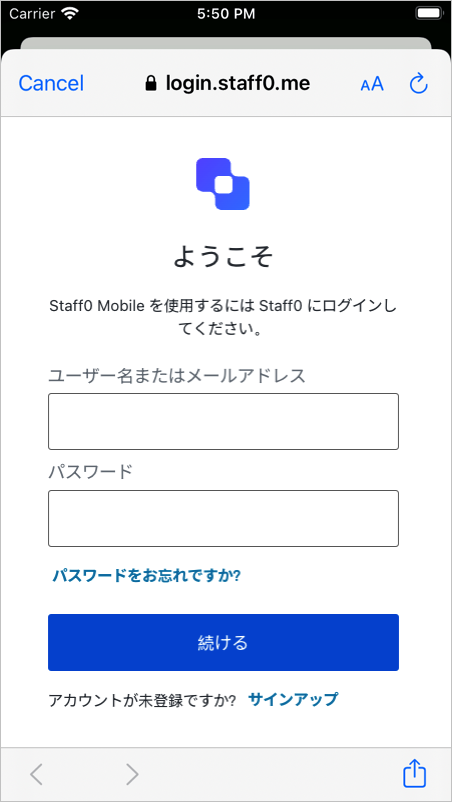
      はじめに、ユーザーがログインする方法を提供する必要があります。Auth0がホストするログインページを使用することをお薦めします。

      <Frame>
        <img src="https://mintlify.s3.us-west-1.amazonaws.com/auth0-docs-event-stream-action-templates/docs/images/ja-jp/cdy7uua7fh8z/3ZRDXpjlUXEcQpXq6Q00L1/4b6b596983b5f7d257975a5efcc1cafa/login-ios_japanese.png" alt="iOSアプリのユニバーサルログイン画面の例" />
      </Frame>

      ### Androidを構成する

      アプリケーションのディレクトリ（`android/app/build.gradle`が典型的）で`build.gradle`ファイルを開き、以下のマニフェストプレースホルダーを追加します。`auth0Domain`の値には、上で構成したようにAuth0アプリケーション設定が含まれなければなりません。

      ```
      android {
      defaultConfig {

          // Add the next line

          manifestPlaceholders = [auth0Domain: "{yourDomain}", auth0Scheme: "${applicationId}.auth0"]

      }

      ...

      }
      ```

      <Info>
        ランタイムでは、`applicationId`の値がアプリケーションのパッケージ名またはIDで自動的に更新します（例：`com.example.app`）。この値は`build.gradle`ファイルから変更できます。`AndroidManifest.xml`ファイルの上部でも確認できます。
      </Info>

      ### iOSを構成する

      `ios/<YOUR PROJECT>/AppDelegate.mm`ファイルで、以下を追加します：

      ```
      #import <React/RCTLinkingManager.h>

      (BOOL)application:(UIApplication *)app openURL:(NSURL *)url
            options:(NSDictionary<UIApplicationOpenURLOptionsKey, id> *)options

      {
      return [RCTLinkingManager application:app openURL:url options:options];
      }
      ```

      <Info>
        このファイルは、[古いアーキテクチャ](https://reactnative.dev/docs/next/new-architecture-app-intro#ios---use-objective-c-mm-extension)を使ったアプリケーションの`ios/<YOUR PROJECT>/AppDelegate.m`になります。
      </Info>

      次に、アプリのバンドルIDを使ってURLSchemeを追加します。

      `ios`フォルダーで`Info.plist`を開き、`CFBundleIdentifier`の値を見つけます。

      ```xml theme={null}
      <key>CFBundleIdentifier</key>
      <string>$(PRODUCT_BUNDLE_IDENTIFIER)</string>
      ```

      この値の下に、`CFBundleIdentifier`の値を`CFBundleURLSchemes`の値として使い、URLタイプのエントリーを登録します。

      ```xml theme={null}
      <key>CFBundleURLTypes</key>
      <array>
      <dict>
      <key>CFBundleTypeRole</key>
      <string>None</string>
      <key>CFBundleURLName</key>
      <string>auth0</string>
      <key>CFBundleURLSchemes</key>
      <array>
      <string>$(PRODUCT_BUNDLE_IDENTIFIER).auth0</string>
      </array>
      </dict>
      </array>
      ```

      <Info>
        アプリケーションがReact Native CLIで生成された場合、`$(PRODUCT_BUNDLE_IDENTIFIER)`のデフォルト値は`org.reactjs.native.example.$(PRODUCT_NAME:rfc1034identifier)`と動的に一致します。サンプルアプリの場合、この値は`com.auth0samples`と一致します。
      </Info>

      この値は、この後の手順で、Callback URLを定義するために使用します。以下の手順で、XCodeを用いて変更できます：

      * アプリのルートからターミナルで`ios/<YOUR PROJECT>.xcodeproj`ファイルを開くか、`xed ios`を実行する。
      * プロジェクトまたは希望ターゲットの［Build Settings（ビルド設定）］タブを開いて「Bundle Identifier」を含むセクションを見つける。
      * 「Bundle Identifier」値を希望のアプリケーションのバンドルID名と置き換える。

      詳細情報は[React Nativeドキュメント](https://facebook.github.io/react-native/docs/linking)をご覧ください。
    </Section>

    <Section id={sections[3].id} title={sections[3].title} stepNumber="4">
      `useAuth0`フックはReact Contextに依存して状態を管理します。`Auth0Provider`コンポーネントがこのコンテキストを提供します。

      `react-native-auth0`パッケージから`useAuth0`フックと`Auth0Provider`コンポーネントをインポートします：

      ```js theme={null}
      import {useAuth0, Auth0Provider} from 'react-native-auth0';
      ```

      SDKが正しく機能するためには、アプリケーションを`Auth0Provider`コンポーネントでラップし、次のプロパティをセットします：

      * `domain`：Auth0テナントのドメインです。通常、Auth0 Dashboardにあるアプリケーションの設定の［Domain（ドメイン）］フィールドで確認できます。カスタムドメインを使用している場合は、代わりにその値を設定してください。
      * `clientId`：このクイックスタートで前に設定した、Auth0アプリケーションのIDです。Auth0 Dashboardにあるアプリケーションの［Settings（設定）］タブの［Client ID（クライアントID）］フィールドで確認できます。

      <Note>
        ##### チェックポイント

        Auth0Providerコンポーネントの構成が完了しました。アプリケーションを実行して次の点を確認します：
        SDKが正しく初期化している。
        アプリケーションがAuth0に関連したエラーを投入していない。
      </Note>
    </Section>

    <Section id={sections[4].id} title={sections[4].title} stepNumber="5">
      ユーザを認証するには、`useAuth0`フックが提供する`authorize`メソッドを呼び出します。このメソッドは認証のためにユーザーをAuth0ユニバーサルログインページへリダイレクトし、アプリへ戻します。

      ユーザーのログインが成功したことを確認するには、フックの提供する`user`プロパティが`null`でないことを確認してください。

      <Note>
        ##### チェックポイント

        クリックでauthorizeを呼び出すボタンコンポーネントを追加します。ログインページにリダイレクトされてから、アプリケーションに戻されることを確認します。
      </Note>
    </Section>

    <Section id={sections[5].id} title={sections[5].title} stepNumber="6">
      ユーザーをログアウトさせるには、`clearSession`を呼び出して、ユーザーをAuth0のログアウトエンドポイントにリダイレクトします。そうすると、ユーザーのセッションが認可サーバーから削除され、ユーザーがアプリケーションからログアウトされます。

      <Note>
        ##### チェックポイント

        clearSessionを呼び出すボタンを追加して、Auth0のログアウトエンドポイントにリダイレクトされ、再び戻されることを確認してください。アプリケーションにはログインしていないはずです。
      </Note>
    </Section>

    <Section id={sections[6].id} title={sections[6].title} stepNumber="7">
      `useAuth0`フックは、認証済みユーザーの情報を含む`user`オブジェクトを公開します。これを使用すると、認証済みユーザーについてデコードされたユーザープロファイル情報に、IDトークンからアクセスできます。

      ユーザーが認証されていない場合、このプロパティは`null`になります。

      <Note>
        ##### チェックポイント

        ログインして、結果のuserプロパティを調査します。emailやnameなど、現在のユーザーのプロファイル情報を確認します。
      </Note>
    </Section>

    ## 次のステップ

    成功です！ここまで来れば、アプリケーションにログイン、ログアウト、ユーザープロファイル情報が備わっているはずです。

    これでクイックスタートチュートリアルは終了ですが、機能はまだまだたくさんあります。Auth0でできることについて詳しくは、以下をご覧ください。

    * [Auth0 Dashboard](https://manage.auth0.com/#) - Auth0のテナントやアプリケーションを構成して管理する方法について説明します
    * [react-native-auth0 SDK](https://github.com/auth0/react-native-auth0) - このチュートリアルで使用されているSDKをより詳しく説明します
    * [Auth0 Marketplace](https://marketplace.auth0.com/) - Auth0の機能性を拡張できる各種の統合を見つけられます
  </Content>

  <SideMenu sections={sections}>
    <SideMenuSectionItem id={sections[0].id}>
      <SignUpForm />
    </SideMenuSectionItem>

    <SideMenuSectionItem id={sections[1].id}>
      <SignUpForm />
    </SideMenuSectionItem>

    <SideMenuSectionItem id={sections[2].id}>
      <SignUpForm />
    </SideMenuSectionItem>

    <SideMenuSectionItem id={sections[3].id}>
      ```jsx app.js lines highlight={46-48} theme={null}
      import React from 'react';
      import {Button, Text, View, StyleSheet} from 'react-native';
      import {useAuth0, Auth0Provider} from 'react-native-auth0';

      const Home = () => {
        const {authorize, clearSession, user, error, isLoading} = useAuth0();

        const onLogin = async () => {
          try {
            await authorize();
          } catch (e) {
            console.log(e);
          }
        };

        const onLogout = async () => {
          try {
            await clearSession();
          } catch (e) {
            console.log('Log out cancelled');
          }
        };

        if (isLoading) {
          return <View style={styles.container}><Text>Loading</Text></View>;
        }

        const loggedIn = user !== undefined && user !== null;

        return (
          <View style={styles.container}>
            {loggedIn && <Text>You are logged in as {user.name}</Text>}
            {!loggedIn && <Text>You are not logged in</Text>}
            {error && <Text>{error.message}</Text>}

            <Button
              onPress={loggedIn ? onLogout : onLogin}
              title={loggedIn ? 'Log Out' : 'Log In'}
            />
          </View>
        );
      };

      const App = () => {
        return (
          <Auth0Provider domain={"{yourDomain}"} clientId={"{yourClientId}"}>
            <Home />
          </Auth0Provider>
        );
      };

      const styles = StyleSheet.create({
        container: {
          flex: 1,
          justifyContent: 'center',
          alignItems: 'center',
          backgroundColor: '#F5FCFF',
        }
      });

      export default App;
      ```
    </SideMenuSectionItem>

    <SideMenuSectionItem id={sections[4].id}>
      ```jsx app.js lines highlight={8-14} theme={null}
      import React from 'react';
      import {Button, Text, View, StyleSheet} from 'react-native';
      import {useAuth0, Auth0Provider} from 'react-native-auth0';

      const Home = () => {
        const {authorize, clearSession, user, error, isLoading} = useAuth0();

        const onLogin = async () => {
          try {
            await authorize();
          } catch (e) {
            console.log(e);
          }
        };

        const onLogout = async () => {
          try {
            await clearSession();
          } catch (e) {
            console.log('Log out cancelled');
          }
        };

        if (isLoading) {
          return <View style={styles.container}><Text>Loading</Text></View>;
        }

        const loggedIn = user !== undefined && user !== null;

        return (
          <View style={styles.container}>
            {loggedIn && <Text>You are logged in as {user.name}</Text>}
            {!loggedIn && <Text>You are not logged in</Text>}
            {error && <Text>{error.message}</Text>}

            <Button
              onPress={loggedIn ? onLogout : onLogin}
              title={loggedIn ? 'Log Out' : 'Log In'}
            />
          </View>
        );
      };

      const App = () => {
        return (
          <Auth0Provider domain={"{yourDomain}"} clientId={"{yourClientId}"}>
            <Home />
          </Auth0Provider>
        );
      };

      const styles = StyleSheet.create({
        container: {
          flex: 1,
          justifyContent: 'center',
          alignItems: 'center',
          backgroundColor: '#F5FCFF',
        }
      });

      export default App;
      ```
    </SideMenuSectionItem>

    <SideMenuSectionItem id={sections[5].id}>
      ```jsx app.js lines highlight={16-22} theme={null}
      import React from 'react';
      import {Button, Text, View, StyleSheet} from 'react-native';
      import {useAuth0, Auth0Provider} from 'react-native-auth0';

      const Home = () => {
        const {authorize, clearSession, user, error, isLoading} = useAuth0();

        const onLogin = async () => {
          try {
            await authorize();
          } catch (e) {
            console.log(e);
          }
        };

        const onLogout = async () => {
          try {
            await clearSession();
          } catch (e) {
            console.log('Log out cancelled');
          }
        };

        if (isLoading) {
          return <View style={styles.container}><Text>Loading</Text></View>;
        }

        const loggedIn = user !== undefined && user !== null;

        return (
          <View style={styles.container}>
            {loggedIn && <Text>You are logged in as {user.name}</Text>}
            {!loggedIn && <Text>You are not logged in</Text>}
            {error && <Text>{error.message}</Text>}

            <Button
              onPress={loggedIn ? onLogout : onLogin}
              title={loggedIn ? 'Log Out' : 'Log In'}
            />
          </View>
        );
      };

      const App = () => {
        return (
          <Auth0Provider domain={"{yourDomain}"} clientId={"{yourClientId}"}>
            <Home />
          </Auth0Provider>
        );
      };

      const styles = StyleSheet.create({
        container: {
          flex: 1,
          justifyContent: 'center',
          alignItems: 'center',
          backgroundColor: '#F5FCFF',
        }
      });

      export default App;
      ```
    </SideMenuSectionItem>

    <SideMenuSectionItem id={sections[6].id}>
      ```jsx app.js lines highlight={28-34} theme={null}
      import React from 'react';
      import {Button, Text, View, StyleSheet} from 'react-native';
      import {useAuth0, Auth0Provider} from 'react-native-auth0';

      const Home = () => {
        const {authorize, clearSession, user, error, isLoading} = useAuth0();

        const onLogin = async () => {
          try {
            await authorize();
          } catch (e) {
            console.log(e);
          }
        };

        const onLogout = async () => {
          try {
            await clearSession();
          } catch (e) {
            console.log('Log out cancelled');
          }
        };

        if (isLoading) {
          return <View style={styles.container}><Text>Loading</Text></View>;
        }

        const loggedIn = user !== undefined && user !== null;

        return (
          <View style={styles.container}>
            {loggedIn && <Text>You are logged in as {user.name}</Text>}
            {!loggedIn && <Text>You are not logged in</Text>}
            {error && <Text>{error.message}</Text>}

            <Button
              onPress={loggedIn ? onLogout : onLogin}
              title={loggedIn ? 'Log Out' : 'Log In'}
            />
          </View>
        );
      };

      const App = () => {
        return (
          <Auth0Provider domain={"{yourDomain}"} clientId={"{yourClientId}"}>
            <Home />
          </Auth0Provider>
        );
      };

      const styles = StyleSheet.create({
        container: {
          flex: 1,
          justifyContent: 'center',
          alignItems: 'center',
          backgroundColor: '#F5FCFF',
        }
      });

      export default App;
      ```
    </SideMenuSectionItem>
  </SideMenu>
</Recipe>