> ## Documentation Index
> Fetch the complete documentation index at: https://auth0-docs-event-stream-action-templates.mintlify.site/llms.txt
> Use this file to discover all available pages before exploring further.
# ルールを作成する
> Auth0 DashboardまたはManagement APIを使用してルールを作成する方法を説明します。
export const AuthCodeGroup = ({children, dropdown}) => {
const [processedChildren, setProcessedChildren] = useState(children);
useEffect(() => {
let unsubscribe = null;
function init() {
unsubscribe = window.autorun(() => {
const processChildren = node => {
if (typeof node === "string") {
let processedNode = node;
for (const [key, value] of window.rootStore.variableStore.values.entries()) {
const escapedKey = key.replaceAll(/[.*+?^${}()|[\]\\]/g, (String.raw)`\$&`);
processedNode = processedNode.replaceAll(new RegExp(escapedKey, "g"), value);
}
return processedNode;
} else if (Array.isArray(node)) {
return node.map(processChildren);
} else if (node && node.props && node.props.children) {
return {
...node,
props: {
...node.props,
children: processChildren(node.props.children)
}
};
}
return node;
};
setProcessedChildren(processChildren(children));
});
}
if (window.rootStore) {
init();
} else {
window.addEventListener("adu:storeReady", init);
}
return () => {
window.removeEventListener("adu:storeReady", init);
unsubscribe?.();
};
}, [children]);
return {processedChildren};
};
export const AuthCodeBlock = ({filename, icon, language, highlight, children}) => {
const [displayText, setDisplayText] = useState(children);
const [copyText, setCopyText] = useState(children);
const wrapperRef = React.useRef(null);
useEffect(() => {
let unsubscribe = null;
function init() {
if (!window.autorun || !window.rootStore) {
return;
}
unsubscribe = window.autorun(() => {
let processedChildrenForDisplay = children;
let processedChildrenForCopy = children;
for (const [key, value] of window.rootStore.variableStore.values.entries()) {
const escapedKey = key.replaceAll(/[.*+?^${}()|[\]\\]/g, (String.raw)`\$&`);
let displayValue = value;
if (key === "{yourClientSecret}" && value !== "{yourClientSecret}") {
displayValue = value.substring(0, 3) + "*****MASKED*****";
}
processedChildrenForDisplay = processedChildrenForDisplay.replaceAll(new RegExp(escapedKey, "g"), displayValue);
processedChildrenForCopy = processedChildrenForCopy.replaceAll(new RegExp(escapedKey, "g"), value);
}
setDisplayText(processedChildrenForDisplay);
setCopyText(processedChildrenForCopy);
});
}
if (window.rootStore) {
init();
} else {
window.addEventListener("adu:storeReady", init);
}
return () => {
window.removeEventListener("adu:storeReady", init);
unsubscribe?.();
};
}, [children]);
useEffect(() => {
if (!wrapperRef.current) return;
const originalWriteText = navigator.clipboard.writeText.bind(navigator.clipboard);
let isOverriding = false;
const handleClick = e => {
const button = e.target.closest('[data-testid="copy-code-button"]');
if (!button || !wrapperRef.current.contains(button)) return;
isOverriding = true;
navigator.clipboard.writeText = text => {
if (isOverriding) {
isOverriding = false;
navigator.clipboard.writeText = originalWriteText;
return originalWriteText(copyText);
}
return originalWriteText(text);
};
setTimeout(() => {
if (isOverriding) {
isOverriding = false;
navigator.clipboard.writeText = originalWriteText;
}
}, 100);
};
const wrapper = wrapperRef.current;
wrapper.addEventListener('click', handleClick, true);
return () => {
wrapper.removeEventListener('click', handleClick, true);
if (navigator.clipboard.writeText !== originalWriteText) {
navigator.clipboard.writeText = originalWriteText;
}
};
}, [copyText]);
return
{displayText}
;
};
RulesとHooksのサポート終了(EOL)日は**2026年11月18日** であり、**2023年10月16** 日の時点で作成された新しいテナントは使用できなくなります。Hooksが有効な既存のテナントは、サポート終了までHooksを利用できます。
今後はActionsに移行して、Auth0の機能を拡張することを強くお勧めします。Actionsを使用すると、豊富な情報やインラインドキュメント、パブリック`npm`パッケージにアクセスして、外部統合を使って全体的な拡張エクスペリエンスを強化することができます。Actionsの詳細については、「[Auth0 Actionsの仕組みを理解する](/docs/ja-jp/customize/actions/actions-overview)」をお読みください。
当社では、移行の参考資料として、[RulesからActionsへの移行](/docs/ja-jp/customize/actions/migrate/migrate-from-rules-to-actions)と[HooksからActionsへの移行](/docs/ja-jp/customize/actions/migrate/migrate-from-hooks-to-actions)に関するガイドを提供しています。また、専用の「[Actionsへの移行](https://auth0.com/extensibility/movetoactions)」ページでは、機能の比較や[Actionsのデモ](https://www.youtube.com/watch?v=UesFSY1klrI)、その他のリソースを掲載して、円滑な移行をサポートしています。
RulesとHooksの廃止の詳細については、当社のブログ記事「[RulesとHooksの提供終了について](https://auth0.com/blog/preparing-for-rules-and-hooks-end-of-life/)」をお読みください。
RulesとHooksの機能は2026年にサポートの終了を予定しているため、新しいルールやフックは、アクションへの移行をテストするためだけに、開発環境内で作成してください。
RulesからActionsへの移行方法については、「[RulesからActionsに移行する](/docs/ja-jp/customize/actions/migrate/migrate-from-rules-to-actions)」をお読みください。HooksからActionsへの移行方法については、「[HooksからActionsに移行する](/docs/ja-jp/customize/actions/migrate/migrate-from-hooks-to-actions)」をお読みください。
独自のルールを作成して、特定の機能要件に対応させることができます。また、既存のルールテンプレートを編集するか、提供しているサンプルを使ってゼロから始めることもできます。Auth0は、目的の達成に役立つ既存のルールやルールテンプレートを取り揃えて提供しています。それらのリストについては、[GitHubのルールリポジトリ](https://github.com/auth0/rules)をご覧ください。
## ルールの仕組み
ルールは、ユーザーがアプリケーションに対して認証するときに実行されるJavaScript関数です。認証プロセスが完了すると実行され、Auth0の機能をカスタマイズしたり拡張したりするために活用できます。セキュリティ上の理由により、ルールのコードは、サンドボックス内の他のAuth0テナントのコードとは分離して実行されます。ルールは、トークンのリフレッシュフロー時にも実行されます。詳細については、「[リフレッシュトークン](/docs/ja-jp/secure/tokens/refresh-tokens)」をお読みください。
ルールを使用する場合、Auth0の認証トランザクションフローは以下の流れで行われます。
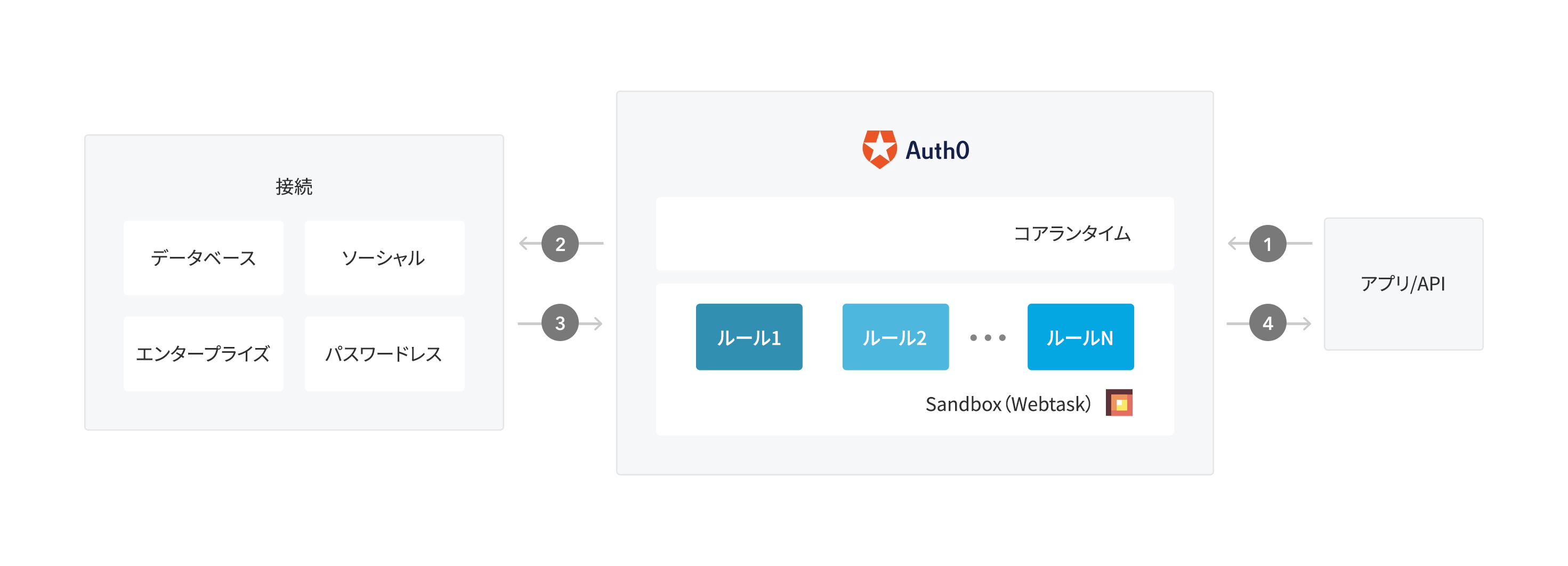 1. アプリがAuth0への認証要求を開始します。
2. Auth0が、構成されている接続を介して、要求をIDプロバイダーにルーティングします。
3. ユーザーが正常に認証されます。
4. IDトークンおよび/またはアクセストークンがルールパイプラインを介して渡され、アプリケーションに送られます。
## 前提条件
ルールにグローバル変数を使用する予定がある場合は、必ず先にルール変数を構成してください。詳細については、「[ルールのグローバル変数を構成する](/docs/ja-jp/customize/rules/configure-global-variables-for-rules)」をお読みください。
## Dashboardの使用
1. [[Dashboard]>[Auth Pipeline(Authパイプライン)]>[Rules(ルール)]](https://manage.auth0.com/#/rules)に移動して、**[Create(作成)]** をクリックします。
1. アプリがAuth0への認証要求を開始します。
2. Auth0が、構成されている接続を介して、要求をIDプロバイダーにルーティングします。
3. ユーザーが正常に認証されます。
4. IDトークンおよび/またはアクセストークンがルールパイプラインを介して渡され、アプリケーションに送られます。
## 前提条件
ルールにグローバル変数を使用する予定がある場合は、必ず先にルール変数を構成してください。詳細については、「[ルールのグローバル変数を構成する](/docs/ja-jp/customize/rules/configure-global-variables-for-rules)」をお読みください。
## Dashboardの使用
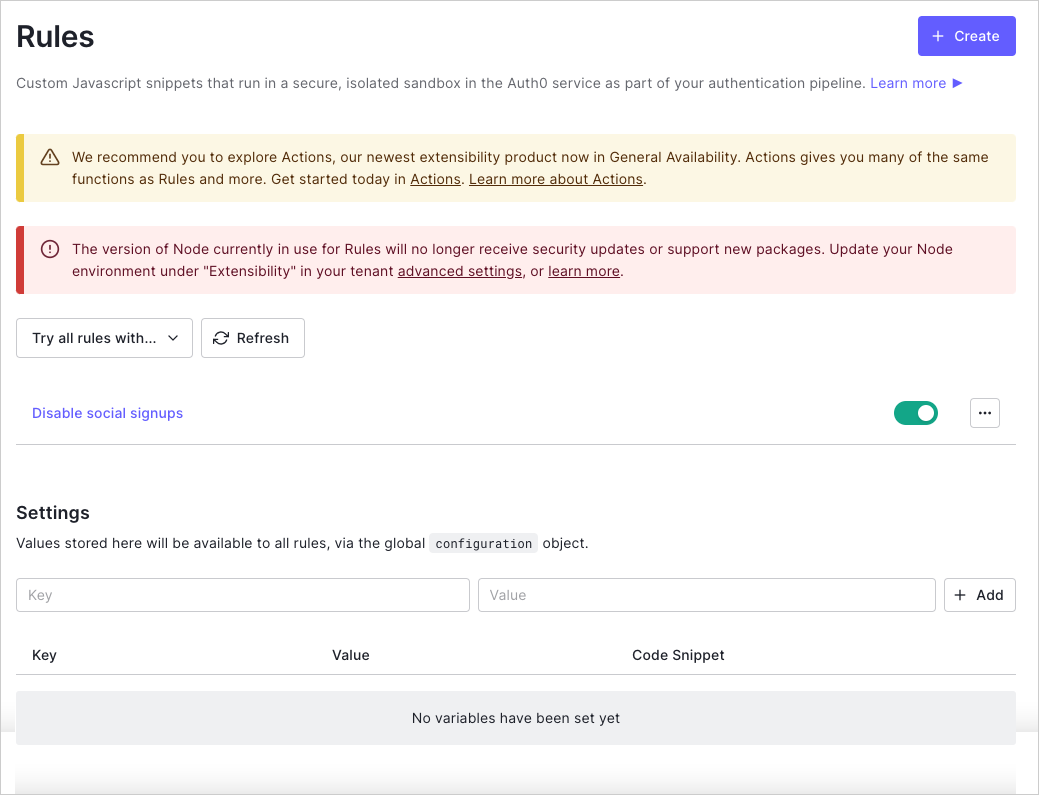
1. [[Dashboard]>[Auth Pipeline(Authパイプライン)]>[Rules(ルール)]](https://manage.auth0.com/#/rules)に移動して、**[Create(作成)]** をクリックします。
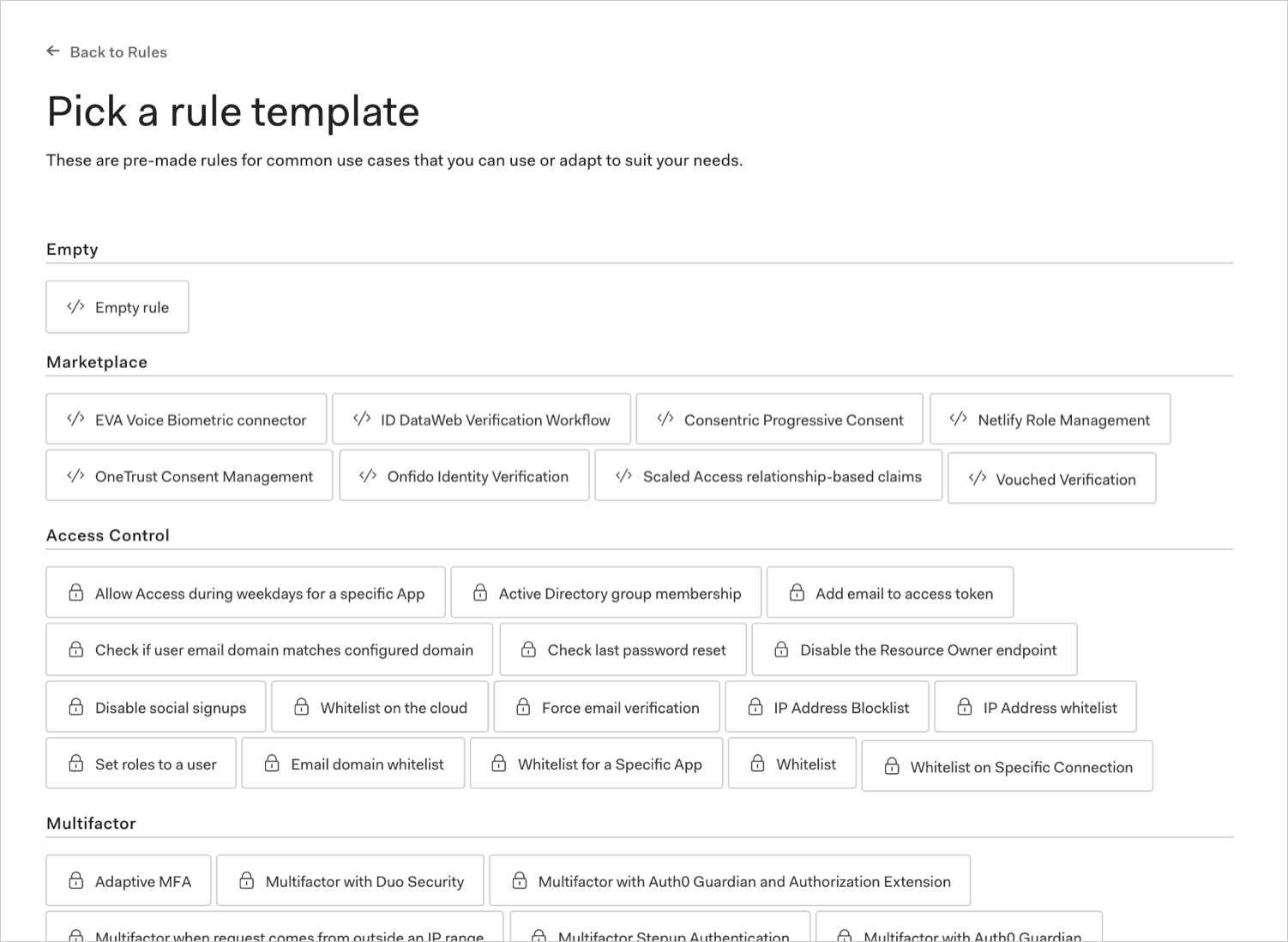
 2. ルールテンプレートを選択します。
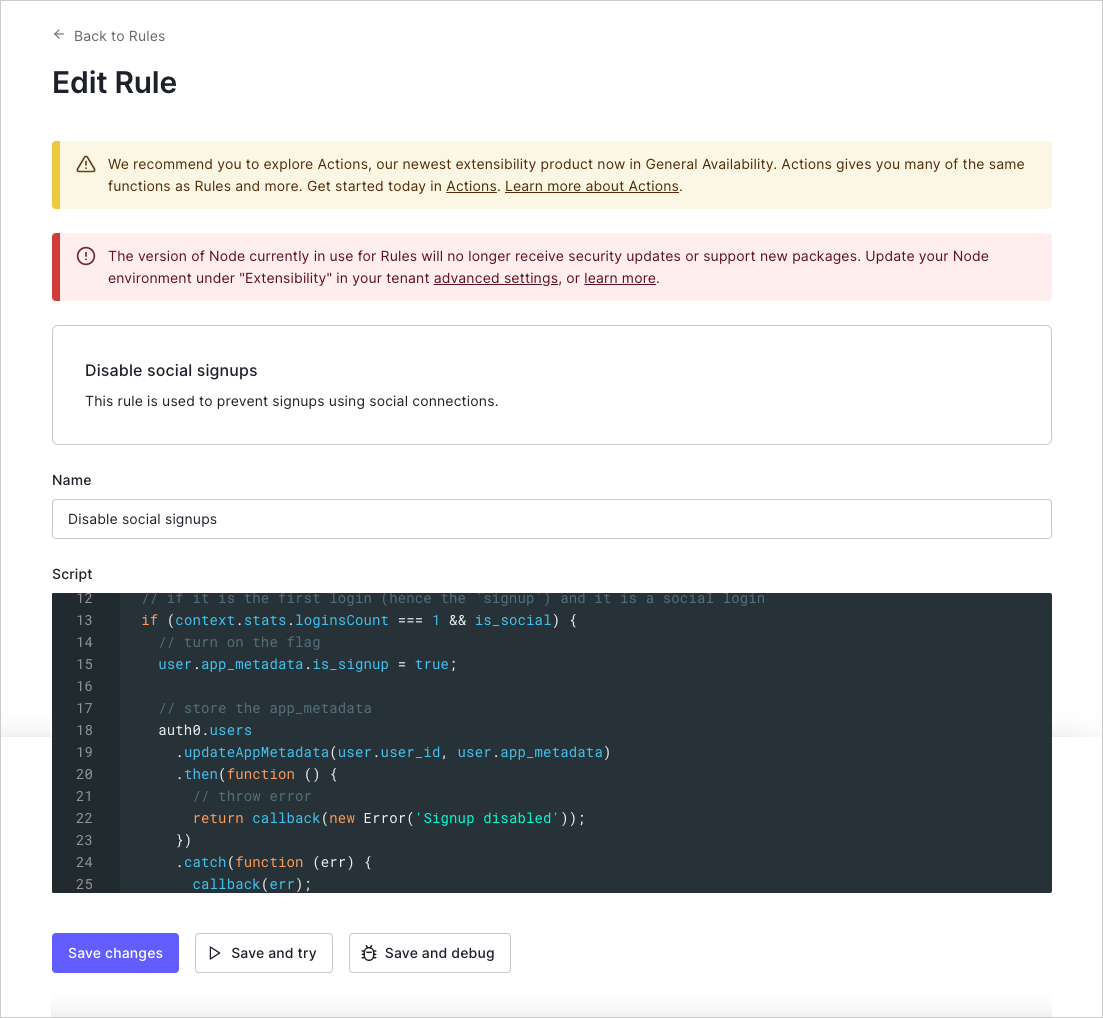
 3. ルールに名前を付けて、必要に応じてスクリプトを編集し、**[Save changes(変更の保存)]** をクリックします。
 ## Management APIの使用
[ルール作成エンドポイント](/docs/ja-jp/api/management/v2#!/Rules/post_rules)に`POST`呼び出しを行います。`MGMT_API_ACCESS_TOKEN`、`RULE_NAME`、`RULE_SCRIPT`、`RULE_ORDER`、および`RULE_ENABLED`のプレースホルダーの値をそれぞれ、実際のManagement APIのアクセストークン、ルール名、ルールスクリプト、ルールの順序、ルールの有効化の値に置き換えてください。
```bash cURL theme={null}
curl --request POST \
--url 'https://{yourDomain}/api/v2/rules' \
--header 'authorization: Bearer MGMT_API_ACCESS_TOKEN' \
--header 'cache-control: no-cache' \
--header 'content-type: application/json' \
--data '{ "name": "RULE_NAME", "script": "RULE_SCRIPT" }'
```
```csharp C# theme={null}
var client = new RestClient("https://{yourDomain}/api/v2/rules");
var request = new RestRequest(Method.POST);
request.AddHeader("content-type", "application/json");
request.AddHeader("authorization", "Bearer MGMT_API_ACCESS_TOKEN");
request.AddHeader("cache-control", "no-cache");
request.AddParameter("application/json", "{ "name": "RULE_NAME", "script": "RULE_SCRIPT" }", ParameterType.RequestBody);
IRestResponse response = client.Execute(request);
```
```go Go theme={null}
package main
import (
"fmt"
"strings"
"net/http"
"io/ioutil"
)
func main() {
url := "https://{yourDomain}/api/v2/rules"
payload := strings.NewReader("{ "name": "RULE_NAME", "script": "RULE_SCRIPT" }")
req, _ := http.NewRequest("POST", url, payload)
req.Header.Add("content-type", "application/json")
req.Header.Add("authorization", "Bearer MGMT_API_ACCESS_TOKEN")
req.Header.Add("cache-control", "no-cache")
res, _ := http.DefaultClient.Do(req)
defer res.Body.Close()
body, _ := ioutil.ReadAll(res.Body)
fmt.Println(res)
fmt.Println(string(body))
}
```
```java Java theme={null}
HttpResponse response = Unirest.post("https://{yourDomain}/api/v2/rules")
.header("content-type", "application/json")
.header("authorization", "Bearer MGMT_API_ACCESS_TOKEN")
.header("cache-control", "no-cache")
.body("{ "name": "RULE_NAME", "script": "RULE_SCRIPT" }")
.asString();
```
```javascript Node.JS theme={null}
var axios = require("axios").default;
var options = {
method: 'POST',
url: 'https://{yourDomain}/api/v2/rules',
headers: {
'content-type': 'application/json',
authorization: 'Bearer MGMT_API_ACCESS_TOKEN',
'cache-control': 'no-cache'
},
data: {name: 'RULE_NAME', script: 'RULE_SCRIPT'}
};
axios.request(options).then(function (response) {
console.log(response.data);
}).catch(function (error) {
console.error(error);
});
```
```objc Obj-C theme={null}
#import
NSDictionary *headers = @{ @"content-type": @"application/json",
@"authorization": @"Bearer MGMT_API_ACCESS_TOKEN",
@"cache-control": @"no-cache" };
NSDictionary *parameters = @{ @"name": @"RULE_NAME",
@"script": @"RULE_SCRIPT" };
NSData *postData = [NSJSONSerialization dataWithJSONObject:parameters options:0 error:nil];
NSMutableURLRequest *request = [NSMutableURLRequest requestWithURL:[NSURL URLWithString:@"https://{yourDomain}/api/v2/rules"]
cachePolicy:NSURLRequestUseProtocolCachePolicy
timeoutInterval:10.0];
[request setHTTPMethod:@"POST"];
[request setAllHTTPHeaderFields:headers];
[request setHTTPBody:postData];
NSURLSession *session = [NSURLSession sharedSession];
NSURLSessionDataTask *dataTask = [session dataTaskWithRequest:request
completionHandler:^(NSData *data, NSURLResponse *response, NSError *error) {
if (error) {
NSLog(@"%@", error);
} else {
NSHTTPURLResponse *httpResponse = (NSHTTPURLResponse *) response;
NSLog(@"%@", httpResponse);
}
}];
[dataTask resume];
```
```php PHP theme={null}
$curl = curl_init();
curl_setopt_array($curl, [
CURLOPT_URL => "https://{yourDomain}/api/v2/rules",
CURLOPT_RETURNTRANSFER => true,
CURLOPT_ENCODING => "",
CURLOPT_MAXREDIRS => 10,
CURLOPT_TIMEOUT => 30,
CURLOPT_HTTP_VERSION => CURL_HTTP_VERSION_1_1,
CURLOPT_CUSTOMREQUEST => "POST",
CURLOPT_POSTFIELDS => "{ "name": "RULE_NAME", "script": "RULE_SCRIPT" }",
CURLOPT_HTTPHEADER => [
"authorization: Bearer MGMT_API_ACCESS_TOKEN",
"cache-control: no-cache",
"content-type: application/json"
],
]);
$response = curl_exec($curl);
$err = curl_error($curl);
curl_close($curl);
if ($err) {
echo "cURL Error #:" . $err;
} else {
echo $response;
}
```
```python Python theme={null}
import http.client
conn = http.client.HTTPSConnection("")
payload = "{ "name": "RULE_NAME", "script": "RULE_SCRIPT" }"
headers = {
'content-type': "application/json",
'authorization': "Bearer MGMT_API_ACCESS_TOKEN",
'cache-control': "no-cache"
}
conn.request("POST", "/{yourDomain}/api/v2/rules", payload, headers)
res = conn.getresponse()
data = res.read()
print(data.decode("utf-8"))
```
```ruby Ruby theme={null}
require 'uri'
require 'net/http'
require 'openssl'
url = URI("https://{yourDomain}/api/v2/rules")
http = Net::HTTP.new(url.host, url.port)
http.use_ssl = true
http.verify_mode = OpenSSL::SSL::VERIFY_NONE
request = Net::HTTP::Post.new(url)
request["content-type"] = 'application/json'
request["authorization"] = 'Bearer MGMT_API_ACCESS_TOKEN'
request["cache-control"] = 'no-cache'
request.body = "{ "name": "RULE_NAME", "script": "RULE_SCRIPT" }"
response = http.request(request)
puts response.read_body
```
```swift Swift theme={null}
import Foundation
let headers = [
"content-type": "application/json",
"authorization": "Bearer MGMT_API_ACCESS_TOKEN",
"cache-control": "no-cache"
]
let parameters = [
"name": "RULE_NAME",
"script": "RULE_SCRIPT"
] as [String : Any]
let postData = JSONSerialization.data(withJSONObject: parameters, options: [])
let request = NSMutableURLRequest(url: NSURL(string: "https://{yourDomain}/api/v2/rules")! as URL,
cachePolicy: .useProtocolCachePolicy,
timeoutInterval: 10.0)
request.httpMethod = "POST"
request.allHTTPHeaderFields = headers
request.httpBody = postData as Data
let session = URLSession.shared
let dataTask = session.dataTask(with: request as URLRequest, completionHandler: { (data, response, error) -> Void in
if (error != nil) {
print(error)
} else {
let httpResponse = response as? HTTPURLResponse
print(httpResponse)
}
})
dataTask.resume()
```
| 値 | 説明 |
| ----------------------- | ------------------------------------------------------------------------------------------- |
| `MGMT_API_ACCESS_TOKEN` | `create:rules`スコープを持つManagement APIのアクセストークン。 |
| `RULE_NAME` | 作成するルールの名前。ルール名は、英数字、スペース、ハイフンのみを含むことができます。スペースまたはハイフンで始めるまたは終わることはできません。 |
| `RULE_SCRIPT` | ルールのコードを含むスクリプト。Dashboardを使用して新しいルールを作成する場合は、その入力内容と一致する必要があります。 |
| `RULE_ORDER`(任意) | 他のルールとの関係でルールが実行される順番を示す整数。より小さい番号のルールは、大きな番号のルールより先に実行されます。順番の番号が提供されなかった場合、ルールは最後に実行されます。 |
| `RULE_ENABLED`(任意) | ルールが有効(`true`)か無効(`false`)かを示すブール値。 |
IPv6アドレスはパブリックエンドポイントで公開しています(例:`travel0.us.auth0.com`)。IPv6をサポートするマシンから要求が届いた場合、`context.request.ip`プロパティにIPv6アドレスが含まれます。手動でIPアドレスを操作する場合は、[ipaddr.js@1.9.0 library](https://www.npmjs.com/package/ipaddr.js/v/1.9.0)の使用をお勧めします。
## レート制限を管理する
Auth0 APIを呼び出すルールの場合は、`X-RateLimit-Remaining`ヘッダーを確認し、返された数値が0に近づいたときに適切に対応することで、常にレート制限に対処する必要があります。また、指定されたレート制限を超えてHTTPステータスコード429(Too Many Requests)を受信した場合に対処するためのロジックも追加する必要があります。この際、再試行が必要な場合は、再試行の無限ループに陥らないためにバックオフを許可するのが最善策です。レート制限の詳細については、「[Auth0 APIのレート制限ポリシー](/docs/ja-jp/troubleshoot/customer-support/operational-policies/rate-limit-policy)」をお読みください。
## 利用可能なモジュール
Rulesは、該当するNode.js用に設定されたJavaScriptサンドボックスで実行されます。
サンドボックスは、構成されているNode.jsバージョンに対して、JavaScript言語(と関連の構文)の全バージョンと多数のNode.jsモジュールをサポートしています。サポートされているサンドボックスモジュールのリストについては、[「必要かを判断する:Auth0の拡張性」](https://auth0-extensions.github.io/canirequire/)を参照してください。
## もっと詳しく
* [ルールのグローバル変数を構成する](/docs/ja-jp/customize/rules/configure-global-variables-for-rules)
* [ルール環境のベストプラクティス](/docs/ja-jp/rules-best-practices/rules-environment-best-practices)
## Management APIの使用
[ルール作成エンドポイント](/docs/ja-jp/api/management/v2#!/Rules/post_rules)に`POST`呼び出しを行います。`MGMT_API_ACCESS_TOKEN`、`RULE_NAME`、`RULE_SCRIPT`、`RULE_ORDER`、および`RULE_ENABLED`のプレースホルダーの値をそれぞれ、実際のManagement APIのアクセストークン、ルール名、ルールスクリプト、ルールの順序、ルールの有効化の値に置き換えてください。
```bash cURL theme={null}
curl --request POST \
--url 'https://{yourDomain}/api/v2/rules' \
--header 'authorization: Bearer MGMT_API_ACCESS_TOKEN' \
--header 'cache-control: no-cache' \
--header 'content-type: application/json' \
--data '{ "name": "RULE_NAME", "script": "RULE_SCRIPT" }'
```
```csharp C# theme={null}
var client = new RestClient("https://{yourDomain}/api/v2/rules");
var request = new RestRequest(Method.POST);
request.AddHeader("content-type", "application/json");
request.AddHeader("authorization", "Bearer MGMT_API_ACCESS_TOKEN");
request.AddHeader("cache-control", "no-cache");
request.AddParameter("application/json", "{ "name": "RULE_NAME", "script": "RULE_SCRIPT" }", ParameterType.RequestBody);
IRestResponse response = client.Execute(request);
```
```go Go theme={null}
package main
import (
"fmt"
"strings"
"net/http"
"io/ioutil"
)
func main() {
url := "https://{yourDomain}/api/v2/rules"
payload := strings.NewReader("{ "name": "RULE_NAME", "script": "RULE_SCRIPT" }")
req, _ := http.NewRequest("POST", url, payload)
req.Header.Add("content-type", "application/json")
req.Header.Add("authorization", "Bearer MGMT_API_ACCESS_TOKEN")
req.Header.Add("cache-control", "no-cache")
res, _ := http.DefaultClient.Do(req)
defer res.Body.Close()
body, _ := ioutil.ReadAll(res.Body)
fmt.Println(res)
fmt.Println(string(body))
}
```
```java Java theme={null}
HttpResponse response = Unirest.post("https://{yourDomain}/api/v2/rules")
.header("content-type", "application/json")
.header("authorization", "Bearer MGMT_API_ACCESS_TOKEN")
.header("cache-control", "no-cache")
.body("{ "name": "RULE_NAME", "script": "RULE_SCRIPT" }")
.asString();
```
```javascript Node.JS theme={null}
var axios = require("axios").default;
var options = {
method: 'POST',
url: 'https://{yourDomain}/api/v2/rules',
headers: {
'content-type': 'application/json',
authorization: 'Bearer MGMT_API_ACCESS_TOKEN',
'cache-control': 'no-cache'
},
data: {name: 'RULE_NAME', script: 'RULE_SCRIPT'}
};
axios.request(options).then(function (response) {
console.log(response.data);
}).catch(function (error) {
console.error(error);
});
```
```objc Obj-C theme={null}
#import
NSDictionary *headers = @{ @"content-type": @"application/json",
@"authorization": @"Bearer MGMT_API_ACCESS_TOKEN",
@"cache-control": @"no-cache" };
NSDictionary *parameters = @{ @"name": @"RULE_NAME",
@"script": @"RULE_SCRIPT" };
NSData *postData = [NSJSONSerialization dataWithJSONObject:parameters options:0 error:nil];
NSMutableURLRequest *request = [NSMutableURLRequest requestWithURL:[NSURL URLWithString:@"https://{yourDomain}/api/v2/rules"]
cachePolicy:NSURLRequestUseProtocolCachePolicy
timeoutInterval:10.0];
[request setHTTPMethod:@"POST"];
[request setAllHTTPHeaderFields:headers];
[request setHTTPBody:postData];
NSURLSession *session = [NSURLSession sharedSession];
NSURLSessionDataTask *dataTask = [session dataTaskWithRequest:request
completionHandler:^(NSData *data, NSURLResponse *response, NSError *error) {
if (error) {
NSLog(@"%@", error);
} else {
NSHTTPURLResponse *httpResponse = (NSHTTPURLResponse *) response;
NSLog(@"%@", httpResponse);
}
}];
[dataTask resume];
```
```php PHP theme={null}
$curl = curl_init();
curl_setopt_array($curl, [
CURLOPT_URL => "https://{yourDomain}/api/v2/rules",
CURLOPT_RETURNTRANSFER => true,
CURLOPT_ENCODING => "",
CURLOPT_MAXREDIRS => 10,
CURLOPT_TIMEOUT => 30,
CURLOPT_HTTP_VERSION => CURL_HTTP_VERSION_1_1,
CURLOPT_CUSTOMREQUEST => "POST",
CURLOPT_POSTFIELDS => "{ "name": "RULE_NAME", "script": "RULE_SCRIPT" }",
CURLOPT_HTTPHEADER => [
"authorization: Bearer MGMT_API_ACCESS_TOKEN",
"cache-control: no-cache",
"content-type: application/json"
],
]);
$response = curl_exec($curl);
$err = curl_error($curl);
curl_close($curl);
if ($err) {
echo "cURL Error #:" . $err;
} else {
echo $response;
}
```
```python Python theme={null}
import http.client
conn = http.client.HTTPSConnection("")
payload = "{ "name": "RULE_NAME", "script": "RULE_SCRIPT" }"
headers = {
'content-type': "application/json",
'authorization': "Bearer MGMT_API_ACCESS_TOKEN",
'cache-control': "no-cache"
}
conn.request("POST", "/{yourDomain}/api/v2/rules", payload, headers)
res = conn.getresponse()
data = res.read()
print(data.decode("utf-8"))
```
```ruby Ruby theme={null}
require 'uri'
require 'net/http'
require 'openssl'
url = URI("https://{yourDomain}/api/v2/rules")
http = Net::HTTP.new(url.host, url.port)
http.use_ssl = true
http.verify_mode = OpenSSL::SSL::VERIFY_NONE
request = Net::HTTP::Post.new(url)
request["content-type"] = 'application/json'
request["authorization"] = 'Bearer MGMT_API_ACCESS_TOKEN'
request["cache-control"] = 'no-cache'
request.body = "{ "name": "RULE_NAME", "script": "RULE_SCRIPT" }"
response = http.request(request)
puts response.read_body
```
```swift Swift theme={null}
import Foundation
let headers = [
"content-type": "application/json",
"authorization": "Bearer MGMT_API_ACCESS_TOKEN",
"cache-control": "no-cache"
]
let parameters = [
"name": "RULE_NAME",
"script": "RULE_SCRIPT"
] as [String : Any]
let postData = JSONSerialization.data(withJSONObject: parameters, options: [])
let request = NSMutableURLRequest(url: NSURL(string: "https://{yourDomain}/api/v2/rules")! as URL,
cachePolicy: .useProtocolCachePolicy,
timeoutInterval: 10.0)
request.httpMethod = "POST"
request.allHTTPHeaderFields = headers
request.httpBody = postData as Data
let session = URLSession.shared
let dataTask = session.dataTask(with: request as URLRequest, completionHandler: { (data, response, error) -> Void in
if (error != nil) {
print(error)
} else {
let httpResponse = response as? HTTPURLResponse
print(httpResponse)
}
})
dataTask.resume()
```
| 値 | 説明 |
| ----------------------- | ------------------------------------------------------------------------------------------- |
| `MGMT_API_ACCESS_TOKEN` | `create:rules`スコープを持つManagement APIのアクセストークン。 |
| `RULE_NAME` | 作成するルールの名前。ルール名は、英数字、スペース、ハイフンのみを含むことができます。スペースまたはハイフンで始めるまたは終わることはできません。 |
| `RULE_SCRIPT` | ルールのコードを含むスクリプト。Dashboardを使用して新しいルールを作成する場合は、その入力内容と一致する必要があります。 |
| `RULE_ORDER`(任意) | 他のルールとの関係でルールが実行される順番を示す整数。より小さい番号のルールは、大きな番号のルールより先に実行されます。順番の番号が提供されなかった場合、ルールは最後に実行されます。 |
| `RULE_ENABLED`(任意) | ルールが有効(`true`)か無効(`false`)かを示すブール値。 |
IPv6アドレスはパブリックエンドポイントで公開しています(例:`travel0.us.auth0.com`)。IPv6をサポートするマシンから要求が届いた場合、`context.request.ip`プロパティにIPv6アドレスが含まれます。手動でIPアドレスを操作する場合は、[ipaddr.js@1.9.0 library](https://www.npmjs.com/package/ipaddr.js/v/1.9.0)の使用をお勧めします。
## レート制限を管理する
Auth0 APIを呼び出すルールの場合は、`X-RateLimit-Remaining`ヘッダーを確認し、返された数値が0に近づいたときに適切に対応することで、常にレート制限に対処する必要があります。また、指定されたレート制限を超えてHTTPステータスコード429(Too Many Requests)を受信した場合に対処するためのロジックも追加する必要があります。この際、再試行が必要な場合は、再試行の無限ループに陥らないためにバックオフを許可するのが最善策です。レート制限の詳細については、「[Auth0 APIのレート制限ポリシー](/docs/ja-jp/troubleshoot/customer-support/operational-policies/rate-limit-policy)」をお読みください。
## 利用可能なモジュール
Rulesは、該当するNode.js用に設定されたJavaScriptサンドボックスで実行されます。
サンドボックスは、構成されているNode.jsバージョンに対して、JavaScript言語(と関連の構文)の全バージョンと多数のNode.jsモジュールをサポートしています。サポートされているサンドボックスモジュールのリストについては、[「必要かを判断する:Auth0の拡張性」](https://auth0-extensions.github.io/canirequire/)を参照してください。
## もっと詳しく
* [ルールのグローバル変数を構成する](/docs/ja-jp/customize/rules/configure-global-variables-for-rules)
* [ルール環境のベストプラクティス](/docs/ja-jp/rules-best-practices/rules-environment-best-practices)