> ## Documentation Index
> Fetch the complete documentation index at: https://auth0-docs-event-stream-action-templates.mintlify.site/llms.txt
> Use this file to discover all available pages before exploring further.
# Authentication Methods Management on Android
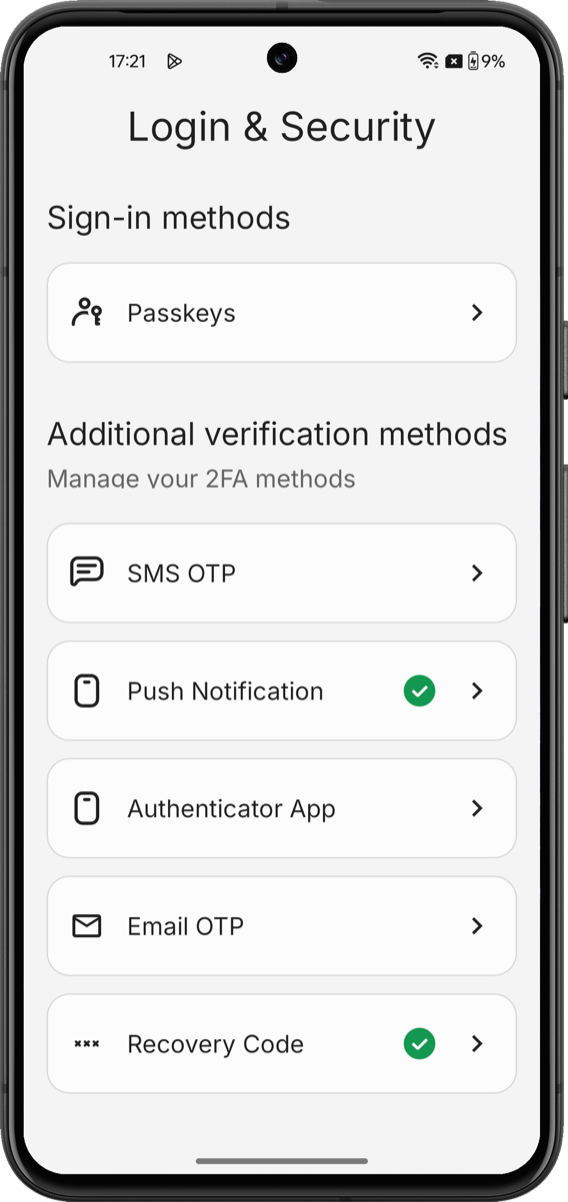
> Render a full-screen UI that lets users enroll, review, and remove MFA factors, passkeys, and recovery codes using the Auth0 My Account API on Android.
export const ReleaseStageNotice = ({feature, stage, plans, contact, terms}) => {
const stageTextMap = {
"beta": "Beta",
"ea": "Early Access"
};
const stageText = stageTextMap[stage] || "a product release stage";
const prsLink = "/docs/troubleshoot/product-lifecycle/product-release-stages";
const linkify = (text, url) => {
return {text};
};
const includeDetails = (plans, contact, terms) => {
const hasDetails = terms || plans || contact;
if (!hasDetails) return null;
return
{plans && <>This feature is available for {linkify(`${plans} plans`, "https://auth0.com/pricing")}. }
{contact && "To participate, contact " + contact + ". "}
{terms && <>By using this feature, you agree to the applicable Free Trial terms in Okta's {linkify("Master Subscription Agreement", "https://www.okta.com/legal")}.}
;
};
return
The {feature} feature is in {linkify(stageText, prsLink)}.
{includeDetails(plans, contact, terms)}
;
};
The Universal Components for Android SDK includes the `AuthenticatorSettingsComponent`, a Jetpack Compose composable that handles every enrollment, verification, listing, and removal flow using the [My Account API](/docs/manage-users/my-account-api).
It uses the My Account API's [authentication methods management](/docs/manage-users/my-account-api#manage-authentication-methods) capabilities to render a complete UI for managing a user's authentication methods.
With the `AuthenticatorSettingsComponent`, you do not need to orchestrate navigation, call endpoints, or manage state.
 ## Setup requirements
Before rendering `AuthenticatorSettingsComponent` component, follow [Build a Self-Service Account Security Interface](/docs/get-started/universal-components/android/components/my-account-overview) to install the SDK, configure your Auth0 tenant, and initialize the SDK with a token provider.
The `AuthenticatorSettingsComponent` component reads its configuration, token provider, and passkey settings from the initialized SDK singleton.
## Supported factors
The component handles every factor Auth0 supports with the My Account API. Each factor's screens inherit the component's active theme. To learn more, read [Customize Style and Themes](/docs/get-started/universal-components/android/android-theming).
| **Factor** | **What the component renders** | **SDK notes** |
| ------------------------------------------------------------------------------------------------ | ------------------------------------------------------------------------------------------------------------------------- | ------------------------------------------------------------------------------------------------------------------------------------------------------------------------------------------ |
| [Email OTP](/docs/secure/multi-factor-authentication/configure-mfa-email) | Email input → 6-digit OTP verification | Platform OTP autofill (Android keyboard autofill) works against the OTP field. |
| [SMS OTP](/docs/secure/multi-factor-authentication/configure-sms-notifications-for-mfa) | Country-code picker and phone entry → 6-digit OTP verification | The Android [SMS Retriever API](https://developers.google.com/identity/sms-retriever/overview) is not used; the SMS body has no app hash. Autofill via the system keyboard works normally. |
| [TOTP (authenticator application)](/docs/secure/multi-factor-authentication/configure-otp) | QR code with manual-entry key → 6-digit OTP verification | Renders the standard `otpauth://` payload. No custom brand logo injection into the QR. |
| [Push notifications](/docs/secure/multi-factor-authentication/enable-push-notifications-for-mfa) | QR code for [Auth0 Guardian](/docs/secure/multi-factor-authentication/auth0-guardian) scan → "waiting for approval" state | End users need the public Auth0 Guardian application. Enterprise customers with a branded Guardian SDK build must surface their own install link outside the component. |
| [Passkeys](/docs/get-started/universal-components/android/components/factors/passkeys) | Educational screen → OS biometric prompt → enrolled entry in the list | Requires Digital Asset Links (Android 14+). See the dedicated page for app-side platform setup. |
| [Recovery codes](/docs/secure/multi-factor-authentication/configure-recovery-codes-for-mfa) | Display-once code list with a copy action and an "I've saved my codes" confirmation | Codes are displayed to the user and never returned to the caller. The copy-to-clipboard action uses the platform's standard clipboard API. |
## Get started
Add the `AuthenticatorSettingsComponent()` from any composable. The SDK handles all internal navigation between enrollment, verification, and management screens.
```kotlin LoginSecurityScreen.kt wrap lines theme={null}
import androidx.compose.runtime.Composable
import com.auth0.universalcomponents.presentation.ui.mfa.AuthenticatorSettingsComponent
@Composable
fun LoginSecurityScreen() {
AuthenticatorSettingsComponent()
}
```
## Parameters
The `AuthenticatorSettingsComponent()` component accepts the following modifier:
| **Parameter** | **Type** | **Default** | **Purpose** |
| -------------------- | ------------------------- | --------------------------------- | --------------------------------------------------------------------------------------------------------------------------------------------------------------------------------------- |
| `modifier` | `Modifier` | `Modifier` | Standard Compose modifier. |
| `themeConfiguration` | `Auth0ThemeConfiguration` | `Auth0ThemeConfiguration.Default` | Override design tokens—colors, typography, shapes, dimensions, sizes. To learn more, read [Customize Style and Themes](/docs/get-started/universal-components/android/android-theming). |
## Customize
Theming is applied to the component as a whole; individual factor screens inherit the active theme.
To learn more about the full token catalog and dark-mode patterns, read [Customize Style and Themes](/docs/get-started/universal-components/android/android-theming).
## Advanced Compose NavHost integration
The `AuthenticatorSettingsComponent` participates in Compose's `NavHost` when present and does not need special wiring. Use it like any other composable. When it is a destination in your `NavHost`, back-navigation defers to the host's `NavController`.
```kotlin wrap lines theme={null}
@Composable
fun AccountNavGraph(navController: NavHostController) {
NavHost(navController, startDestination = "settings") {
composable("settings") { SettingsScreen(navController) }
composable("auth-methods") { AuthenticatorSettingsComponent() }
}
}
```
Internally, the SDK manages its own nested navigation between enrollment, verification, and management screens. That internal graph is isolated from your application's `NavController`, so it does not collide with your application's routes.
## Localization
All user-facing strings live in the SDK's `values/strings.xml` file. You can override any string in your application by redefining the same key in your own `values/strings.xml` file:
```xml wrap lines theme={null}
Next
```
Your resource value shadows the SDK default at build time.
To ship localized copies, you can provide translated `values-/strings.xml` files that use the same keys.
## Limitations
* **No standalone factor components on Android**. Every factor renders inside the Authentication Methods Management component. There is no public API to enroll, verify, or remove a single factor from a different part of your application.
* **No standalone list/remove components**. The SDK does not ship public components for listing enrolled factors or removing them outside the component. Use the Authentication Methods Management component for the full management experience.
* **Post-login passkey prompts are not supported**. Prompting a user to save a passkey immediately after sign-in (separate from the settings screen) is not covered by this SDK. You can track [universal-components-android](https://github.com/auth0/universal-components-android/issues) for updates.
## Learn more
Initialize the SDK and wire the token provider to your Auth0 tenant.
Override colors, typography, spacing, radius, and size tokens using the Auth0 design-token system.
## Setup requirements
Before rendering `AuthenticatorSettingsComponent` component, follow [Build a Self-Service Account Security Interface](/docs/get-started/universal-components/android/components/my-account-overview) to install the SDK, configure your Auth0 tenant, and initialize the SDK with a token provider.
The `AuthenticatorSettingsComponent` component reads its configuration, token provider, and passkey settings from the initialized SDK singleton.
## Supported factors
The component handles every factor Auth0 supports with the My Account API. Each factor's screens inherit the component's active theme. To learn more, read [Customize Style and Themes](/docs/get-started/universal-components/android/android-theming).
| **Factor** | **What the component renders** | **SDK notes** |
| ------------------------------------------------------------------------------------------------ | ------------------------------------------------------------------------------------------------------------------------- | ------------------------------------------------------------------------------------------------------------------------------------------------------------------------------------------ |
| [Email OTP](/docs/secure/multi-factor-authentication/configure-mfa-email) | Email input → 6-digit OTP verification | Platform OTP autofill (Android keyboard autofill) works against the OTP field. |
| [SMS OTP](/docs/secure/multi-factor-authentication/configure-sms-notifications-for-mfa) | Country-code picker and phone entry → 6-digit OTP verification | The Android [SMS Retriever API](https://developers.google.com/identity/sms-retriever/overview) is not used; the SMS body has no app hash. Autofill via the system keyboard works normally. |
| [TOTP (authenticator application)](/docs/secure/multi-factor-authentication/configure-otp) | QR code with manual-entry key → 6-digit OTP verification | Renders the standard `otpauth://` payload. No custom brand logo injection into the QR. |
| [Push notifications](/docs/secure/multi-factor-authentication/enable-push-notifications-for-mfa) | QR code for [Auth0 Guardian](/docs/secure/multi-factor-authentication/auth0-guardian) scan → "waiting for approval" state | End users need the public Auth0 Guardian application. Enterprise customers with a branded Guardian SDK build must surface their own install link outside the component. |
| [Passkeys](/docs/get-started/universal-components/android/components/factors/passkeys) | Educational screen → OS biometric prompt → enrolled entry in the list | Requires Digital Asset Links (Android 14+). See the dedicated page for app-side platform setup. |
| [Recovery codes](/docs/secure/multi-factor-authentication/configure-recovery-codes-for-mfa) | Display-once code list with a copy action and an "I've saved my codes" confirmation | Codes are displayed to the user and never returned to the caller. The copy-to-clipboard action uses the platform's standard clipboard API. |
## Get started
Add the `AuthenticatorSettingsComponent()` from any composable. The SDK handles all internal navigation between enrollment, verification, and management screens.
```kotlin LoginSecurityScreen.kt wrap lines theme={null}
import androidx.compose.runtime.Composable
import com.auth0.universalcomponents.presentation.ui.mfa.AuthenticatorSettingsComponent
@Composable
fun LoginSecurityScreen() {
AuthenticatorSettingsComponent()
}
```
## Parameters
The `AuthenticatorSettingsComponent()` component accepts the following modifier:
| **Parameter** | **Type** | **Default** | **Purpose** |
| -------------------- | ------------------------- | --------------------------------- | --------------------------------------------------------------------------------------------------------------------------------------------------------------------------------------- |
| `modifier` | `Modifier` | `Modifier` | Standard Compose modifier. |
| `themeConfiguration` | `Auth0ThemeConfiguration` | `Auth0ThemeConfiguration.Default` | Override design tokens—colors, typography, shapes, dimensions, sizes. To learn more, read [Customize Style and Themes](/docs/get-started/universal-components/android/android-theming). |
## Customize
Theming is applied to the component as a whole; individual factor screens inherit the active theme.
To learn more about the full token catalog and dark-mode patterns, read [Customize Style and Themes](/docs/get-started/universal-components/android/android-theming).
## Advanced Compose NavHost integration
The `AuthenticatorSettingsComponent` participates in Compose's `NavHost` when present and does not need special wiring. Use it like any other composable. When it is a destination in your `NavHost`, back-navigation defers to the host's `NavController`.
```kotlin wrap lines theme={null}
@Composable
fun AccountNavGraph(navController: NavHostController) {
NavHost(navController, startDestination = "settings") {
composable("settings") { SettingsScreen(navController) }
composable("auth-methods") { AuthenticatorSettingsComponent() }
}
}
```
Internally, the SDK manages its own nested navigation between enrollment, verification, and management screens. That internal graph is isolated from your application's `NavController`, so it does not collide with your application's routes.
## Localization
All user-facing strings live in the SDK's `values/strings.xml` file. You can override any string in your application by redefining the same key in your own `values/strings.xml` file:
```xml wrap lines theme={null}
Next
```
Your resource value shadows the SDK default at build time.
To ship localized copies, you can provide translated `values-/strings.xml` files that use the same keys.
## Limitations
* **No standalone factor components on Android**. Every factor renders inside the Authentication Methods Management component. There is no public API to enroll, verify, or remove a single factor from a different part of your application.
* **No standalone list/remove components**. The SDK does not ship public components for listing enrolled factors or removing them outside the component. Use the Authentication Methods Management component for the full management experience.
* **Post-login passkey prompts are not supported**. Prompting a user to save a passkey immediately after sign-in (separate from the settings screen) is not covered by this SDK. You can track [universal-components-android](https://github.com/auth0/universal-components-android/issues) for updates.
## Learn more
Initialize the SDK and wire the token provider to your Auth0 tenant.
Override colors, typography, spacing, radius, and size tokens using the Auth0 design-token system.