> ## Documentation Index
> Fetch the complete documentation index at: https://auth0-docs-event-stream-action-templates.mintlify.site/llms.txt
> Use this file to discover all available pages before exploring further.

# Ajouter une fonctionnalité de connexion à votre application Spring Web

> Ce guide explique comment intégrer Auth0 à une application Spring Boot à l’aide de la trousse SDK Spring Boot Auth0.

export const AuthCodeGroup = ({children, dropdown}) => {
  const [processedChildren, setProcessedChildren] = useState(children);
  useEffect(() => {
    let unsubscribe = null;
    function init() {
      unsubscribe = window.autorun(() => {
        const processChildren = node => {
          if (typeof node === "string") {
            let processedNode = node;
            for (const [key, value] of window.rootStore.variableStore.values.entries()) {
              const escapedKey = key.replaceAll(/[.*+?^${}()|[\]\\]/g, (String.raw)`\$&`);
              processedNode = processedNode.replaceAll(new RegExp(escapedKey, "g"), value);
            }
            return processedNode;
          } else if (Array.isArray(node)) {
            return node.map(processChildren);
          } else if (node && node.props && node.props.children) {
            return {
              ...node,
              props: {
                ...node.props,
                children: processChildren(node.props.children)
              }
            };
          }
          return node;
        };
        setProcessedChildren(processChildren(children));
      });
    }
    if (window.rootStore) {
      init();
    } else {
      window.addEventListener("adu:storeReady", init);
    }
    return () => {
      window.removeEventListener("adu:storeReady", init);
      unsubscribe?.();
    };
  }, [children]);
  return <CodeGroup dropdown={dropdown}>{processedChildren}</CodeGroup>;
};

export const QuickstartButtons = ({githubLink, lang = "en"}) => {
  const translations = {
    en: {
      viewOnGithub: "View On GitHub",
      loginAndDownload: "Download Sample"
    },
    "fr-ca": {
      viewOnGithub: "Afficher sur GitHub",
      loginAndDownload: "Télécharger un exemple"
    },
    "ja-jp": {
      viewOnGithub: "Githubで表示",
      loginAndDownload: "サンプルをダウンロード"
    }
  };
  const text = translations[lang] || translations.en;
  const parseGithubUrl = url => {
    try {
      const urlObj = new URL(url);
      const pathParts = urlObj.pathname.split("/").filter(Boolean);
      if (pathParts.length >= 4 && pathParts[2] === "tree") {
        const repoName = pathParts[1];
        const branch = pathParts[3];
        const path = pathParts.slice(4).join("/") || undefined;
        return {
          repo: repoName,
          branch,
          path
        };
      }
      console.warn("Could not parse GitHub URL:", url);
      return null;
    } catch (error) {
      console.error("Error parsing GitHub URL:", error);
      return null;
    }
  };
  const handleDownload = async () => {
    const params = parseGithubUrl(githubLink);
    if (!params) {
      console.error("Invalid GitHub URL format");
      return;
    }
    try {
      await window.Auth0DocsUI?.getSample(params);
    } catch (error) {
      console.error("Failed to download sample:", error);
    }
  };
  return <div className="quickstart_buttons flex flex-wrap gap-3 mb-4">
      <a href={githubLink} target="_blank" rel="noopener noreferrer" className="no_external_icon quickstart_button inline-flex items-center justify-center px-6 py-3 text-sm font-medium rounded-[18px] bg-black dark:bg-white !text-white dark:!text-black hover:bg-gray-800 dark:hover:bg-gray-100 transition-colors">
        {text.viewOnGithub}
      </a>
      <button onClick={handleDownload} type="button" className="no_external_icon quickstart_button inline-flex items-center justify-center px-6 py-3 text-sm font-medium rounded-[18px] border border-gray-300 dark:border-[#454545] bg-white dark:bg-[#272728] !text-black dark:!text-white hover:bg-gray-50 dark:hover:bg-neutral-800 transition-colors">
        {text.loginAndDownload}
      </button>
    </div>;
};

export const LoggedInForm = ({sampleApp}) => {
  const LS_APPS_KEY = "auth_demo_apps";
  const LS_APP_CFG_KEY = "auth_demo_app_cfg";
  const CHANNEL = "auth_flows_sync_v1";
  const mkChannel = () => new BroadcastChannel(CHANNEL);
  function uid() {
    return Math.random().toString(36).slice(2) + Date.now().toString(36);
  }
  function loadApps() {
    const raw = localStorage.getItem(LS_APPS_KEY);
    if (raw) return JSON.parse(raw);
    const seeded = [{
      id: "{yourClientId}",
      name: "Default App"
    }];
    localStorage.setItem(LS_APPS_KEY, JSON.stringify(seeded));
    return seeded;
  }
  function saveApps(apps) {
    localStorage.setItem(LS_APPS_KEY, JSON.stringify(apps));
  }
  function loadCfg() {
    const raw = localStorage.getItem(LS_APP_CFG_KEY);
    return raw ? JSON.parse(raw) : {};
  }
  function saveCfg(cfg) {
    localStorage.setItem(LS_APP_CFG_KEY, JSON.stringify(cfg));
  }
  const RightChevron = ({className = "w-5 h-5", ...props}) => <svg xmlns="http://www.w3.org/2000/svg" viewBox="0 0 24 24" stroke="currentColor" fill="none" strokeWidth="2" strokeLinecap="round" strokeLinejoin="round" className={className} {...props}>
      <polyline points="9 18 15 12 9 6" />
    </svg>;
  const LightningIcon = () => <svg width="24" height="24" viewBox="0 0 48 48" fill="none" xmlns="http://www.w3.org/2000/svg">
      <path fillRule="evenodd" clipRule="evenodd" className="fill-[#3F59E4] dark:fill-[#99A7F1]" d="M24.971 30.152H7.088c-1.786 0-2.745-2.103-1.574-3.453l19.07-21.988c1.33-1.532 3.835-.4 3.569 1.607L24.97 30.152z" />
      <path fillRule="evenodd" clipRule="evenodd" className="fill-[#3F59E4] dark:fill-[#99A7F1]" d="M23.201 17.885h17.885c1.787 0 2.746 2.102 1.575 3.453l-19.073 21.99c-1.33 1.532-3.835.4-3.568-1.607L23.2 17.885z" />
    </svg>;
  const LayersIcon = () => <svg width="24" height="24" viewBox="0 0 48 48" fill="none" xmlns="http://www.w3.org/2000/svg">
      <path className="fill-[#3F59E4] dark:fill-[#99A7F1]" d="M34.54 29.135l6.373 3.183c1.566.782 1.566 3.017 0 3.8l-14.815 7.396a4.623 4.623 0 01-4.125 0L7.174 36.12c-1.565-.782-1.565-3.017 0-3.798l6.532-3.214" />
      <path className="fill-[#AAB6F3] dark:fill-[#3449BA]" d="M34.54 18.86l6.373 3.183c1.566.782 1.566 3.016 0 3.8L26.098 33.24a4.623 4.623 0 01-4.125 0L7.174 25.843c-1.565-.781-1.565-3.016 0-3.798l6.33-3.164" />
      <path className="fill-[#CFD6F8] dark:fill-[#22307C]" d="M21.94 23.058L7.306 15.745c-1.62-.81-1.62-3.123 0-3.932l14.631-7.319a4.693 4.693 0 014.194 0l14.648 7.319c1.622.81 1.62 3.124 0 3.932L26.13 23.058c-1.321.66-2.873.66-4.191 0z" />
    </svg>;
  const GithubIcon = () => <svg xmlns="http://www.w3.org/2000/svg" viewBox="0 0 24 24" fill="none" stroke="currentColor" strokeWidth="2" strokeLinecap="round" strokeLinejoin="round" className="w-5 h-5">
      <path d="M9 19c-5 1.5-5-2.5-7-3m14 6v-3.87a3.37 3.37 0 0 0-.94-2.61c3.14-.35 6.44-1.54 6.44-7A5.44 5.44 0 0 0 20 4.77 5.07 5.07 0 0 0 19.91 1S18.73.65 16 2.48a13.38 13.38 0 0 0-7 0C6.27.65 5.09 1 5.09 1A5.07 5.07 0 0 0 5 4.77a5.44 5.44 0 0 0-1.5 3.78c0 5.42 3.3 6.61 6.44 7A3.37 3.37 0 0 0 9 18.13V22"></path>
    </svg>;
  function IconTile({children}) {
    return <div className="
          shrink-0 grid place-items-center w-10 h-10 rounded-lg
          bg-indigo-50 ring-1 ring-indigo-200/60
          dark:bg-indigo-950/40 dark:ring-white/10
        ">
        {children}
      </div>;
  }
  function Card({className = "", children}) {
    return <div className={`rounded-2xl shadow-sm ring-1 ring-zinc-200 dark:ring-zinc-800 ${className}`}>{children}</div>;
  }
  function Button({variant = "primary", type = "button", onClick, children}) {
    const base = "inline-flex items-center justify-center gap-2 h-10 px-4 rounded-xl font-medium transition";
    let styles = "";
    if (variant === "primary") {
      styles = "mint-bg-indigo-600 text-white hover:mint-bg-indigo-700";
    } else if (variant === "outline") {
      styles = "border border-zinc-300 dark:border-zinc-700 mint-bg-transparent hover:mint-bg-zinc-50 dark:hover:mint-bg-zinc-800";
    } else if (variant === "ghost") {
      styles = "hover:mint-bg-zinc-100 dark:hover:mint-bg-zinc-800";
    }
    return <button type={type} onClick={onClick} className={`${base} ${styles}`}>
        {children}
      </button>;
  }
  function Input({id, label, value, onChange, placeholder, name}) {
    return <label className="block space-y-1">
        <span className="text-sm text-zinc-700 dark:text-zinc-300">{label}</span>
        <input id={id} name={name} className="w-full h-11 px-3 rounded-xl border border-zinc-300 dark:border-zinc-700 bg-white dark:bg-zinc-900 text-zinc-900 dark:text-zinc-100 focus:outline-none focus:ring-2 focus:ring-indigo-500" placeholder={placeholder} value={value} onChange={e => onChange(e.target.value)} />
      </label>;
  }
  function Select({label, value, onChange, options}) {
    return <label className="block space-y-1 max-w-[300px]">
        <span className="text-sm text-zinc-700 dark:text-zinc-300">{label}</span>
        <div className="relative">
          <select className="w-full h-11 appearance-none px-3 pr-9 rounded-xl border border-zinc-300 dark:border-zinc-700 bg-white dark:bg-zinc-900 text-zinc-900 dark:text-zinc-100 focus:outline-none focus:ring-2 focus:ring-indigo-500" value={value} onChange={e => onChange(e.target.value)}>
            <optgroup label="Generic Applications">
              {options.map(o => <option key={o.id} value={o.id}>
                  {o.name}
                </option>)}
            </optgroup>
          </select>
          <svg className="pointer-events-none absolute right-3 top-1/2 -translate-y-1/2 w-5 h-5 text-zinc-500" viewBox="0 0 24 24">
            <path d="M7 10l5 5 5-5z" fill="currentColor" />
          </svg>
        </div>
      </label>;
  }
  function Toast({open, onClose, children}) {
    useEffect(() => {
      if (!open) return;
      const t = setTimeout(onClose, 2200);
      return () => clearTimeout(t);
    }, [open, onClose]);
    return <div className={`fixed right-4 top-4 z-50 transition ${open ? "opacity-100 translate-y-0" : "opacity-0 -translate-y-2 pointer-events-none"}`}>
        <div className="flex items-center gap-2 rounded-xl shadow ring-1 ring-emerald-200 bg-white dark:bg-zinc-900 px-4 py-2">
          <span className="w-1.5 h-8 rounded-l bg-emerald-500" />
          <svg className="w-5 h-5 text-emerald-600" viewBox="0 0 24 24" fill="none" stroke="currentColor" strokeWidth="2">
            <path d="M20 6L9 17l-5-5" />
          </svg>
          <span className="text-sm text-zinc-900 dark:text-zinc-100">{children}</span>
        </div>
      </div>;
  }
  function Flows() {
    const [route, setRoute] = useState("menu");
    const [apps, setApps] = useState(loadApps());
    const [cfg, setCfg] = useState(loadCfg());
    const [selected, setSelected] = useState(apps[0]?.id || "");
    const [toast, setToast] = useState(false);
    const [bc] = useState(() => mkChannel());
    useEffect(() => {
      if (!apps.find(a => a.id === selected)) {
        setSelected(apps[0]?.id || "");
      }
    }, [apps, selected]);
    useEffect(() => {
      const onMsg = e => {
        const {type, payload} = e.data || ({});
        switch (type) {
          case "NAV":
            setRoute(payload.route);
            break;
          case "SELECT":
            setSelected(payload.appId);
            break;
          case "APPS_UPDATED":
            setApps(loadApps());
            break;
          case "CFG_UPDATED":
            setCfg(loadCfg());
            setToast(true);
            break;
          default:
            break;
        }
      };
      bc.addEventListener("message", onMsg);
      return () => bc.removeEventListener("message", onMsg);
    }, [bc]);
    const nav = nextRoute => {
      setRoute(nextRoute);
      bc.postMessage({
        type: "NAV",
        payload: {
          route: nextRoute
        }
      });
    };
    const selectApp = appId => {
      setSelected(appId);
      bc.postMessage({
        type: "SELECT",
        payload: {
          appId
        }
      });
    };
    const onCreate = name => {
      const id = uid();
      const next = [...apps, {
        id,
        name: name || "Untitled"
      }];
      setApps(next);
      saveApps(next);
      bc.postMessage({
        type: "APPS_UPDATED"
      });
      selectApp(id);
      nav("integrate");
    };
    const onSaveCfg = (appId, data) => {
      const next = {
        ...cfg,
        [appId]: data
      };
      setCfg(next);
      saveCfg(next);
      setToast(true);
      bc.postMessage({
        type: "CFG_UPDATED"
      });
    };
    return <div>
        {route === "menu" && <Menu onCreate={() => nav("create")} onIntegrate={() => nav("integrate")} />}

        {route === "create" && <CreateForm onCancel={() => nav("menu")} onSave={onCreate} />}

        {route === "integrate" && <IntegrateForm apps={apps} selected={selected} onSelect={selectApp} saved={cfg[selected]} onSave={data => onSaveCfg(selected, data)} onCancel={() => nav("menu")} />}

        <Toast open={toast} onClose={() => setToast(false)}>
          Successfully saved your changes.
        </Toast>
      </div>;
  }
  function Menu({onCreate, onIntegrate}) {
    return <ul className="space-y-4 list-none login_list">
        <li className="list-none !px-0">
          <button onClick={onCreate} className="w-full text-left">
            <Card className="p-5 hover:shadow-md transition">
              <div className="flex items-center justify-between">
                <div className="flex items-center gap-4">
                  <IconTile>
                    <LightningIcon />
                  </IconTile>
                  <h2 className="text-lg">Create a new application</h2>
                </div>
                <RightChevron className="w-4 h-4 text-zinc-500" />
              </div>
            </Card>
          </button>
        </li>
        <li className="list-none !px-0">
          <button onClick={onIntegrate} className="w-full text-left">
            <Card className="p-5 hover:shadow-md transition">
              <div className="flex items-center justify-between">
                <div className="flex items-center gap-4">
                  <IconTile>
                    <LayersIcon />
                  </IconTile>
                  <h2 className="text-lg">Integrate with an existing application</h2>
                </div>
                <RightChevron className="w-4 h-4 text-zinc-500" />
              </div>
            </Card>
          </button>
        </li>
        <li className="list-none !px-0">
          <a className="no_external_icon block" href={sampleApp ? sampleApp : "/"} target="_blank" rel="noreferrer">
            <Card className="p-5 hover:shadow-md transition">
              <div className="flex items-center justify-between">
                <div className="flex items-center gap-4">
                  <IconTile>
                    <GithubIcon />
                  </IconTile>
                  <h2 className="text-lg">View a sample application</h2>
                </div>
                <RightChevron className="w-4 h-4 text-zinc-500" />
              </div>
            </Card>
          </a>
        </li>
      </ul>;
  }
  function CreateForm({onSave, onCancel}) {
    const [name, setName] = useState("");
    return <div className="space-y-6">
        <Input id="app-name" label="Application Name" placeholder="My App" value={name} onChange={setName} />
        <p className="text-sm text-zinc-500">You can change this later in the application settings.</p>
        <div className="flex gap-3">
          <Button onClick={() => onSave(name)}>Save</Button>
          <Button variant="outline" onClick={onCancel}>
            Cancel
          </Button>
        </div>
      </div>;
  }
  function IntegrateForm({apps, selected, onSelect, saved, onSave, onCancel}) {
    const [callbacks, setCallbacks] = useState(saved?.callbacks ?? "");
    const [logouts, setLogouts] = useState(saved?.logouts ?? "");
    const [origins, setOrigins] = useState(saved?.origins ?? "");
    useEffect(() => {
      setCallbacks(loadCfg()[selected]?.callbacks ?? "");
      setLogouts(loadCfg()[selected]?.logouts ?? "");
      setOrigins(loadCfg()[selected]?.origins ?? "");
    }, [selected]);
    return <div className="space-y-6">
        <div>
          <span className="block text-sm text-zinc-600 dark:text-zinc-300 mb-1">Select your Application</span>
          <Select label="" value={selected} onChange={onSelect} options={apps} />
        </div>

        <form className="space-y-4" onSubmit={e => {
      e.preventDefault();
      onSave({
        callbacks,
        logouts,
        origins
      });
    }}>
          <Input id="callbacks" name="callbacks" label="Callback URLs" placeholder="http://localhost:3000" value={callbacks} onChange={setCallbacks} />
          <Input id="logout" name="allowed_logout_urls" label="Logout URLs" placeholder="http://localhost:3000" value={logouts} onChange={setLogouts} />
          <Input id="origins" name="web_origins" label="Allowed Web Origins" placeholder="http://localhost:3000" value={origins} onChange={setOrigins} />

          <div className="flex gap-3 pt-2">
            <Button type="submit">Save</Button>
            <Button variant="outline" type="button" onClick={onCancel}>
              Cancel
            </Button>
          </div>
        </form>
      </div>;
  }
  return <div className="w-full mx-auto py-8">
      <Flows />
    </div>;
};

export const SignUpForm = () => {
  const [isAuthenticated, setIsAuthenticated] = useState(false);
  const [storeReady, setStoreReady] = useState(false);
  useEffect(() => {
    let unsubscribe = null;
    function init() {
      setStoreReady(true);
      unsubscribe = window.autorun(() => {
        const authenticated = window.rootStore?.sessionStore?.isAuthenticated || false;
        setIsAuthenticated(authenticated);
      });
    }
    if (window.rootStore) {
      init();
    } else {
      window.addEventListener("adu:storeReady", init);
    }
    return () => {
      window.removeEventListener("adu:storeReady", init);
      unsubscribe?.();
    };
  }, []);
  function LoggedInForm({sampleApp}) {
    const LS_APPS_KEY = "auth_demo_apps";
    const LS_APP_CFG_KEY = "auth_demo_app_cfg";
    const CHANNEL = "auth_flows_sync_v1";
    const mkChannel = () => new BroadcastChannel(CHANNEL);
    function uid() {
      return Math.random().toString(36).slice(2) + Date.now().toString(36);
    }
    function loadApps() {
      const raw = localStorage.getItem(LS_APPS_KEY);
      if (raw) return JSON.parse(raw);
      const seeded = [{
        id: "{yourClientId}",
        name: "Default App"
      }];
      localStorage.setItem(LS_APPS_KEY, JSON.stringify(seeded));
      return seeded;
    }
    function saveApps(apps) {
      localStorage.setItem(LS_APPS_KEY, JSON.stringify(apps));
    }
    function loadCfg() {
      const raw = localStorage.getItem(LS_APP_CFG_KEY);
      return raw ? JSON.parse(raw) : {};
    }
    function saveCfg(cfg) {
      localStorage.setItem(LS_APP_CFG_KEY, JSON.stringify(cfg));
    }
    const RightChevron = ({className = "w-5 h-5", ...props}) => <svg xmlns="http://www.w3.org/2000/svg" viewBox="0 0 24 24" stroke="currentColor" fill="none" strokeWidth="2" strokeLinecap="round" strokeLinejoin="round" className={className} {...props}>
        <polyline points="9 18 15 12 9 6" />
      </svg>;
    const LightningIcon = () => <svg width="24" height="24" viewBox="0 0 48 48" fill="none" xmlns="http://www.w3.org/2000/svg">
        <path fillRule="evenodd" clipRule="evenodd" className="fill-[#3F59E4] dark:fill-[#99A7F1]" d="M24.971 30.152H7.088c-1.786 0-2.745-2.103-1.574-3.453l19.07-21.988c1.33-1.532 3.835-.4 3.569 1.607L24.97 30.152z" />
        <path fillRule="evenodd" clipRule="evenodd" className="fill-[#3F59E4] dark:fill-[#99A7F1]" d="M23.201 17.885h17.885c1.787 0 2.746 2.102 1.575 3.453l-19.073 21.99c-1.33 1.532-3.835.4-3.568-1.607L23.2 17.885z" />
      </svg>;
    const LayersIcon = () => <svg width="24" height="24" viewBox="0 0 48 48" fill="none" xmlns="http://www.w3.org/2000/svg">
        <path className="fill-[#3F59E4] dark:fill-[#99A7F1]" d="M34.54 29.135l6.373 3.183c1.566.782 1.566 3.017 0 3.8l-14.815 7.396a4.623 4.623 0 01-4.125 0L7.174 36.12c-1.565-.782-1.565-3.017 0-3.798l6.532-3.214" />
        <path className="fill-[#AAB6F3] dark:fill-[#3449BA]" d="M34.54 18.86l6.373 3.183c1.566.782 1.566 3.016 0 3.8L26.098 33.24a4.623 4.623 0 01-4.125 0L7.174 25.843c-1.565-.781-1.565-3.016 0-3.798l6.33-3.164" />
        <path className="fill-[#CFD6F8] dark:fill-[#22307C]" d="M21.94 23.058L7.306 15.745c-1.62-.81-1.62-3.123 0-3.932l14.631-7.319a4.693 4.693 0 014.194 0l14.648 7.319c1.622.81 1.62 3.124 0 3.932L26.13 23.058c-1.321.66-2.873.66-4.191 0z" />
      </svg>;
    const GithubIcon = () => <svg xmlns="http://www.w3.org/2000/svg" viewBox="0 0 24 24" fill="none" stroke="currentColor" strokeWidth="2" strokeLinecap="round" strokeLinejoin="round" className="w-5 h-5">
        <path d="M9 19c-5 1.5-5-2.5-7-3m14 6v-3.87a3.37 3.37 0 0 0-.94-2.61c3.14-.35 6.44-1.54 6.44-7A5.44 5.44 0 0 0 20 4.77 5.07 5.07 0 0 0 19.91 1S18.73.65 16 2.48a13.38 13.38 0 0 0-7 0C6.27.65 5.09 1 5.09 1A5.07 5.07 0 0 0 5 4.77a5.44 5.44 0 0 0-1.5 3.78c0 5.42 3.3 6.61 6.44 7A3.37 3.37 0 0 0 9 18.13V22"></path>
      </svg>;
    function IconTile({children}) {
      return <div className="
            shrink-0 grid place-items-center w-10 h-10 rounded-lg
            bg-indigo-50 ring-1 ring-indigo-200/60
            dark:bg-indigo-950/40 dark:ring-white/10
          ">
          {children}
        </div>;
    }
    function Card({className = "", children}) {
      return <div className={`rounded-2xl shadow-sm ring-1 ring-zinc-200 dark:ring-zinc-800 ${className}`}>{children}</div>;
    }
    function Button({variant = "primary", type = "button", onClick, children}) {
      const base = "inline-flex items-center justify-center gap-2 h-10 px-4 rounded-xl font-medium transition";
      let styles = "";
      if (variant === "primary") {
        styles = "mint-bg-indigo-600 text-white hover:mint-bg-indigo-700";
      } else if (variant === "outline") {
        styles = "border border-zinc-300 dark:border-zinc-700 mint-bg-transparent hover:mint-bg-zinc-50 dark:hover:mint-bg-zinc-800";
      } else if (variant === "ghost") {
        styles = "hover:mint-bg-zinc-100 dark:hover:mint-bg-zinc-800";
      }
      return <button type={type} onClick={onClick} className={`${base} ${styles}`}>
          {children}
        </button>;
    }
    function Input({id, label, value, onChange, placeholder, name}) {
      return <label className="block space-y-1">
          <span className="text-sm text-zinc-700 dark:text-zinc-300">{label}</span>
          <input id={id} name={name} className="w-full h-11 px-3 rounded-xl border border-zinc-300 dark:border-zinc-700 bg-white dark:bg-zinc-900 text-zinc-900 dark:text-zinc-100 focus:outline-none focus:ring-2 focus:ring-indigo-500" placeholder={placeholder} value={value} onChange={e => onChange(e.target.value)} />
        </label>;
    }
    function Select({label, value, onChange, options}) {
      return <label className="block space-y-1 max-w-[300px]">
          <span className="text-sm text-zinc-700 dark:text-zinc-300">{label}</span>
          <div className="relative">
            <select className="w-full h-11 appearance-none px-3 pr-9 rounded-xl border border-zinc-300 dark:border-zinc-700 bg-white dark:bg-zinc-900 text-zinc-900 dark:text-zinc-100 focus:outline-none focus:ring-2 focus:ring-indigo-500" value={value} onChange={e => onChange(e.target.value)}>
              <optgroup label="Generic Applications">
                {options.map(o => <option key={o.id} value={o.id}>
                    {o.name}
                  </option>)}
              </optgroup>
            </select>
            <svg className="pointer-events-none absolute right-3 top-1/2 -translate-y-1/2 w-5 h-5 text-zinc-500" viewBox="0 0 24 24">
              <path d="M7 10l5 5 5-5z" fill="currentColor" />
            </svg>
          </div>
        </label>;
    }
    function Toast({open, onClose, children}) {
      useEffect(() => {
        if (!open) return;
        const t = setTimeout(onClose, 2200);
        return () => clearTimeout(t);
      }, [open, onClose]);
      return <div className={`fixed right-4 top-4 z-50 transition ${open ? "opacity-100 translate-y-0" : "opacity-0 -translate-y-2 pointer-events-none"}`}>
          <div className="flex items-center gap-2 rounded-xl shadow ring-1 ring-emerald-200 bg-white dark:bg-zinc-900 px-4 py-2">
            <span className="w-1.5 h-8 rounded-l bg-emerald-500" />
            <svg className="w-5 h-5 text-emerald-600" viewBox="0 0 24 24" fill="none" stroke="currentColor" strokeWidth="2">
              <path d="M20 6L9 17l-5-5" />
            </svg>
            <span className="text-sm text-zinc-900 dark:text-zinc-100">{children}</span>
          </div>
        </div>;
    }
    function Flows() {
      const [route, setRoute] = useState("menu");
      const [apps, setApps] = useState(loadApps());
      const [cfg, setCfg] = useState(loadCfg());
      const [selected, setSelected] = useState(apps[0]?.id || "");
      const [toast, setToast] = useState(false);
      const [bc] = useState(() => mkChannel());
      useEffect(() => {
        if (!apps.find(a => a.id === selected)) {
          setSelected(apps[0]?.id || "");
        }
      }, [apps, selected]);
      useEffect(() => {
        const onMsg = e => {
          const {type, payload} = e.data || ({});
          switch (type) {
            case "NAV":
              setRoute(payload.route);
              break;
            case "SELECT":
              setSelected(payload.appId);
              break;
            case "APPS_UPDATED":
              setApps(loadApps());
              break;
            case "CFG_UPDATED":
              setCfg(loadCfg());
              setToast(true);
              break;
            default:
              break;
          }
        };
        bc.addEventListener("message", onMsg);
        return () => bc.removeEventListener("message", onMsg);
      }, [bc]);
      const nav = nextRoute => {
        setRoute(nextRoute);
        bc.postMessage({
          type: "NAV",
          payload: {
            route: nextRoute
          }
        });
      };
      const selectApp = appId => {
        setSelected(appId);
        bc.postMessage({
          type: "SELECT",
          payload: {
            appId
          }
        });
      };
      const onCreate = name => {
        const id = uid();
        const next = [...apps, {
          id,
          name: name || "Untitled"
        }];
        setApps(next);
        saveApps(next);
        bc.postMessage({
          type: "APPS_UPDATED"
        });
        selectApp(id);
        nav("integrate");
      };
      const onSaveCfg = (appId, data) => {
        const next = {
          ...cfg,
          [appId]: data
        };
        setCfg(next);
        saveCfg(next);
        setToast(true);
        bc.postMessage({
          type: "CFG_UPDATED"
        });
      };
      return <div>
          {route === "menu" && <Menu onCreate={() => nav("create")} onIntegrate={() => nav("integrate")} />}

          {route === "create" && <CreateForm onCancel={() => nav("menu")} onSave={onCreate} />}

          {route === "integrate" && <IntegrateForm apps={apps} selected={selected} onSelect={selectApp} saved={cfg[selected]} onSave={data => onSaveCfg(selected, data)} onCancel={() => nav("menu")} />}

          <Toast open={toast} onClose={() => setToast(false)}>
            Successfully saved your changes.
          </Toast>
        </div>;
    }
    function Menu({onCreate, onIntegrate}) {
      return <ul className="space-y-4 list-none login_list">
          <li className="list-none !px-0">
            <button onClick={onCreate} className="w-full text-left">
              <Card className="p-5 hover:shadow-md transition">
                <div className="flex items-center justify-between">
                  <div className="flex items-center gap-4">
                    <IconTile>
                      <LightningIcon />
                    </IconTile>
                    <h2 className="text-lg">Create a new application</h2>
                  </div>
                  <RightChevron className="w-4 h-4 text-zinc-500" />
                </div>
              </Card>
            </button>
          </li>
          <li className="list-none !px-0">
            <button onClick={onIntegrate} className="w-full text-left">
              <Card className="p-5 hover:shadow-md transition">
                <div className="flex items-center justify-between">
                  <div className="flex items-center gap-4">
                    <IconTile>
                      <LayersIcon />
                    </IconTile>
                    <h2 className="text-lg">Integrate with an existing application</h2>
                  </div>
                  <RightChevron className="w-4 h-4 text-zinc-500" />
                </div>
              </Card>
            </button>
          </li>
          <li className="list-none !px-0">
            <a className="no_external_icon block" href={sampleApp ? sampleApp : "/"} target="_blank" rel="noreferrer">
              <Card className="p-5 hover:shadow-md transition">
                <div className="flex items-center justify-between">
                  <div className="flex items-center gap-4">
                    <IconTile>
                      <GithubIcon />
                    </IconTile>
                    <h2 className="text-lg">View a sample application</h2>
                  </div>
                  <RightChevron className="w-4 h-4 text-zinc-500" />
                </div>
              </Card>
            </a>
          </li>
        </ul>;
    }
    function CreateForm({onSave, onCancel}) {
      const [name, setName] = useState("");
      return <div className="space-y-6">
          <Input id="app-name" label="Application Name" placeholder="My App" value={name} onChange={setName} />
          <p className="text-sm text-zinc-500">You can change this later in the application settings.</p>
          <div className="flex gap-3">
            <Button onClick={() => onSave(name)}>Save</Button>
            <Button variant="outline" onClick={onCancel}>
              Cancel
            </Button>
          </div>
        </div>;
    }
    function IntegrateForm({apps, selected, onSelect, saved, onSave, onCancel}) {
      const [callbacks, setCallbacks] = useState(saved?.callbacks ?? "");
      const [logouts, setLogouts] = useState(saved?.logouts ?? "");
      const [origins, setOrigins] = useState(saved?.origins ?? "");
      useEffect(() => {
        setCallbacks(loadCfg()[selected]?.callbacks ?? "");
        setLogouts(loadCfg()[selected]?.logouts ?? "");
        setOrigins(loadCfg()[selected]?.origins ?? "");
      }, [selected]);
      return <div className="space-y-6">
          <div>
            <span className="block text-sm text-zinc-600 dark:text-zinc-300 mb-1">Select your Application</span>
            <Select label="" value={selected} onChange={onSelect} options={apps} />
          </div>

          <form className="space-y-4" onSubmit={e => {
        e.preventDefault();
        onSave({
          callbacks,
          logouts,
          origins
        });
      }}>
            <Input id="callbacks" name="callbacks" label="Callback URLs" placeholder="http://localhost:3000" value={callbacks} onChange={setCallbacks} />
            <Input id="logout" name="allowed_logout_urls" label="Logout URLs" placeholder="http://localhost:3000" value={logouts} onChange={setLogouts} />
            <Input id="origins" name="web_origins" label="Allowed Web Origins" placeholder="http://localhost:3000" value={origins} onChange={setOrigins} />

            <div className="flex gap-3 pt-2">
              <Button type="submit">Save</Button>
              <Button variant="outline" type="button" onClick={onCancel}>
                Cancel
              </Button>
            </div>
          </form>
        </div>;
    }
    return <div className="w-full mx-auto py-8">
        <Flows />
      </div>;
  }
  ;
  function SignUpFormInternal() {
    return <div className="flex flex-col gap-2 items-center h-full">
        <img noZoom src="/docs/img/quickstarts/action_hero_dashboard.svg" alt="Sign up for an Auth0 account" style={{
      width: "250px",
      height: "250px"
    }} />
        <span className="text-center" style={{
      width: "400px"
    }}>
          Sign up for an{" "}
          <a href="https://auth0.com/signup" target="_blank" rel="noopener noreferrer">
            Auth0 account
          </a>{" "}
          or{" "}
          <span className="font-semibold text-primary dark:text-white cursor-pointer" onClick={() => console.log("log in")}>
            log in
          </span>{" "}
          to your existing account to integrate directly with your own tenant.
        </span>
        <button onClick={() => console.log("sign up")} className="bg-primary dark:bg-primary-light text-white dark:text-black px-4 py-2 rounded-md mt-4 font-medium" style={{
      width: "140px"
    }}>
          Sign up
        </button>
      </div>;
  }
  ;
  return <></>;
};

export const SideMenuSectionItem = ({id, children}) => {
  return <div id={`side-menu-item-${id}`} className="recipe-side-menu-item flex flex-col w-full h-full">
      {children}
    </div>;
};

export const SideMenu = ({sections, children}) => {
  const [visibleSection, setVisibleSection] = useState(sections[0]?.id ?? null);
  const checkVisibility = () => {
    let currentVisible = null;
    const viewportHeight = window.innerHeight;
    const scrollY = window.scrollY;
    sections.forEach(({id}) => {
      const section = document.getElementById(id);
      if (section) {
        const rect = section.getBoundingClientRect();
        const sectionTop = rect.top + scrollY;
        const sectionBottom = sectionTop + rect.height;
        const multiplier = viewportHeight > 1600 ? 0.34 : 0.22;
        if (scrollY + viewportHeight * multiplier >= sectionTop && scrollY <= sectionBottom) {
          currentVisible = id;
        }
      }
    });
    if (currentVisible && currentVisible !== visibleSection) {
      setVisibleSection(currentVisible);
    }
  };
  useEffect(() => {
    const throttledCheck = () => {
      setTimeout(checkVisibility, 100);
    };
    checkVisibility();
    window.addEventListener("scroll", throttledCheck);
    return () => {
      window.removeEventListener("scroll", throttledCheck);
    };
  }, [sections, visibleSection]);
  useEffect(() => {
    sections.forEach(({id}) => {
      const section = document.getElementById(id);
      const sideMenuItem = document.getElementById(`side-menu-item-${id}`);
      if (section) {
        if (id === visibleSection) {
          section.classList.add("active-section");
        } else {
          section.classList.remove("active-section");
        }
      }
      if (sideMenuItem) {
        if (id === visibleSection) {
          sideMenuItem.classList.add("active-side-menu-item");
        } else {
          sideMenuItem.classList.remove("active-side-menu-item");
        }
      }
    });
  }, [visibleSection, sections]);
  return <div className="recipe-side-menu sticky px-2 py-1" style={{
    height: "calc(100vh - 7rem)",
    top: "7rem",
    scrollMarginTop: "var(--scroll-mt)"
  }}>
      {children.map(child => {
    if (child.props.id === visibleSection) {
      return child;
    }
    return null;
  })}
    </div>;
};

export const Section = ({id, title, stepNumber, children, isSingleColumn = false}) => {
  return <div id={id} className={`recipe-section flex flex-col transition-opacity duration-200`}>
      {}
      <Step title={title} stepNumber={stepNumber} titleSize="h3">
        {children}
      </Step>
    </div>;
};

export const Content = ({title, children}) => {
  return <div className="recipe-content flex flex-col">
      {title && <h1 className="text-3xl">{title}</h1>}
      {children}
    </div>;
};

export const Recipe = ({children, isSingleColumn = false}) => {
  return <div className={`pl-4 recipe-container mx-auto grid grid-cols-1 gap-10 relative ${isSingleColumn ? "md:grid-cols-1" : "md:grid-cols-2"}`}>
      {children}
    </div>;
};

<QuickstartButtons githubLink="https://github.com/auth0-samples/auth0-spring-boot-login-samples/tree/master/mvc-login" lang="fr-ca" />

export const sections = [{
  id: "configuration-d-auth0",
  title: "Configuration d’Auth0"
}, {
  id: "configurer-l-application-sprint-boot",
  title: "Configurer l’application Sprint Boot"
}, {
  id: "configurer-spring-security",
  title: "Configurer Spring Security"
}, {
  id: "ajouter-une-fonctionnalité-de-connexion-à-votre-application",
  title: "Ajouter une fonctionnalité de connexion à votre application"
}];

<Recipe>
  <Content>
    ### Vous utilisez Spring WebFlux?

    Ce tutoriel utilise [Spring MVC](https://docs.spring.io/spring/docs/current/spring-framework-reference/web.html). Si vous utilisez [Spring WebFlux](https://docs.spring.io/spring/docs/current/spring-framework-reference/web-reactive.html#spring-web-reactive), les étapes pour ajouter l’authentification sont similaires, mais certains détails d’implémentation sont différents. Reportez-vous au [Code d’exemple Spring Boot WebFlux](https://github.com/auth0-samples/auth0-spring-boot-login-samples/tree/master/webflux-login) pour voir comment intégrer Auth0 à votre application Spring Boot WebFlux.

    <Section id={sections[0].id} title={sections[0].title} stepNumber="1">
      Pour utiliser les services Auth0, vous devez avoir une application installée dans Auth0 Dashboard. L’application Auth0 est l’endroit où vous allez configurer le fonctionnement de l’authentification pour le projet que vous développez.

      ### Configurer une application

      Utilisez le sélecteur interactif pour créer une nouvelle application Auth0 ou sélectionner une application existante qui représente le projet avec lequel vous souhaitez effectuer l’intégration. Dans Auth0, chaque application se voit attribuer un identifiant client unique alphanumérique que votre code d’application utilisera pour appeler les API Auth0 via la trousse SDK.

      Tous les paramètres que vous configurez à l’aide de ce guide de démarrage rapide seront automatiquement mis à jour pour votre application dans le [Tableau de bord](https://manage.auth0.com/#/), qui est l’endroit où vous pourrez gérer vos applications à l’avenir.

      Si vous préférez explorer une configuration complète, consultez plutôt un exemple d’application.

      ### Configuration des URL de rappel

      Une URL de rappel est une URL intégrée dans votre application vers laquelle vous souhaitez qu’Auth0 redirige les utilisateurs après leur authentification. Si elle n’est pas définie, les utilisateurs ne seront pas redirigés vers votre application après s’être connectés.

      <Info>
        Si vous suivez notre projet à titre d’exemple, définissez ceci sur
        `http://localhost:3000/login/oauth2/code/okta`.
      </Info>

      ### Configuration des URL de déconnexion

      Une URL de déconnexion est une URL intégrée dans votre application vers laquelle vous souhaitez qu’Auth0 redirige les utilisateurs après leur déconnexion. Si elle n’est pas définie, les utilisateurs ne pourront pas se déconnecter de votre application et recevront un message d’erreur.

      <Info>
        Si vous suivez notre projet à titre d’exemple, définissez ceci sur
        `http://localhost:3000`.
      </Info>
    </Section>

    <Section id={sections[1].id} title={sections[1].title} stepNumber="2">
      ### Ajouter les dépendances Spring

      Pour intégrer votre application Spring Boot avec Auth0, incluez [Okta Spring Boot Starter](https://github.com/okta/okta-spring-boot/) dans les dépendances de votre application.

      <Info>
        Ce guide utilise [Thymeleaf](https://www.thymeleaf.org/) et le [module d’intégration Spring Security](https://github.com/thymeleaf/thymeleaf-extras-springsecurity) pour la couche d’affichage. Si vous utilisez une technologie d’affichage différente, la configuration et les composants de Spring Security restent les mêmes.
      </Info>

      Si vous utilisez Gradle, vous pouvez inclure ces dépendances comme indiqué ci-dessous.

      ```
      plugins {
      id 'java'
      id 'org.springframework.boot' version '3.1.4'
      id 'io.spring.dependency-management' version '1.1.3'
      }
      implementation 'com.okta.spring:okta-spring-boot-starter:3.0.5'
      implementation 'org.springframework.boot:spring-boot-starter-web'
      implementation 'org.springframework.boot:spring-boot-starter-thymeleaf'
      implementation 'org.thymeleaf.extras:thymeleaf-extras-springsecurity6'
      implementation 'nz.net.ultraq.thymeleaf:thymeleaf-layout-dialect'
      ```

      Si vous utilisez Maven :

      ```html theme={null}
      <parent>
      <groupId>org.springframework.boot</groupId>
      <artifactId>spring-boot-starter-parent</artifactId>
      <version>3.1.4</version>
      <relativePath/>
      </parent>
      <dependencies>
      <dependency>
      <groupId>com.okta</groupId>
      <artifactId>okta-spring-boot-starter</artifactId>
      <version>3.0.5</version>
      </dependency>
      <dependency>
      <groupId>org.springframework.boot</groupId>
      <artifactId>spring-boot-starter-web</artifactId>
      </dependency>
      <dependency>
      <groupId>org.springframework.boot</groupId>
      <artifactId>spring-boot-starter-oauth2-client</artifactId>
      </dependency>
      <dependency>
      <groupId>org.springframework.boot</groupId>
      <artifactId>spring-boot-starter-thymeleaf</artifactId>
      </dependency>
      <dependency>
      <groupId>org.thymeleaf.extras</groupId>
      <artifactId>thymeleaf-extras-springsecurity6</artifactId>
      </dependency>
      <dependency>
      <groupId>nz.net.ultraq.thymeleaf</groupId>
      <artifactId>thymeleaf-layout-dialect</artifactId>
      </dependency>
      </dependencies>
      ```
    </Section>

    <Section id={sections[2].id} title={sections[2].title} stepNumber="3">
      Okta Spring Boot Starter facilite la configuration de votre application avec Auth0. L’exemple ci-dessous utilise un fichier `application.yml`, mais vous pouvez également utiliser des fichiers de propriétés ou tout autre [mécanisme d’externalisation pris en charge](https://docs.spring.io/spring-boot/docs/current/reference/htmlsingle/#boot-features-external-config).

      ```
      #src/main/resources/application.yml
      okta:
      oauth2:
      issuer: https://{yourDomain}/

      client-id: {yourClientId}

      client-secret: {yourClientSecret}

      #The sample and instructions above for the callback and logout URL configuration use port 3000.
      #If you wish to use a different port, change this and be sure your callback and logout URLs are
      #configured with the correct port.
      server:
      port: 3000
      ```
    </Section>

    <Section id={sections[3].id} title={sections[3].title} stepNumber="4">
      Pour permettre aux utilisateurs de se connecter avec Auth0, créez une classe qui enregistrera une [SecurityFilterChain](https://docs.spring.io/spring-security/site/docs/current/api/org/springframework/security/web/SecurityFilterChain.html) et ajoutez l’annotation `@Configuration`.

      <Info>
        Vous pouvez configurer l’instance [HttpSecurity](https://docs.spring.io/spring-security/site/docs/current/api/org/springframework/security/config/annotation/web/builders/HttpSecurity.html) pour qu’elle exige une authentification sur tous les chemins ou seulement sur certains d’entre eux. Par exemple, pour exiger l’authentification sur tous les chemins à l’exception de la page d’accueil :

        `http`

        ```http theme={null}
        .authorizeHttpRequests(authorize -> authorize
        .requestMatchers("/").permitAll()
        .anyRequest().authenticated()
        );
        ```

        ## Ajouter une page d’accueil

        Okta Spring Boot Starter utilisera la configuration client que vous avez définie précédemment pour gérer la connexion lorsqu’un utilisateur visite le chemin `//oauth2/authorization/okta` de votre application. Vous pouvez l’utiliser pour créer un lien de connexion dans votre application.

        Cette page renvoie les attributs de l’utilisateur lorsque celui-ci s’authentifie. Vous utiliserez le lien `/logout` dans le modèle pour mettre en œuvre la fonctionnalité de déconnexion.

        ## Ajouter un contrôleur

        Créez un contrôleur pour traiter la demande entrante. Ce contrôleur crée la page `index.html`. Lorsque l’utilisateur s’authentifie, l’application récupère les attributs d’information du profil utilisateur pour créer la page.

        <Note>
          ##### Point de contrôle

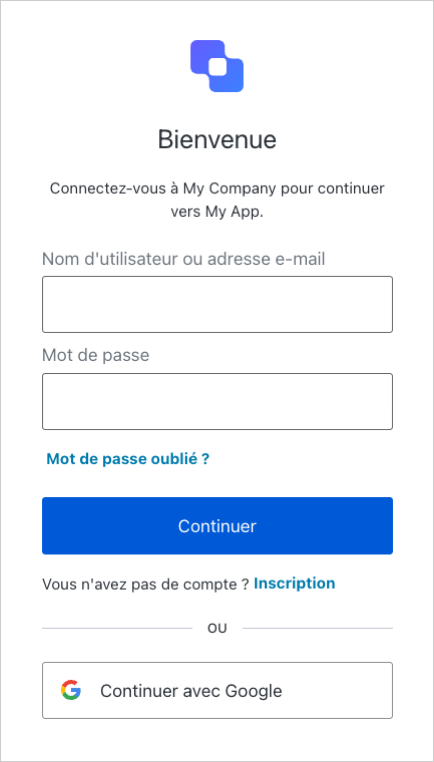
          Lorsque vous cliquez sur le lien de connexion, vérifiez que l’application vous redirige vers la page [Connexion universelle Auth0](https://auth0.com/universal-login) et que vous pouvez maintenant vous connecter ou vous inscrire en utilisant un nom d’utilisateur et un mot de passe, ou un réseau social.
        </Note>

        <Frame>
          <img src="https://mintlify.s3.us-west-1.amazonaws.com/auth0-docs-event-stream-action-templates/docs/images/fr-ca/cdy7uua7fh8z/7L6lZ6xCi1L7sJBFZUPb9g/215ad0b724c138290b0b217edb5ddf96/Login_Screen_-_French.png" alt="null" />
        </Frame>

        Auth0 active le fournisseur social Google par défaut sur les nouveaux locataires et vous offre des clés de développeur pour tester la connexion avec des [fournisseurs d’identité sociale](https://auth0.com/docs/connections/identity-providers-social). Toutefois, ces clés de développeur présentent certaines limitations qui peuvent entraîner un comportement différent de votre application. Pour plus de détails sur ce comportement et comment le résoudre, consultez le document [Tester les connexions sociales avec des clés de développeur Auth0](https://auth0.com/docs/connections/social/devkeys#limitations-of-developer-keys).

        ## Ajouter une fonctionnalité de déconnexion à votre application

        Maintenant que les utilisateurs peuvent se connecter à votre application, ils ont besoin d’un [moyen de se déconnecter](https://auth0.com/docs/logout/guides/logout-auth0). Par défaut, lorsque la déconnexion est activée, Spring Security déconnecte l’utilisateur de votre application et efface la session. Pour permettre une déconnexion réussie de Auth0, vous pouvez fournir un `LogoutHandler` pour rediriger les utilisateurs vers votre [point de terminaison de déconnexion Auth0](https://auth0.com/docs/api/authentication?javascript#logout) (`https://{yourDomain}/v2/logout`) et ensuite les rediriger immédiatement vers votre application.

        Dans la classe `SecurityConfig`, fournissez un `LogoutHandler` qui redirige vers le point de terminaison de déconnexion Auth0, et configurez `HTTPSecurity` pour ajouter le gestionnaire de déconnexion.

        <Note>
          ##### Point de contrôle

          Lorsque vous cliquez sur le lien de déconnexion, l’application doit vous rediriger vers l’adresse que vous avez spécifiée comme l’une des « URL de déconnexion autorisées » dans les « Paramètres d’application » et vous n’êtes plus connecté à votre application.
        </Note>
      </Info>
    </Section>

    ## Étapes suivantes

    Beau travail! Si vous en êtes arrivé là, vous devriez avoir la connexion, la déconnexion et les informations de profil utilisateur actives dans votre application.

    Cela conclut notre tutoriel de démarrage rapide, mais il y a tellement plus à explorer. Pour en savoir plus sur ce que vous pouvez faire avec Auth0, consultez :

    * [Auth0 Dashboard](https://manage.auth0.com/#) : apprenez à configurer et gérer votre locataire et vos applications Auth0
    * [Trousse SDK Okta Spring Boot Starter](https://github.com/okta/okta-spring-boot/) : explorez en détail la trousse SDK utilisée dans ce tutoriel
    * [Auth0 Marketplace](https://marketplace.auth0.com/) : découvrez des intégrations que vous pouvez activer pour étendre les fonctionnalités d’Auth0
  </Content>

  <SideMenu sections={sections}>
    <SideMenuSectionItem id={sections[0].id}>
      <SignUpForm lang="fr" />
    </SideMenuSectionItem>

    <SideMenuSectionItem id={sections[1].id}>
      <SignUpForm lang="fr" />
    </SideMenuSectionItem>

    <SideMenuSectionItem id={sections[2].id}>
      <AuthCodeGroup>
        ```yml application.yml lines theme={null}
        okta:
          oauth2:
            issuer: https://{yourDomain}/
            client-id: {yourClientId}
            client-secret: {yourClientSecret}
        ```

        ```java SecurityConfig.java lines theme={null}
        package com.auth0.example;

        import org.springframework.context.annotation.Bean;
        import org.springframework.context.annotation.Configuration;
        import org.springframework.security.config.annotation.web.builders.HttpSecurity;
        import org.springframework.security.config.annotation.web.configuration.EnableWebSecurity;
        import org.springframework.security.web.SecurityFilterChain;

        import static org.springframework.security.config.Customizer.withDefaults;

        @Configuration
        @EnableWebSecurity
        public class SecurityConfig {

            @Bean
            public SecurityFilterChain filterChain(HttpSecurity http) throws Exception {
                 http
                    .authorizeHttpRequests(authorize -> authorize
                        .anyRequest().authenticated()
                    )
                    .oauth2Login(withDefaults());
                return http.build();
            }
        }
        ```

        ```html index.html lines theme={null}
        <!-- src/main/resources/templates/index.html -->
        <html lang="en" xmlns:th="http://www.thymeleaf.org" xmlns:sec="http://www.thymeleaf.org/thymeleaf-extras-springsecurity5">
            <body>
                <div sec:authorize="!isAuthenticated()">
                    <a th:href="@{/oauth2/authorization/okta}">Log In</a>
                </div>
                <div sec:authorize="isAuthenticated()">
                    <p>You are logged in!</p>
                    <img th:src="${profile.get('picture')}" th:attr="alt=${profile.get('name')}"/>
                    <h2 th:text="${profile.get('name')}"></h2>
                    <p th:text="${profile.get('email')}"></p>
                    <form name="logoutForm" th:action="@{/logout}" method="post">
                        <button type="submit" value="Log out"/>
                    </form>
                </div>
            </body>
        </html>
        ```

        ```java HomeController.java lines theme={null}
        package com.auth0.example;

        import org.springframework.security.core.annotation.AuthenticationPrincipal;
        import org.springframework.security.oauth2.core.oidc.user.OidcUser;
        import org.springframework.stereotype.Controller;
        import org.springframework.ui.Model;
        import org.springframework.web.bind.annotation.GetMapping;

        /**
         * Controller for the home page.
         */
        @Controller
        public class HomeController {

            @GetMapping("/")
            public String home(Model model, @AuthenticationPrincipal OidcUser principal) {
                if (principal != null) {
                    model.addAttribute("profile", principal.getClaims());
                }
                return "index";
            }
        }
        ```

        ```java SecurityConfigWithLogout.java lines theme={null}
        package com.auth0.example;

        import org.springframework.beans.factory.annotation.Value;
        import org.springframework.context.annotation.Bean;
        import org.springframework.context.annotation.Configuration;
        import org.springframework.security.config.annotation.web.builders.HttpSecurity;
        import org.springframework.security.config.annotation.web.configuration.EnableWebSecurity;
        import org.springframework.security.web.SecurityFilterChain;
        import org.springframework.security.web.authentication.logout.LogoutHandler;
        import org.springframework.web.servlet.support.ServletUriComponentsBuilder;

        import java.io.IOException;

        import static org.springframework.security.config.Customizer.withDefaults;

        @Configuration
        @EnableWebSecurity
        public class SecurityConfig {

            @Value("${okta.oauth2.issuer}")
            private String issuer;
            @Value("${okta.oauth2.client-id}")
            private String clientId;

            @Bean
            public SecurityFilterChain configure(HttpSecurity http) throws Exception {
                http
                    .authorizeHttpRequests(authorize -> authorize
                        .requestMatchers("/", "/images/**").permitAll()
                        .anyRequest().authenticated()
                    )
                    .oauth2Login(withDefaults())
                    .logout(logout -> logout
                        .addLogoutHandler(logoutHandler()));
                return http.build();
            }

            private LogoutHandler logoutHandler() {
                return (request, response, authentication) -> {
                    try {
                        String baseUrl = ServletUriComponentsBuilder.fromCurrentContextPath().build().toUriString();
                        response.sendRedirect(issuer + "v2/logout?client_id=" + clientId + "&returnTo=" + baseUrl);
                    } catch (IOException e) {
                        throw new RuntimeException(e);
                    }
                };
            }
        }
        ```
      </AuthCodeGroup>
    </SideMenuSectionItem>

    <SideMenuSectionItem id={sections[3].id}>
      <AuthCodeGroup>
        ```java SecurityConfig.java lines theme={null}
        package com.auth0.example;

        import org.springframework.context.annotation.Bean;
        import org.springframework.context.annotation.Configuration;
        import org.springframework.security.config.annotation.web.builders.HttpSecurity;
        import org.springframework.security.config.annotation.web.configuration.EnableWebSecurity;
        import org.springframework.security.web.SecurityFilterChain;

        import static org.springframework.security.config.Customizer.withDefaults;

        @Configuration
        @EnableWebSecurity
        public class SecurityConfig {

            @Bean
            public SecurityFilterChain filterChain(HttpSecurity http) throws Exception {
                 http
                    .authorizeHttpRequests(authorize -> authorize
                        .anyRequest().authenticated()
                    )
                    .oauth2Login(withDefaults());
                return http.build();
            }
        }
        ```

        ```yml application.yml lines theme={null}
        okta:
          oauth2:
            issuer: https://{yourDomain}/
            client-id: {yourClientId}
            client-secret: {yourClientSecret}
        ```

        ```html index.html lines theme={null}
        <!-- src/main/resources/templates/index.html -->
        <html lang="en" xmlns:th="http://www.thymeleaf.org" xmlns:sec="http://www.thymeleaf.org/thymeleaf-extras-springsecurity5">
            <body>
                <div sec:authorize="!isAuthenticated()">
                    <a th:href="@{/oauth2/authorization/okta}">Log In</a>
                </div>
                <div sec:authorize="isAuthenticated()">
                    <p>You are logged in!</p>
                    <img th:src="${profile.get('picture')}" th:attr="alt=${profile.get('name')}"/>
                    <h2 th:text="${profile.get('name')}"></h2>
                    <p th:text="${profile.get('email')}"></p>
                    <form name="logoutForm" th:action="@{/logout}" method="post">
                        <button type="submit" value="Log out"/>
                    </form>
                </div>
            </body>
        </html>
        ```

        ```java HomeController.java lines theme={null}
        package com.auth0.example;

        import org.springframework.security.core.annotation.AuthenticationPrincipal;
        import org.springframework.security.oauth2.core.oidc.user.OidcUser;
        import org.springframework.stereotype.Controller;
        import org.springframework.ui.Model;
        import org.springframework.web.bind.annotation.GetMapping;

        /**
         * Controller for the home page.
         */
        @Controller
        public class HomeController {

            @GetMapping("/")
            public String home(Model model, @AuthenticationPrincipal OidcUser principal) {
                if (principal != null) {
                    model.addAttribute("profile", principal.getClaims());
                }
                return "index";
            }
        }
        ```

        ```java SecurityConfigWithLogout.java lines theme={null}
        package com.auth0.example;

        import org.springframework.beans.factory.annotation.Value;
        import org.springframework.context.annotation.Bean;
        import org.springframework.context.annotation.Configuration;
        import org.springframework.security.config.annotation.web.builders.HttpSecurity;
        import org.springframework.security.config.annotation.web.configuration.EnableWebSecurity;
        import org.springframework.security.web.SecurityFilterChain;
        import org.springframework.security.web.authentication.logout.LogoutHandler;
        import org.springframework.web.servlet.support.ServletUriComponentsBuilder;

        import java.io.IOException;

        import static org.springframework.security.config.Customizer.withDefaults;

        @Configuration
        @EnableWebSecurity
        public class SecurityConfig {

            @Value("${okta.oauth2.issuer}")
            private String issuer;
            @Value("${okta.oauth2.client-id}")
            private String clientId;

            @Bean
            public SecurityFilterChain configure(HttpSecurity http) throws Exception {
                http
                    .authorizeHttpRequests(authorize -> authorize
                        .requestMatchers("/", "/images/**").permitAll()
                        .anyRequest().authenticated()
                    )
                    .oauth2Login(withDefaults())
                    .logout(logout -> logout
                        .addLogoutHandler(logoutHandler()));
                return http.build();
            }

            private LogoutHandler logoutHandler() {
                return (request, response, authentication) -> {
                    try {
                        String baseUrl = ServletUriComponentsBuilder.fromCurrentContextPath().build().toUriString();
                        response.sendRedirect(issuer + "v2/logout?client_id=" + clientId + "&returnTo=" + baseUrl);
                    } catch (IOException e) {
                        throw new RuntimeException(e);
                    }
                };
            }
        }
        ```
      </AuthCodeGroup>
    </SideMenuSectionItem>

    <SideMenuSectionItem id={sections[4].id}>
      <AuthCodeGroup>
        ```html index.html lines theme={null}
        <!-- src/main/resources/templates/index.html -->
        <html lang="en" xmlns:th="http://www.thymeleaf.org" xmlns:sec="http://www.thymeleaf.org/thymeleaf-extras-springsecurity5">
            <body>
                <div sec:authorize="!isAuthenticated()">
                    <a th:href="@{/oauth2/authorization/okta}">Log In</a>
                </div>
                <div sec:authorize="isAuthenticated()">
                    <p>You are logged in!</p>
                    <img th:src="${profile.get('picture')}" th:attr="alt=${profile.get('name')}"/>
                    <h2 th:text="${profile.get('name')}"></h2>
                    <p th:text="${profile.get('email')}"></p>
                    <form name="logoutForm" th:action="@{/logout}" method="post">
                        <button type="submit" value="Log out"/>
                    </form>
                </div>
            </body>
        </html>
        ```

        ```yml application.yml lines theme={null}
        okta:
          oauth2:
            issuer: https://{yourDomain}/
            client-id: {yourClientId}
            client-secret: {yourClientSecret}
        ```

        ```java SecurityConfig.java lines theme={null}
        package com.auth0.example;

        import org.springframework.context.annotation.Bean;
        import org.springframework.context.annotation.Configuration;
        import org.springframework.security.config.annotation.web.builders.HttpSecurity;
        import org.springframework.security.config.annotation.web.configuration.EnableWebSecurity;
        import org.springframework.security.web.SecurityFilterChain;

        import static org.springframework.security.config.Customizer.withDefaults;

        @Configuration
        @EnableWebSecurity
        public class SecurityConfig {

            @Bean
            public SecurityFilterChain filterChain(HttpSecurity http) throws Exception {
                 http
                    .authorizeHttpRequests(authorize -> authorize
                        .anyRequest().authenticated()
                    )
                    .oauth2Login(withDefaults());
                return http.build();
            }
        }
        ```

        ```java HomeController.java lines theme={null}
        package com.auth0.example;

        import org.springframework.security.core.annotation.AuthenticationPrincipal;
        import org.springframework.security.oauth2.core.oidc.user.OidcUser;
        import org.springframework.stereotype.Controller;
        import org.springframework.ui.Model;
        import org.springframework.web.bind.annotation.GetMapping;

        /**
         * Controller for the home page.
         */
        @Controller
        public class HomeController {

            @GetMapping("/")
            public String home(Model model, @AuthenticationPrincipal OidcUser principal) {
                if (principal != null) {
                    model.addAttribute("profile", principal.getClaims());
                }
                return "index";
            }
        }
        ```

        ```java SecurityConfigWithLogout.java lines theme={null}
        package com.auth0.example;

        import org.springframework.beans.factory.annotation.Value;
        import org.springframework.context.annotation.Bean;
        import org.springframework.context.annotation.Configuration;
        import org.springframework.security.config.annotation.web.builders.HttpSecurity;
        import org.springframework.security.config.annotation.web.configuration.EnableWebSecurity;
        import org.springframework.security.web.SecurityFilterChain;
        import org.springframework.security.web.authentication.logout.LogoutHandler;
        import org.springframework.web.servlet.support.ServletUriComponentsBuilder;

        import java.io.IOException;

        import static org.springframework.security.config.Customizer.withDefaults;

        @Configuration
        @EnableWebSecurity
        public class SecurityConfig {

            @Value("${okta.oauth2.issuer}")
            private String issuer;
            @Value("${okta.oauth2.client-id}")
            private String clientId;

            @Bean
            public SecurityFilterChain configure(HttpSecurity http) throws Exception {
                http
                    .authorizeHttpRequests(authorize -> authorize
                        .requestMatchers("/", "/images/**").permitAll()
                        .anyRequest().authenticated()
                    )
                    .oauth2Login(withDefaults())
                    .logout(logout -> logout
                        .addLogoutHandler(logoutHandler()));
                return http.build();
            }

            private LogoutHandler logoutHandler() {
                return (request, response, authentication) -> {
                    try {
                        String baseUrl = ServletUriComponentsBuilder.fromCurrentContextPath().build().toUriString();
                        response.sendRedirect(issuer + "v2/logout?client_id=" + clientId + "&returnTo=" + baseUrl);
                    } catch (IOException e) {
                        throw new RuntimeException(e);
                    }
                };
            }
        }
        ```
      </AuthCodeGroup>
    </SideMenuSectionItem>

    <SideMenuSectionItem id={sections[5].id}>
      <AuthCodeGroup>
        ```java HomeController.java lines theme={null}
        package com.auth0.example;

        import org.springframework.security.core.annotation.AuthenticationPrincipal;
        import org.springframework.security.oauth2.core.oidc.user.OidcUser;
        import org.springframework.stereotype.Controller;
        import org.springframework.ui.Model;
        import org.springframework.web.bind.annotation.GetMapping;

        /**
         * Controller for the home page.
         */
        @Controller
        public class HomeController {

            @GetMapping("/")
            public String home(Model model, @AuthenticationPrincipal OidcUser principal) {
                if (principal != null) {
                    model.addAttribute("profile", principal.getClaims());
                }
                return "index";
            }
        }
        ```

        ```yml application.yml lines theme={null}
        okta:
          oauth2:
            issuer: https://{yourDomain}/
            client-id: {yourClientId}
            client-secret: {yourClientSecret}
        ```

        ```java SecurityConfig.java lines theme={null}
        package com.auth0.example;

        import org.springframework.context.annotation.Bean;
        import org.springframework.context.annotation.Configuration;
        import org.springframework.security.config.annotation.web.builders.HttpSecurity;
        import org.springframework.security.config.annotation.web.configuration.EnableWebSecurity;
        import org.springframework.security.web.SecurityFilterChain;

        import static org.springframework.security.config.Customizer.withDefaults;

        @Configuration
        @EnableWebSecurity
        public class SecurityConfig {

            @Bean
            public SecurityFilterChain filterChain(HttpSecurity http) throws Exception {
                 http
                    .authorizeHttpRequests(authorize -> authorize
                        .anyRequest().authenticated()
                    )
                    .oauth2Login(withDefaults());
                return http.build();
            }
        }
        ```

        ```html index.html lines theme={null}
        <!-- src/main/resources/templates/index.html -->
        <html lang="en" xmlns:th="http://www.thymeleaf.org" xmlns:sec="http://www.thymeleaf.org/thymeleaf-extras-springsecurity5">
            <body>
                <div sec:authorize="!isAuthenticated()">
                    <a th:href="@{/oauth2/authorization/okta}">Log In</a>
                </div>
                <div sec:authorize="isAuthenticated()">
                    <p>You are logged in!</p>
                    <img th:src="${profile.get('picture')}" th:attr="alt=${profile.get('name')}"/>
                    <h2 th:text="${profile.get('name')}"></h2>
                    <p th:text="${profile.get('email')}"></p>
                    <form name="logoutForm" th:action="@{/logout}" method="post">
                        <button type="submit" value="Log out"/>
                    </form>
                </div>
            </body>
        </html>
        ```

        ```java SecurityConfigWithLogout.java lines theme={null}
        package com.auth0.example;

        import org.springframework.beans.factory.annotation.Value;
        import org.springframework.context.annotation.Bean;
        import org.springframework.context.annotation.Configuration;
        import org.springframework.security.config.annotation.web.builders.HttpSecurity;
        import org.springframework.security.config.annotation.web.configuration.EnableWebSecurity;
        import org.springframework.security.web.SecurityFilterChain;
        import org.springframework.security.web.authentication.logout.LogoutHandler;
        import org.springframework.web.servlet.support.ServletUriComponentsBuilder;

        import java.io.IOException;

        import static org.springframework.security.config.Customizer.withDefaults;

        @Configuration
        @EnableWebSecurity
        public class SecurityConfig {

            @Value("${okta.oauth2.issuer}")
            private String issuer;
            @Value("${okta.oauth2.client-id}")
            private String clientId;

            @Bean
            public SecurityFilterChain configure(HttpSecurity http) throws Exception {
                http
                    .authorizeHttpRequests(authorize -> authorize
                        .requestMatchers("/", "/images/**").permitAll()
                        .anyRequest().authenticated()
                    )
                    .oauth2Login(withDefaults())
                    .logout(logout -> logout
                        .addLogoutHandler(logoutHandler()));
                return http.build();
            }

            private LogoutHandler logoutHandler() {
                return (request, response, authentication) -> {
                    try {
                        String baseUrl = ServletUriComponentsBuilder.fromCurrentContextPath().build().toUriString();
                        response.sendRedirect(issuer + "v2/logout?client_id=" + clientId + "&returnTo=" + baseUrl);
                    } catch (IOException e) {
                        throw new RuntimeException(e);
                    }
                };
            }
        }
        ```
      </AuthCodeGroup>
    </SideMenuSectionItem>

    <SideMenuSectionItem id={sections[6].id}>
      <AuthCodeGroup>
        ```java SecurityConfigWithLogout.java lines theme={null}
        package com.auth0.example;

        import org.springframework.beans.factory.annotation.Value;
        import org.springframework.context.annotation.Bean;
        import org.springframework.context.annotation.Configuration;
        import org.springframework.security.config.annotation.web.builders.HttpSecurity;
        import org.springframework.security.config.annotation.web.configuration.EnableWebSecurity;
        import org.springframework.security.web.SecurityFilterChain;
        import org.springframework.security.web.authentication.logout.LogoutHandler;
        import org.springframework.web.servlet.support.ServletUriComponentsBuilder;

        import java.io.IOException;

        import static org.springframework.security.config.Customizer.withDefaults;

        @Configuration
        @EnableWebSecurity
        public class SecurityConfig {

            @Value("${okta.oauth2.issuer}")
            private String issuer;
            @Value("${okta.oauth2.client-id}")
            private String clientId;

            @Bean
            public SecurityFilterChain configure(HttpSecurity http) throws Exception {
                http
                    .authorizeHttpRequests(authorize -> authorize
                        .requestMatchers("/", "/images/**").permitAll()
                        .anyRequest().authenticated()
                    )
                    .oauth2Login(withDefaults())
                    .logout(logout -> logout
                        .addLogoutHandler(logoutHandler()));
                return http.build();
            }

            private LogoutHandler logoutHandler() {
                return (request, response, authentication) -> {
                    try {
                        String baseUrl = ServletUriComponentsBuilder.fromCurrentContextPath().build().toUriString();
                        response.sendRedirect(issuer + "v2/logout?client_id=" + clientId + "&returnTo=" + baseUrl);
                    } catch (IOException e) {
                        throw new RuntimeException(e);
                    }
                };
            }
        }
        ```

        ```yml application.yml lines theme={null}
        okta:
          oauth2:
            issuer: https://{yourDomain}/
            client-id: {yourClientId}
            client-secret: {yourClientSecret}
        ```

        ```java SecurityConfig.java lines theme={null}
        package com.auth0.example;

        import org.springframework.context.annotation.Bean;
        import org.springframework.context.annotation.Configuration;
        import org.springframework.security.config.annotation.web.builders.HttpSecurity;
        import org.springframework.security.config.annotation.web.configuration.EnableWebSecurity;
        import org.springframework.security.web.SecurityFilterChain;

        import static org.springframework.security.config.Customizer.withDefaults;

        @Configuration
        @EnableWebSecurity
        public class SecurityConfig {

            @Bean
            public SecurityFilterChain filterChain(HttpSecurity http) throws Exception {
                 http
                    .authorizeHttpRequests(authorize -> authorize
                        .anyRequest().authenticated()
                    )
                    .oauth2Login(withDefaults());
                return http.build();
            }
        }
        ```

        ```html index.html lines theme={null}
        <!-- src/main/resources/templates/index.html -->
        <html lang="en" xmlns:th="http://www.thymeleaf.org" xmlns:sec="http://www.thymeleaf.org/thymeleaf-extras-springsecurity5">
            <body>
                <div sec:authorize="!isAuthenticated()">
                    <a th:href="@{/oauth2/authorization/okta}">Log In</a>
                </div>
                <div sec:authorize="isAuthenticated()">
                    <p>You are logged in!</p>
                    <img th:src="${profile.get('picture')}" th:attr="alt=${profile.get('name')}"/>
                    <h2 th:text="${profile.get('name')}"></h2>
                    <p th:text="${profile.get('email')}"></p>
                    <form name="logoutForm" th:action="@{/logout}" method="post">
                        <button type="submit" value="Log out"/>
                    </form>
                </div>
            </body>
        </html>
        ```

        ```java HomeController.java lines theme={null}
        package com.auth0.example;

        import org.springframework.security.core.annotation.AuthenticationPrincipal;
        import org.springframework.security.oauth2.core.oidc.user.OidcUser;
        import org.springframework.stereotype.Controller;
        import org.springframework.ui.Model;
        import org.springframework.web.bind.annotation.GetMapping;

        /**
         * Controller for the home page.
         */
        @Controller
        public class HomeController {

            @GetMapping("/")
            public String home(Model model, @AuthenticationPrincipal OidcUser principal) {
                if (principal != null) {
                    model.addAttribute("profile", principal.getClaims());
                }
                return "index";
            }
        }
        ```
      </AuthCodeGroup>
    </SideMenuSectionItem>
  </SideMenu>
</Recipe>