> ## Documentation Index
> Fetch the complete documentation index at: https://auth0-docs-event-stream-action-templates.mintlify.site/llms.txt
> Use this file to discover all available pages before exploring further.

# Ajouter une connexion à votre application web Java EE

> Ce tutoriel montre comment ajouter une connexion utilisateur à une application web Java EE.

export const AuthCodeGroup = ({children, dropdown}) => {
  const [processedChildren, setProcessedChildren] = useState(children);
  useEffect(() => {
    let unsubscribe = null;
    function init() {
      unsubscribe = window.autorun(() => {
        const processChildren = node => {
          if (typeof node === "string") {
            let processedNode = node;
            for (const [key, value] of window.rootStore.variableStore.values.entries()) {
              const escapedKey = key.replaceAll(/[.*+?^${}()|[\]\\]/g, (String.raw)`\$&`);
              processedNode = processedNode.replaceAll(new RegExp(escapedKey, "g"), value);
            }
            return processedNode;
          } else if (Array.isArray(node)) {
            return node.map(processChildren);
          } else if (node && node.props && node.props.children) {
            return {
              ...node,
              props: {
                ...node.props,
                children: processChildren(node.props.children)
              }
            };
          }
          return node;
        };
        setProcessedChildren(processChildren(children));
      });
    }
    if (window.rootStore) {
      init();
    } else {
      window.addEventListener("adu:storeReady", init);
    }
    return () => {
      window.removeEventListener("adu:storeReady", init);
      unsubscribe?.();
    };
  }, [children]);
  return <CodeGroup dropdown={dropdown}>{processedChildren}</CodeGroup>;
};

export const QuickstartButtons = ({githubLink, lang = "en"}) => {
  const translations = {
    en: {
      viewOnGithub: "View On GitHub",
      loginAndDownload: "Download Sample"
    },
    "fr-ca": {
      viewOnGithub: "Afficher sur GitHub",
      loginAndDownload: "Télécharger un exemple"
    },
    "ja-jp": {
      viewOnGithub: "Githubで表示",
      loginAndDownload: "サンプルをダウンロード"
    }
  };
  const text = translations[lang] || translations.en;
  const parseGithubUrl = url => {
    try {
      const urlObj = new URL(url);
      const pathParts = urlObj.pathname.split("/").filter(Boolean);
      if (pathParts.length >= 4 && pathParts[2] === "tree") {
        const repoName = pathParts[1];
        const branch = pathParts[3];
        const path = pathParts.slice(4).join("/") || undefined;
        return {
          repo: repoName,
          branch,
          path
        };
      }
      console.warn("Could not parse GitHub URL:", url);
      return null;
    } catch (error) {
      console.error("Error parsing GitHub URL:", error);
      return null;
    }
  };
  const handleDownload = async () => {
    const params = parseGithubUrl(githubLink);
    if (!params) {
      console.error("Invalid GitHub URL format");
      return;
    }
    try {
      await window.Auth0DocsUI?.getSample(params);
    } catch (error) {
      console.error("Failed to download sample:", error);
    }
  };
  return <div className="quickstart_buttons flex flex-wrap gap-3 mb-4">
      <a href={githubLink} target="_blank" rel="noopener noreferrer" className="no_external_icon quickstart_button inline-flex items-center justify-center px-6 py-3 text-sm font-medium rounded-[18px] bg-black dark:bg-white !text-white dark:!text-black hover:bg-gray-800 dark:hover:bg-gray-100 transition-colors">
        {text.viewOnGithub}
      </a>
      <button onClick={handleDownload} type="button" className="no_external_icon quickstart_button inline-flex items-center justify-center px-6 py-3 text-sm font-medium rounded-[18px] border border-gray-300 dark:border-[#454545] bg-white dark:bg-[#272728] !text-black dark:!text-white hover:bg-gray-50 dark:hover:bg-neutral-800 transition-colors">
        {text.loginAndDownload}
      </button>
    </div>;
};

export const LoggedInForm = ({sampleApp}) => {
  const LS_APPS_KEY = "auth_demo_apps";
  const LS_APP_CFG_KEY = "auth_demo_app_cfg";
  const CHANNEL = "auth_flows_sync_v1";
  const mkChannel = () => new BroadcastChannel(CHANNEL);
  function uid() {
    return Math.random().toString(36).slice(2) + Date.now().toString(36);
  }
  function loadApps() {
    const raw = localStorage.getItem(LS_APPS_KEY);
    if (raw) return JSON.parse(raw);
    const seeded = [{
      id: "{yourClientId}",
      name: "Default App"
    }];
    localStorage.setItem(LS_APPS_KEY, JSON.stringify(seeded));
    return seeded;
  }
  function saveApps(apps) {
    localStorage.setItem(LS_APPS_KEY, JSON.stringify(apps));
  }
  function loadCfg() {
    const raw = localStorage.getItem(LS_APP_CFG_KEY);
    return raw ? JSON.parse(raw) : {};
  }
  function saveCfg(cfg) {
    localStorage.setItem(LS_APP_CFG_KEY, JSON.stringify(cfg));
  }
  const RightChevron = ({className = "w-5 h-5", ...props}) => <svg xmlns="http://www.w3.org/2000/svg" viewBox="0 0 24 24" stroke="currentColor" fill="none" strokeWidth="2" strokeLinecap="round" strokeLinejoin="round" className={className} {...props}>
      <polyline points="9 18 15 12 9 6" />
    </svg>;
  const LightningIcon = () => <svg width="24" height="24" viewBox="0 0 48 48" fill="none" xmlns="http://www.w3.org/2000/svg">
      <path fillRule="evenodd" clipRule="evenodd" className="fill-[#3F59E4] dark:fill-[#99A7F1]" d="M24.971 30.152H7.088c-1.786 0-2.745-2.103-1.574-3.453l19.07-21.988c1.33-1.532 3.835-.4 3.569 1.607L24.97 30.152z" />
      <path fillRule="evenodd" clipRule="evenodd" className="fill-[#3F59E4] dark:fill-[#99A7F1]" d="M23.201 17.885h17.885c1.787 0 2.746 2.102 1.575 3.453l-19.073 21.99c-1.33 1.532-3.835.4-3.568-1.607L23.2 17.885z" />
    </svg>;
  const LayersIcon = () => <svg width="24" height="24" viewBox="0 0 48 48" fill="none" xmlns="http://www.w3.org/2000/svg">
      <path className="fill-[#3F59E4] dark:fill-[#99A7F1]" d="M34.54 29.135l6.373 3.183c1.566.782 1.566 3.017 0 3.8l-14.815 7.396a4.623 4.623 0 01-4.125 0L7.174 36.12c-1.565-.782-1.565-3.017 0-3.798l6.532-3.214" />
      <path className="fill-[#AAB6F3] dark:fill-[#3449BA]" d="M34.54 18.86l6.373 3.183c1.566.782 1.566 3.016 0 3.8L26.098 33.24a4.623 4.623 0 01-4.125 0L7.174 25.843c-1.565-.781-1.565-3.016 0-3.798l6.33-3.164" />
      <path className="fill-[#CFD6F8] dark:fill-[#22307C]" d="M21.94 23.058L7.306 15.745c-1.62-.81-1.62-3.123 0-3.932l14.631-7.319a4.693 4.693 0 014.194 0l14.648 7.319c1.622.81 1.62 3.124 0 3.932L26.13 23.058c-1.321.66-2.873.66-4.191 0z" />
    </svg>;
  const GithubIcon = () => <svg xmlns="http://www.w3.org/2000/svg" viewBox="0 0 24 24" fill="none" stroke="currentColor" strokeWidth="2" strokeLinecap="round" strokeLinejoin="round" className="w-5 h-5">
      <path d="M9 19c-5 1.5-5-2.5-7-3m14 6v-3.87a3.37 3.37 0 0 0-.94-2.61c3.14-.35 6.44-1.54 6.44-7A5.44 5.44 0 0 0 20 4.77 5.07 5.07 0 0 0 19.91 1S18.73.65 16 2.48a13.38 13.38 0 0 0-7 0C6.27.65 5.09 1 5.09 1A5.07 5.07 0 0 0 5 4.77a5.44 5.44 0 0 0-1.5 3.78c0 5.42 3.3 6.61 6.44 7A3.37 3.37 0 0 0 9 18.13V22"></path>
    </svg>;
  function IconTile({children}) {
    return <div className="
          shrink-0 grid place-items-center w-10 h-10 rounded-lg
          bg-indigo-50 ring-1 ring-indigo-200/60
          dark:bg-indigo-950/40 dark:ring-white/10
        ">
        {children}
      </div>;
  }
  function Card({className = "", children}) {
    return <div className={`rounded-2xl shadow-sm ring-1 ring-zinc-200 dark:ring-zinc-800 ${className}`}>{children}</div>;
  }
  function Button({variant = "primary", type = "button", onClick, children}) {
    const base = "inline-flex items-center justify-center gap-2 h-10 px-4 rounded-xl font-medium transition";
    let styles = "";
    if (variant === "primary") {
      styles = "mint-bg-indigo-600 text-white hover:mint-bg-indigo-700";
    } else if (variant === "outline") {
      styles = "border border-zinc-300 dark:border-zinc-700 mint-bg-transparent hover:mint-bg-zinc-50 dark:hover:mint-bg-zinc-800";
    } else if (variant === "ghost") {
      styles = "hover:mint-bg-zinc-100 dark:hover:mint-bg-zinc-800";
    }
    return <button type={type} onClick={onClick} className={`${base} ${styles}`}>
        {children}
      </button>;
  }
  function Input({id, label, value, onChange, placeholder, name}) {
    return <label className="block space-y-1">
        <span className="text-sm text-zinc-700 dark:text-zinc-300">{label}</span>
        <input id={id} name={name} className="w-full h-11 px-3 rounded-xl border border-zinc-300 dark:border-zinc-700 bg-white dark:bg-zinc-900 text-zinc-900 dark:text-zinc-100 focus:outline-none focus:ring-2 focus:ring-indigo-500" placeholder={placeholder} value={value} onChange={e => onChange(e.target.value)} />
      </label>;
  }
  function Select({label, value, onChange, options}) {
    return <label className="block space-y-1 max-w-[300px]">
        <span className="text-sm text-zinc-700 dark:text-zinc-300">{label}</span>
        <div className="relative">
          <select className="w-full h-11 appearance-none px-3 pr-9 rounded-xl border border-zinc-300 dark:border-zinc-700 bg-white dark:bg-zinc-900 text-zinc-900 dark:text-zinc-100 focus:outline-none focus:ring-2 focus:ring-indigo-500" value={value} onChange={e => onChange(e.target.value)}>
            <optgroup label="Generic Applications">
              {options.map(o => <option key={o.id} value={o.id}>
                  {o.name}
                </option>)}
            </optgroup>
          </select>
          <svg className="pointer-events-none absolute right-3 top-1/2 -translate-y-1/2 w-5 h-5 text-zinc-500" viewBox="0 0 24 24">
            <path d="M7 10l5 5 5-5z" fill="currentColor" />
          </svg>
        </div>
      </label>;
  }
  function Toast({open, onClose, children}) {
    useEffect(() => {
      if (!open) return;
      const t = setTimeout(onClose, 2200);
      return () => clearTimeout(t);
    }, [open, onClose]);
    return <div className={`fixed right-4 top-4 z-50 transition ${open ? "opacity-100 translate-y-0" : "opacity-0 -translate-y-2 pointer-events-none"}`}>
        <div className="flex items-center gap-2 rounded-xl shadow ring-1 ring-emerald-200 bg-white dark:bg-zinc-900 px-4 py-2">
          <span className="w-1.5 h-8 rounded-l bg-emerald-500" />
          <svg className="w-5 h-5 text-emerald-600" viewBox="0 0 24 24" fill="none" stroke="currentColor" strokeWidth="2">
            <path d="M20 6L9 17l-5-5" />
          </svg>
          <span className="text-sm text-zinc-900 dark:text-zinc-100">{children}</span>
        </div>
      </div>;
  }
  function Flows() {
    const [route, setRoute] = useState("menu");
    const [apps, setApps] = useState(loadApps());
    const [cfg, setCfg] = useState(loadCfg());
    const [selected, setSelected] = useState(apps[0]?.id || "");
    const [toast, setToast] = useState(false);
    const [bc] = useState(() => mkChannel());
    useEffect(() => {
      if (!apps.find(a => a.id === selected)) {
        setSelected(apps[0]?.id || "");
      }
    }, [apps, selected]);
    useEffect(() => {
      const onMsg = e => {
        const {type, payload} = e.data || ({});
        switch (type) {
          case "NAV":
            setRoute(payload.route);
            break;
          case "SELECT":
            setSelected(payload.appId);
            break;
          case "APPS_UPDATED":
            setApps(loadApps());
            break;
          case "CFG_UPDATED":
            setCfg(loadCfg());
            setToast(true);
            break;
          default:
            break;
        }
      };
      bc.addEventListener("message", onMsg);
      return () => bc.removeEventListener("message", onMsg);
    }, [bc]);
    const nav = nextRoute => {
      setRoute(nextRoute);
      bc.postMessage({
        type: "NAV",
        payload: {
          route: nextRoute
        }
      });
    };
    const selectApp = appId => {
      setSelected(appId);
      bc.postMessage({
        type: "SELECT",
        payload: {
          appId
        }
      });
    };
    const onCreate = name => {
      const id = uid();
      const next = [...apps, {
        id,
        name: name || "Untitled"
      }];
      setApps(next);
      saveApps(next);
      bc.postMessage({
        type: "APPS_UPDATED"
      });
      selectApp(id);
      nav("integrate");
    };
    const onSaveCfg = (appId, data) => {
      const next = {
        ...cfg,
        [appId]: data
      };
      setCfg(next);
      saveCfg(next);
      setToast(true);
      bc.postMessage({
        type: "CFG_UPDATED"
      });
    };
    return <div>
        {route === "menu" && <Menu onCreate={() => nav("create")} onIntegrate={() => nav("integrate")} />}

        {route === "create" && <CreateForm onCancel={() => nav("menu")} onSave={onCreate} />}

        {route === "integrate" && <IntegrateForm apps={apps} selected={selected} onSelect={selectApp} saved={cfg[selected]} onSave={data => onSaveCfg(selected, data)} onCancel={() => nav("menu")} />}

        <Toast open={toast} onClose={() => setToast(false)}>
          Successfully saved your changes.
        </Toast>
      </div>;
  }
  function Menu({onCreate, onIntegrate}) {
    return <ul className="space-y-4 list-none login_list">
        <li className="list-none !px-0">
          <button onClick={onCreate} className="w-full text-left">
            <Card className="p-5 hover:shadow-md transition">
              <div className="flex items-center justify-between">
                <div className="flex items-center gap-4">
                  <IconTile>
                    <LightningIcon />
                  </IconTile>
                  <h2 className="text-lg">Create a new application</h2>
                </div>
                <RightChevron className="w-4 h-4 text-zinc-500" />
              </div>
            </Card>
          </button>
        </li>
        <li className="list-none !px-0">
          <button onClick={onIntegrate} className="w-full text-left">
            <Card className="p-5 hover:shadow-md transition">
              <div className="flex items-center justify-between">
                <div className="flex items-center gap-4">
                  <IconTile>
                    <LayersIcon />
                  </IconTile>
                  <h2 className="text-lg">Integrate with an existing application</h2>
                </div>
                <RightChevron className="w-4 h-4 text-zinc-500" />
              </div>
            </Card>
          </button>
        </li>
        <li className="list-none !px-0">
          <a className="no_external_icon block" href={sampleApp ? sampleApp : "/"} target="_blank" rel="noreferrer">
            <Card className="p-5 hover:shadow-md transition">
              <div className="flex items-center justify-between">
                <div className="flex items-center gap-4">
                  <IconTile>
                    <GithubIcon />
                  </IconTile>
                  <h2 className="text-lg">View a sample application</h2>
                </div>
                <RightChevron className="w-4 h-4 text-zinc-500" />
              </div>
            </Card>
          </a>
        </li>
      </ul>;
  }
  function CreateForm({onSave, onCancel}) {
    const [name, setName] = useState("");
    return <div className="space-y-6">
        <Input id="app-name" label="Application Name" placeholder="My App" value={name} onChange={setName} />
        <p className="text-sm text-zinc-500">You can change this later in the application settings.</p>
        <div className="flex gap-3">
          <Button onClick={() => onSave(name)}>Save</Button>
          <Button variant="outline" onClick={onCancel}>
            Cancel
          </Button>
        </div>
      </div>;
  }
  function IntegrateForm({apps, selected, onSelect, saved, onSave, onCancel}) {
    const [callbacks, setCallbacks] = useState(saved?.callbacks ?? "");
    const [logouts, setLogouts] = useState(saved?.logouts ?? "");
    const [origins, setOrigins] = useState(saved?.origins ?? "");
    useEffect(() => {
      setCallbacks(loadCfg()[selected]?.callbacks ?? "");
      setLogouts(loadCfg()[selected]?.logouts ?? "");
      setOrigins(loadCfg()[selected]?.origins ?? "");
    }, [selected]);
    return <div className="space-y-6">
        <div>
          <span className="block text-sm text-zinc-600 dark:text-zinc-300 mb-1">Select your Application</span>
          <Select label="" value={selected} onChange={onSelect} options={apps} />
        </div>

        <form className="space-y-4" onSubmit={e => {
      e.preventDefault();
      onSave({
        callbacks,
        logouts,
        origins
      });
    }}>
          <Input id="callbacks" name="callbacks" label="Callback URLs" placeholder="http://localhost:3000" value={callbacks} onChange={setCallbacks} />
          <Input id="logout" name="allowed_logout_urls" label="Logout URLs" placeholder="http://localhost:3000" value={logouts} onChange={setLogouts} />
          <Input id="origins" name="web_origins" label="Allowed Web Origins" placeholder="http://localhost:3000" value={origins} onChange={setOrigins} />

          <div className="flex gap-3 pt-2">
            <Button type="submit">Save</Button>
            <Button variant="outline" type="button" onClick={onCancel}>
              Cancel
            </Button>
          </div>
        </form>
      </div>;
  }
  return <div className="w-full mx-auto py-8">
      <Flows />
    </div>;
};

export const SignUpForm = () => {
  const [isAuthenticated, setIsAuthenticated] = useState(false);
  const [storeReady, setStoreReady] = useState(false);
  useEffect(() => {
    let unsubscribe = null;
    function init() {
      setStoreReady(true);
      unsubscribe = window.autorun(() => {
        const authenticated = window.rootStore?.sessionStore?.isAuthenticated || false;
        setIsAuthenticated(authenticated);
      });
    }
    if (window.rootStore) {
      init();
    } else {
      window.addEventListener("adu:storeReady", init);
    }
    return () => {
      window.removeEventListener("adu:storeReady", init);
      unsubscribe?.();
    };
  }, []);
  function LoggedInForm({sampleApp}) {
    const LS_APPS_KEY = "auth_demo_apps";
    const LS_APP_CFG_KEY = "auth_demo_app_cfg";
    const CHANNEL = "auth_flows_sync_v1";
    const mkChannel = () => new BroadcastChannel(CHANNEL);
    function uid() {
      return Math.random().toString(36).slice(2) + Date.now().toString(36);
    }
    function loadApps() {
      const raw = localStorage.getItem(LS_APPS_KEY);
      if (raw) return JSON.parse(raw);
      const seeded = [{
        id: "{yourClientId}",
        name: "Default App"
      }];
      localStorage.setItem(LS_APPS_KEY, JSON.stringify(seeded));
      return seeded;
    }
    function saveApps(apps) {
      localStorage.setItem(LS_APPS_KEY, JSON.stringify(apps));
    }
    function loadCfg() {
      const raw = localStorage.getItem(LS_APP_CFG_KEY);
      return raw ? JSON.parse(raw) : {};
    }
    function saveCfg(cfg) {
      localStorage.setItem(LS_APP_CFG_KEY, JSON.stringify(cfg));
    }
    const RightChevron = ({className = "w-5 h-5", ...props}) => <svg xmlns="http://www.w3.org/2000/svg" viewBox="0 0 24 24" stroke="currentColor" fill="none" strokeWidth="2" strokeLinecap="round" strokeLinejoin="round" className={className} {...props}>
        <polyline points="9 18 15 12 9 6" />
      </svg>;
    const LightningIcon = () => <svg width="24" height="24" viewBox="0 0 48 48" fill="none" xmlns="http://www.w3.org/2000/svg">
        <path fillRule="evenodd" clipRule="evenodd" className="fill-[#3F59E4] dark:fill-[#99A7F1]" d="M24.971 30.152H7.088c-1.786 0-2.745-2.103-1.574-3.453l19.07-21.988c1.33-1.532 3.835-.4 3.569 1.607L24.97 30.152z" />
        <path fillRule="evenodd" clipRule="evenodd" className="fill-[#3F59E4] dark:fill-[#99A7F1]" d="M23.201 17.885h17.885c1.787 0 2.746 2.102 1.575 3.453l-19.073 21.99c-1.33 1.532-3.835.4-3.568-1.607L23.2 17.885z" />
      </svg>;
    const LayersIcon = () => <svg width="24" height="24" viewBox="0 0 48 48" fill="none" xmlns="http://www.w3.org/2000/svg">
        <path className="fill-[#3F59E4] dark:fill-[#99A7F1]" d="M34.54 29.135l6.373 3.183c1.566.782 1.566 3.017 0 3.8l-14.815 7.396a4.623 4.623 0 01-4.125 0L7.174 36.12c-1.565-.782-1.565-3.017 0-3.798l6.532-3.214" />
        <path className="fill-[#AAB6F3] dark:fill-[#3449BA]" d="M34.54 18.86l6.373 3.183c1.566.782 1.566 3.016 0 3.8L26.098 33.24a4.623 4.623 0 01-4.125 0L7.174 25.843c-1.565-.781-1.565-3.016 0-3.798l6.33-3.164" />
        <path className="fill-[#CFD6F8] dark:fill-[#22307C]" d="M21.94 23.058L7.306 15.745c-1.62-.81-1.62-3.123 0-3.932l14.631-7.319a4.693 4.693 0 014.194 0l14.648 7.319c1.622.81 1.62 3.124 0 3.932L26.13 23.058c-1.321.66-2.873.66-4.191 0z" />
      </svg>;
    const GithubIcon = () => <svg xmlns="http://www.w3.org/2000/svg" viewBox="0 0 24 24" fill="none" stroke="currentColor" strokeWidth="2" strokeLinecap="round" strokeLinejoin="round" className="w-5 h-5">
        <path d="M9 19c-5 1.5-5-2.5-7-3m14 6v-3.87a3.37 3.37 0 0 0-.94-2.61c3.14-.35 6.44-1.54 6.44-7A5.44 5.44 0 0 0 20 4.77 5.07 5.07 0 0 0 19.91 1S18.73.65 16 2.48a13.38 13.38 0 0 0-7 0C6.27.65 5.09 1 5.09 1A5.07 5.07 0 0 0 5 4.77a5.44 5.44 0 0 0-1.5 3.78c0 5.42 3.3 6.61 6.44 7A3.37 3.37 0 0 0 9 18.13V22"></path>
      </svg>;
    function IconTile({children}) {
      return <div className="
            shrink-0 grid place-items-center w-10 h-10 rounded-lg
            bg-indigo-50 ring-1 ring-indigo-200/60
            dark:bg-indigo-950/40 dark:ring-white/10
          ">
          {children}
        </div>;
    }
    function Card({className = "", children}) {
      return <div className={`rounded-2xl shadow-sm ring-1 ring-zinc-200 dark:ring-zinc-800 ${className}`}>{children}</div>;
    }
    function Button({variant = "primary", type = "button", onClick, children}) {
      const base = "inline-flex items-center justify-center gap-2 h-10 px-4 rounded-xl font-medium transition";
      let styles = "";
      if (variant === "primary") {
        styles = "mint-bg-indigo-600 text-white hover:mint-bg-indigo-700";
      } else if (variant === "outline") {
        styles = "border border-zinc-300 dark:border-zinc-700 mint-bg-transparent hover:mint-bg-zinc-50 dark:hover:mint-bg-zinc-800";
      } else if (variant === "ghost") {
        styles = "hover:mint-bg-zinc-100 dark:hover:mint-bg-zinc-800";
      }
      return <button type={type} onClick={onClick} className={`${base} ${styles}`}>
          {children}
        </button>;
    }
    function Input({id, label, value, onChange, placeholder, name}) {
      return <label className="block space-y-1">
          <span className="text-sm text-zinc-700 dark:text-zinc-300">{label}</span>
          <input id={id} name={name} className="w-full h-11 px-3 rounded-xl border border-zinc-300 dark:border-zinc-700 bg-white dark:bg-zinc-900 text-zinc-900 dark:text-zinc-100 focus:outline-none focus:ring-2 focus:ring-indigo-500" placeholder={placeholder} value={value} onChange={e => onChange(e.target.value)} />
        </label>;
    }
    function Select({label, value, onChange, options}) {
      return <label className="block space-y-1 max-w-[300px]">
          <span className="text-sm text-zinc-700 dark:text-zinc-300">{label}</span>
          <div className="relative">
            <select className="w-full h-11 appearance-none px-3 pr-9 rounded-xl border border-zinc-300 dark:border-zinc-700 bg-white dark:bg-zinc-900 text-zinc-900 dark:text-zinc-100 focus:outline-none focus:ring-2 focus:ring-indigo-500" value={value} onChange={e => onChange(e.target.value)}>
              <optgroup label="Generic Applications">
                {options.map(o => <option key={o.id} value={o.id}>
                    {o.name}
                  </option>)}
              </optgroup>
            </select>
            <svg className="pointer-events-none absolute right-3 top-1/2 -translate-y-1/2 w-5 h-5 text-zinc-500" viewBox="0 0 24 24">
              <path d="M7 10l5 5 5-5z" fill="currentColor" />
            </svg>
          </div>
        </label>;
    }
    function Toast({open, onClose, children}) {
      useEffect(() => {
        if (!open) return;
        const t = setTimeout(onClose, 2200);
        return () => clearTimeout(t);
      }, [open, onClose]);
      return <div className={`fixed right-4 top-4 z-50 transition ${open ? "opacity-100 translate-y-0" : "opacity-0 -translate-y-2 pointer-events-none"}`}>
          <div className="flex items-center gap-2 rounded-xl shadow ring-1 ring-emerald-200 bg-white dark:bg-zinc-900 px-4 py-2">
            <span className="w-1.5 h-8 rounded-l bg-emerald-500" />
            <svg className="w-5 h-5 text-emerald-600" viewBox="0 0 24 24" fill="none" stroke="currentColor" strokeWidth="2">
              <path d="M20 6L9 17l-5-5" />
            </svg>
            <span className="text-sm text-zinc-900 dark:text-zinc-100">{children}</span>
          </div>
        </div>;
    }
    function Flows() {
      const [route, setRoute] = useState("menu");
      const [apps, setApps] = useState(loadApps());
      const [cfg, setCfg] = useState(loadCfg());
      const [selected, setSelected] = useState(apps[0]?.id || "");
      const [toast, setToast] = useState(false);
      const [bc] = useState(() => mkChannel());
      useEffect(() => {
        if (!apps.find(a => a.id === selected)) {
          setSelected(apps[0]?.id || "");
        }
      }, [apps, selected]);
      useEffect(() => {
        const onMsg = e => {
          const {type, payload} = e.data || ({});
          switch (type) {
            case "NAV":
              setRoute(payload.route);
              break;
            case "SELECT":
              setSelected(payload.appId);
              break;
            case "APPS_UPDATED":
              setApps(loadApps());
              break;
            case "CFG_UPDATED":
              setCfg(loadCfg());
              setToast(true);
              break;
            default:
              break;
          }
        };
        bc.addEventListener("message", onMsg);
        return () => bc.removeEventListener("message", onMsg);
      }, [bc]);
      const nav = nextRoute => {
        setRoute(nextRoute);
        bc.postMessage({
          type: "NAV",
          payload: {
            route: nextRoute
          }
        });
      };
      const selectApp = appId => {
        setSelected(appId);
        bc.postMessage({
          type: "SELECT",
          payload: {
            appId
          }
        });
      };
      const onCreate = name => {
        const id = uid();
        const next = [...apps, {
          id,
          name: name || "Untitled"
        }];
        setApps(next);
        saveApps(next);
        bc.postMessage({
          type: "APPS_UPDATED"
        });
        selectApp(id);
        nav("integrate");
      };
      const onSaveCfg = (appId, data) => {
        const next = {
          ...cfg,
          [appId]: data
        };
        setCfg(next);
        saveCfg(next);
        setToast(true);
        bc.postMessage({
          type: "CFG_UPDATED"
        });
      };
      return <div>
          {route === "menu" && <Menu onCreate={() => nav("create")} onIntegrate={() => nav("integrate")} />}

          {route === "create" && <CreateForm onCancel={() => nav("menu")} onSave={onCreate} />}

          {route === "integrate" && <IntegrateForm apps={apps} selected={selected} onSelect={selectApp} saved={cfg[selected]} onSave={data => onSaveCfg(selected, data)} onCancel={() => nav("menu")} />}

          <Toast open={toast} onClose={() => setToast(false)}>
            Successfully saved your changes.
          </Toast>
        </div>;
    }
    function Menu({onCreate, onIntegrate}) {
      return <ul className="space-y-4 list-none login_list">
          <li className="list-none !px-0">
            <button onClick={onCreate} className="w-full text-left">
              <Card className="p-5 hover:shadow-md transition">
                <div className="flex items-center justify-between">
                  <div className="flex items-center gap-4">
                    <IconTile>
                      <LightningIcon />
                    </IconTile>
                    <h2 className="text-lg">Create a new application</h2>
                  </div>
                  <RightChevron className="w-4 h-4 text-zinc-500" />
                </div>
              </Card>
            </button>
          </li>
          <li className="list-none !px-0">
            <button onClick={onIntegrate} className="w-full text-left">
              <Card className="p-5 hover:shadow-md transition">
                <div className="flex items-center justify-between">
                  <div className="flex items-center gap-4">
                    <IconTile>
                      <LayersIcon />
                    </IconTile>
                    <h2 className="text-lg">Integrate with an existing application</h2>
                  </div>
                  <RightChevron className="w-4 h-4 text-zinc-500" />
                </div>
              </Card>
            </button>
          </li>
          <li className="list-none !px-0">
            <a className="no_external_icon block" href={sampleApp ? sampleApp : "/"} target="_blank" rel="noreferrer">
              <Card className="p-5 hover:shadow-md transition">
                <div className="flex items-center justify-between">
                  <div className="flex items-center gap-4">
                    <IconTile>
                      <GithubIcon />
                    </IconTile>
                    <h2 className="text-lg">View a sample application</h2>
                  </div>
                  <RightChevron className="w-4 h-4 text-zinc-500" />
                </div>
              </Card>
            </a>
          </li>
        </ul>;
    }
    function CreateForm({onSave, onCancel}) {
      const [name, setName] = useState("");
      return <div className="space-y-6">
          <Input id="app-name" label="Application Name" placeholder="My App" value={name} onChange={setName} />
          <p className="text-sm text-zinc-500">You can change this later in the application settings.</p>
          <div className="flex gap-3">
            <Button onClick={() => onSave(name)}>Save</Button>
            <Button variant="outline" onClick={onCancel}>
              Cancel
            </Button>
          </div>
        </div>;
    }
    function IntegrateForm({apps, selected, onSelect, saved, onSave, onCancel}) {
      const [callbacks, setCallbacks] = useState(saved?.callbacks ?? "");
      const [logouts, setLogouts] = useState(saved?.logouts ?? "");
      const [origins, setOrigins] = useState(saved?.origins ?? "");
      useEffect(() => {
        setCallbacks(loadCfg()[selected]?.callbacks ?? "");
        setLogouts(loadCfg()[selected]?.logouts ?? "");
        setOrigins(loadCfg()[selected]?.origins ?? "");
      }, [selected]);
      return <div className="space-y-6">
          <div>
            <span className="block text-sm text-zinc-600 dark:text-zinc-300 mb-1">Select your Application</span>
            <Select label="" value={selected} onChange={onSelect} options={apps} />
          </div>

          <form className="space-y-4" onSubmit={e => {
        e.preventDefault();
        onSave({
          callbacks,
          logouts,
          origins
        });
      }}>
            <Input id="callbacks" name="callbacks" label="Callback URLs" placeholder="http://localhost:3000" value={callbacks} onChange={setCallbacks} />
            <Input id="logout" name="allowed_logout_urls" label="Logout URLs" placeholder="http://localhost:3000" value={logouts} onChange={setLogouts} />
            <Input id="origins" name="web_origins" label="Allowed Web Origins" placeholder="http://localhost:3000" value={origins} onChange={setOrigins} />

            <div className="flex gap-3 pt-2">
              <Button type="submit">Save</Button>
              <Button variant="outline" type="button" onClick={onCancel}>
                Cancel
              </Button>
            </div>
          </form>
        </div>;
    }
    return <div className="w-full mx-auto py-8">
        <Flows />
      </div>;
  }
  ;
  function SignUpFormInternal() {
    return <div className="flex flex-col gap-2 items-center h-full">
        <img noZoom src="/docs/img/quickstarts/action_hero_dashboard.svg" alt="Sign up for an Auth0 account" style={{
      width: "250px",
      height: "250px"
    }} />
        <span className="text-center" style={{
      width: "400px"
    }}>
          Sign up for an{" "}
          <a href="https://auth0.com/signup" target="_blank" rel="noopener noreferrer">
            Auth0 account
          </a>{" "}
          or{" "}
          <span className="font-semibold text-primary dark:text-white cursor-pointer" onClick={() => console.log("log in")}>
            log in
          </span>{" "}
          to your existing account to integrate directly with your own tenant.
        </span>
        <button onClick={() => console.log("sign up")} className="bg-primary dark:bg-primary-light text-white dark:text-black px-4 py-2 rounded-md mt-4 font-medium" style={{
      width: "140px"
    }}>
          Sign up
        </button>
      </div>;
  }
  ;
  return <></>;
};

export const SideMenuSectionItem = ({id, children}) => {
  return <div id={`side-menu-item-${id}`} className="recipe-side-menu-item flex flex-col w-full h-full">
      {children}
    </div>;
};

export const SideMenu = ({sections, children}) => {
  const [visibleSection, setVisibleSection] = useState(sections[0]?.id ?? null);
  const checkVisibility = () => {
    let currentVisible = null;
    const viewportHeight = window.innerHeight;
    const scrollY = window.scrollY;
    sections.forEach(({id}) => {
      const section = document.getElementById(id);
      if (section) {
        const rect = section.getBoundingClientRect();
        const sectionTop = rect.top + scrollY;
        const sectionBottom = sectionTop + rect.height;
        const multiplier = viewportHeight > 1600 ? 0.34 : 0.22;
        if (scrollY + viewportHeight * multiplier >= sectionTop && scrollY <= sectionBottom) {
          currentVisible = id;
        }
      }
    });
    if (currentVisible && currentVisible !== visibleSection) {
      setVisibleSection(currentVisible);
    }
  };
  useEffect(() => {
    const throttledCheck = () => {
      setTimeout(checkVisibility, 100);
    };
    checkVisibility();
    window.addEventListener("scroll", throttledCheck);
    return () => {
      window.removeEventListener("scroll", throttledCheck);
    };
  }, [sections, visibleSection]);
  useEffect(() => {
    sections.forEach(({id}) => {
      const section = document.getElementById(id);
      const sideMenuItem = document.getElementById(`side-menu-item-${id}`);
      if (section) {
        if (id === visibleSection) {
          section.classList.add("active-section");
        } else {
          section.classList.remove("active-section");
        }
      }
      if (sideMenuItem) {
        if (id === visibleSection) {
          sideMenuItem.classList.add("active-side-menu-item");
        } else {
          sideMenuItem.classList.remove("active-side-menu-item");
        }
      }
    });
  }, [visibleSection, sections]);
  return <div className="recipe-side-menu sticky px-2 py-1" style={{
    height: "calc(100vh - 7rem)",
    top: "7rem",
    scrollMarginTop: "var(--scroll-mt)"
  }}>
      {children.map(child => {
    if (child.props.id === visibleSection) {
      return child;
    }
    return null;
  })}
    </div>;
};

export const Section = ({id, title, stepNumber, children, isSingleColumn = false}) => {
  return <div id={id} className={`recipe-section flex flex-col transition-opacity duration-200`}>
      {}
      <Step title={title} stepNumber={stepNumber} titleSize="h3">
        {children}
      </Step>
    </div>;
};

export const Content = ({title, children}) => {
  return <div className="recipe-content flex flex-col">
      {title && <h1 className="text-3xl">{title}</h1>}
      {children}
    </div>;
};

export const Recipe = ({children, isSingleColumn = false}) => {
  return <div className={`pl-4 recipe-container mx-auto grid grid-cols-1 gap-10 relative ${isSingleColumn ? "md:grid-cols-1" : "md:grid-cols-2"}`}>
      {children}
    </div>;
};

<QuickstartButtons githubLink="https://github.com/auth0-samples/auth0-java-ee-sample/tree/master/01-Login" lang="fr-ca" />

export const sections = [{
  id: "configuration-requise",
  title: "Configuration requise"
}, {
  id: "configuration-d-auth0",
  title: "Configuration d’Auth0"
}, {
  id: "configurer-java-ee-pour-utiliser-auth0",
  title: "Configurer Java EE pour utiliser Auth0"
}, {
  id: "configurer-la-sécurité-java-ee",
  title: "Configurer la sécurité Java EE"
}, {
  id: "déclencher-l-authentification",
  title: "Déclencher l’authentification"
}, {
  id: "afficher-les-informations-de-l-utilisateur",
  title: "Afficher les informations de l’utilisateur"
}, {
  id: "gérer-la-déconnexion",
  title: "Gérer la déconnexion"
}, {
  id: "exécuter-l-exemple",
  title: "Exécuter l’exemple"
}];

<Recipe>
  <Content>
    Ce tutoriel montre comment ajouter une connexion utilisateur à une application web Java EE. Nous vous recommandons de vous connecter pour suivre ce démarrage rapide avec les exemples configurés pour votre compte.

    <Section id={sections[0].id} title={sections[0].title} stepNumber="1">
      Ce tutoriel et le projet d’exemple ont été testés avec les éléments suivants :

      * Java 11
    </Section>

    <Section id={sections[1].id} title={sections[1].title} stepNumber="2">
      ### Obtenez vos clés d’application

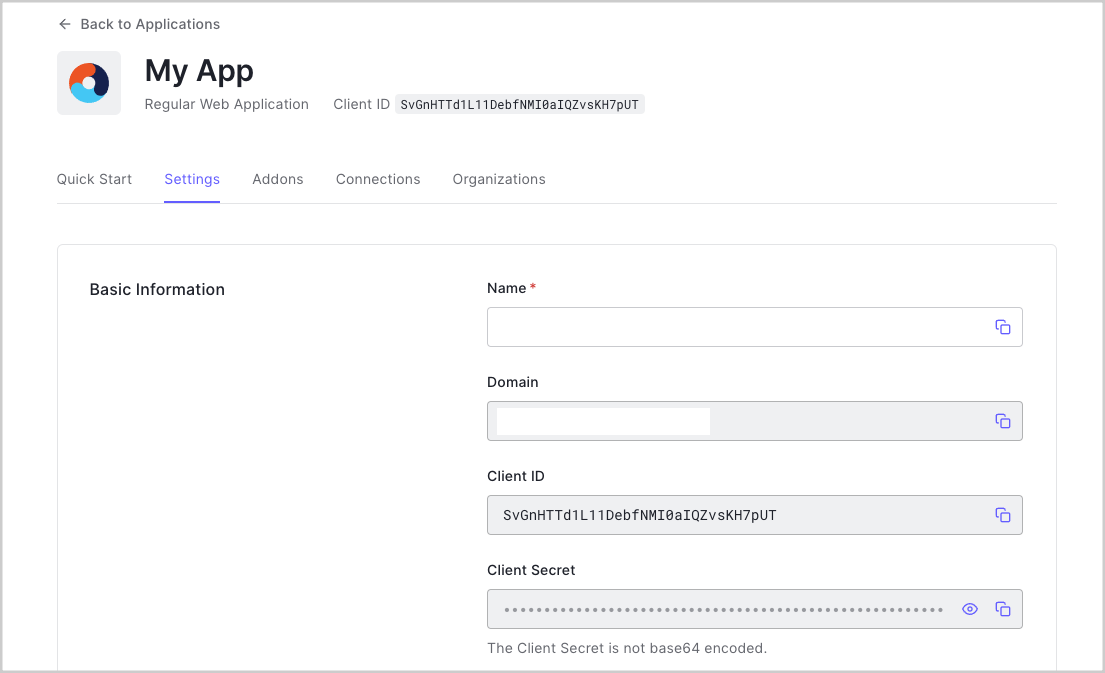
      Après votre inscription à Auth0, une nouvelle application a été créée pour vous, ou vous avez pu en créer une. Vous aurez besoin de quelques informations sur cette application pour communiquer avec Auth0. Vous pouvez obtenir ces détails dans la section [Paramètres de l’application](https://manage.auth0.com/#/applications) d’Auth0 Dashboard.

      <Frame>
        <img src="https://mintlify.s3.us-west-1.amazonaws.com/auth0-docs-event-stream-action-templates/docs/images/fr-ca/cdy7uua7fh8z/1NtemqhRTHLFgWkGyAVSC6/ae66506a56ffab891e8a36e1344e6376/uwp.png" alt="" />
      </Frame>

      Les informations suivantes sont nécessaires :

      * **Domain (Domaine)**
      * **Client ID (Identifiant client)**
      * **Client Secret (Secret client)**

      <Info>
        En téléchargeant l’exemple en haut de cette page, les détails vous seront automatiquement fournis.
      </Info>

      ### Configurer les URL de rappel

      Une URL de rappel est une URL dans votre application où Auth0 redirige l’utilisateur après qu’il se soit authentifié. La callbackc URL de votre application doit être ajoutée au champ **URL de rappel autorisées** dansples [Paramètres de l’application](https://manage.auth0.com/#/applications). Si ce champ n’est pas défini, les utilisateurs ne pourront pas se connecter à l’application et obtiendront un message d’erreur.

      <Info>
        Si vous suivez l’exemple de projet que vous avez téléchargé à partir du haut de cette page, l’URL de rappel que vous devez ajouter au champ **URL de rappel autorisées** est `http://localhost:3000/callback`.
      </Info>

      ### Configuration des URL de déconnexion

      Une URL de déconnexion est une URL de votre application à laquelle Auth0 peut retourner après la déconnexion de l’utilisateur du serveur d’autorisation. Elle est indiquée dans le paramètre de requête `returnTo`. L’URL de déconnexion de votre application doit être ajoutée au champ **URL de déconnexion autorisées** dans les [paramètres de l’application](https://manage.auth0.com/#/applications). Si ce champ n’est pas défini, les utilisateurs ne pourront pas se déconnecter de l’application et obtiendront un message d’erreur.

      <Info>
        Si vous suivez l’exemple de projet que vous avez téléchargé à partir du haut de cette page, l’URL de déconnexion que vous devez ajouter au champ **URL de déconnexion autorisées** est `http://localhost:3000/`.
      </Info>
    </Section>

    <Section id={sections[2].id} title={sections[2].title} stepNumber="3">
      ### Configurez les dépendances

      Pour intégrer votre application Java EE avec Auth0, ajoutez les dépendances suivantes :

      * **javax.javaee-api** : L’API Java EE 8 est nécessaire pour écrire des applications à l’aide de Java EE 8. L’implémentation réelle est fournie par le conteneur d’application : elle n’a donc pas besoin d’être incluse dans le fichier WAR.
      * **javax.security.entreprise** : L’API de sécurité Java EE 8 permet de gérer les problèmes de sécurité dans une application EE. Comme la dépendance `javax.javaee-api`, l’implémentation est fournie par le conteneur d’application : elle n’est donc pas incluse dans le fichier WAR.
      * **auth0-java-mvc-commons** : Le [Kit de développement logiciel (SDK) Java MVC Auth0](https://github.com/auth0/auth0-java-mvc-common) vous permet d’utiliser Auth0 avec Java pour les applications Web MVC côté serveur. Il génère l’URL d’autorisation que votre application doit appeler pour authentifier un utilisateur à l’aide d’Auth0.

      Si vous utilisez Maven, ajoutez les dépendances à votre `pom.xml` :

      ```html theme={null}
      <!-- pom.xml -->
      <dependency>
      <groupId>com.auth0</groupId>
      <artifactId>mvc-auth-commons</artifactId>
      <version>[1.0, 2.0)</version>
      </dependency>
      <dependency>
      <groupId>javax</groupId>
      <artifactId>javaee-api</artifactId>
      <version>8.0.1</version>
      <scope>provided</scope>
      </dependency>
      <dependency>
      <groupId>javax.security.enterprise</groupId>
      <artifactId>javax.security.enterprise-api</artifactId>
      <version>1.0</version>
      <scope>provided</scope>
      </dependency>
      ```

      Si vous utilisez Gradle, ajoutez-les à votre `build.gradle` :

      ```
      // build.gradle
      providedCompile 'javax:javaee-api:8.0.1'
      providedCompile 'javax.security.enterprise:javax.security.enterprise-api:1.0'
      implementation 'com.auth0:mvc-auth-commons:1. '
      ```

      ### Configurez votre application Java EE

      <Info>
        L’exemple qui accompagne ce tutoriel est écrit en JSP et testé avec le serveur d’application [WildFly](https://wildfly.org/). Il se peut que vous deviez adapter certaines des étapes si vous travaillez avec un conteneur d’application ou des technologies différents.
      </Info>

      Votre application Java EE a besoin de certaines informations pour authentifier les utilisateurs avec votre application Auth0. Le fichier descripteur de déploiement `web.xml`  peut être utilisé pour stocker ces informations, bien que vous puissiez les stocker dans un autre emplacement sécurisé.

      Ces informations seront utilisées pour configurer la bibliothèque **auth0-java-mvc-commons** afin de permettre aux utilisateurs de se connecter à votre application. Pour en savoir plus sur la bibliothèque, y compris ses différentes options de configuration, consultez le fichier [README](https://github.com/auth0/auth0-java-mvc-common/blob/master/README.md) de la bibliothèque.

      | **Vérifier les attributs remplis**                                                                                                                                                                                                                                                      |
      | --------------------------------------------------------------------------------------------------------------------------------------------------------------------------------------------------------------------------------------------------------------------------------------- |
      | Si vous avez téléchargé cet exemple en utilisant le bouton **Download Sample**, les attributs `domain`, `clientId` et `clientSecret` seront remplis pour vous. Vous devez vérifier que les valeurs sont correctes, surtout si vous avez plusieurs applications Auth0 dans votre compte. |
    </Section>

    <Section id={sections[3].id} title={sections[3].title} stepNumber="4">
      L’API de Java EE 8 Security a introduit l’interface `HttpAuthenticationMechanism` pour permettre aux applications d’obtenir les identifiants d’un utilisateur. Des implémentations par défaut existent pour l’authentification de base et l’authentification basée sur le formulaire, et il est facile de configurer une stratégie d’authentification personnalisée.

      Pour s’authentifier avec Auth0, il faut fournir des implémentations personnalisées des interfaces suivantes :

      * HttpAuthenticationMechanism : responsable de la gestion du flux d’authentification pour les utilisateurs qui reviennent d’Auth0. ([JavaDoc](https://javaee.github.io/javaee-spec/javadocs/javax/security/enterprise/authentication/mechanism/http/HttpAuthenticationMechanism.html)).
      * IdentityStore : responsable de la validation des identifiants de l’utilisateur ([JavaDoc](https://javaee.github.io/javaee-spec/javadocs/javax/security/enterprise/identitystore/IdentityStore.html)).
      * CallerPrincipal : représente le principal de l’appelant de la requête HTTP en cours ([JavaDoc](https://javaee.github.io/javaee-spec/javadocs/javax/security/enterprise/CallerPrincipal.html)).
      * Credential : représente l’identifiant que l’appelant utilisera pour s’authentifier ([JavaDoc](https://javaee.github.io/javaee-spec/javadocs/javax/security/enterprise/credential/Credential.html)).

      Tout d’abord, mettez vos paramètres Auth0 à la disposition de l’application en créant un bean @ApplicationScoped pour récupérer les valeurs du contexte Web et les rendre disponibles via des getters (accesseurs).

      Ensuite, créez un `CallerPrincipal` personnalisé qui représente l’appelant de la requête en cours :

      ```
      // src/main/java/com/auth0/example/security/Auth0JwtPrincipal.java
      public class Auth0JwtPrincipal extends CallerPrincipal {
      private final DecodedJWT idToken;

      Auth0JwtPrincipal(DecodedJWT idToken) {

          super(idToken.getClaim("name").asString());

          this.idToken = idToken;

      }

      public DecodedJWT getIdToken() {

          return this.idToken;

      }

      }
      ```

      Vous pouvez maintenant mettre en œuvre un `Credential` personnalisé qui sera utilisé pour représenter les identifiants de l’utilisateur. Il contiendra des informations sur le principal :

      ```
      // src/main/java/com/auth0/example/security/Auth0JwtCredential.java
      class Auth0JwtCredential implements Credential {
      private Auth0JwtPrincipal auth0JwtPrincipal;

      Auth0JwtCredential(String token) {

          DecodedJWT decodedJWT = JWT.decode(token);

          this.auth0JwtPrincipal = new Auth0JwtPrincipal(decodedJWT);

      }

      Auth0JwtPrincipal getAuth0JwtPrincipal() {

          return auth0JwtPrincipal;

      }

      }
      ```

      Vous avez maintenant défini les classes qui représentent le principal et l’identifiant d’un appelant. Ensuite, créez une implémentation personnalisée de `IdentityStore`. Cette classe sera chargée de valider les identifiants de l’utilisateur :

      ```
      // src/main/java/com/auth0/example/security/Auth0JwtIdentityStore.java
      @ApplicationScoped
      public class Auth0JwtIdentityStore implements IdentityStore {
      @Override

      public CredentialValidationResult validate(final Credential credential) {

          CredentialValidationResult result = CredentialValidationResult.NOT_VALIDATED_RESULT;

          if (credential instanceof Auth0JwtCredential) {

              Auth0JwtCredential auth0JwtCredential = (Auth0JwtCredential) credential;

              result = new CredentialValidationResult(auth0JwtCredential.getAuth0JwtPrincipal());

          }

          return result;

      }

      }
      ```

      Si le `credential` est un `Auth0Credential`, l’utilisateur appelant est authentifié et valide, et un `CredentialValidationResult` créé avec le credential est renvoyé pour indiquer le succès. S’il ne s’agit pas d’un `Auth0Credential`, un `CredentialValidationResult.NOT_VALIDATED_RESULT` est renvoyé.

      Avant d’implémenter l’interface `HttpAuthenticationMechanism` qui utilisera tous ces collaborateurs, créez un bean qui fournira une instance configurée du `AuthenticationController` de la trousse SDK Auth0 Java MVC. Le `AuthenticationController` est utilisé pour construire l’URL d’autorisation où les utilisateurs se connecteront, et gérer l’échange de jetons pour authentifier les utilisateurs.

      * Si votre application Auth0 est configurée pour utiliser l’algorithme de signature **RS256**  (par défaut lors de la création d’une nouvelle application Auth0), vous devez configurer un `JwkProvider` pour récupérer la clé publique utilisée pour vérifier la signature du jeton. Voir le référentiel [jwks-rsa-java](https://github.com/auth0/jwks-rsa-java) pour connaître les options de configuration supplémentaires.
      * Si votre application Auth0 est configurée pour utiliser l’algorithme de signature **HS256**, il n’est pas nécessaire de configurer le `JwkProvider`.

      <Info>
        Pour en savoir plus sur les algorithmes de signature disponibles, consultez la [documentation](https://auth0.com/docs/tokens/concepts/signing-algorithms).
      </Info>

      L’exemple ci-dessous montre comment configurer le `AuthenticationController` pour l’utiliser avec l’algorithme de signature **RS256** :

      ```
      // src/main/java/com/auth0/example/security/Auth0AuthenticationProvider.java
      @ApplicationScoped
      public class Auth0AuthenticationProvider {
      @Produces

      public AuthenticationController authenticationController(Auth0AuthenticationConfig config) {

          JwkProvider jwkProvider = new JwkProviderBuilder(config.getDomain()).build();

          return AuthenticationController.newBuilder(config.getDomain(), config.getClientId(), config.getClientSecret())

                  .withJwkProvider(jwkProvider)

                  .build();

      }

      }
      ```

      Enfin, mettez en œuvre un `HttpAuthenticationMechanism` personnalisé

      ```
      // src/main/java/com/auth0/example/security/Auth0AuthenticationMechanism.java
      @ApplicationScoped
      @AutoApplySession
      public class Auth0AuthenticationMechanism implements HttpAuthenticationMechanism {
      private final AuthenticationController authenticationController;

      private final IdentityStoreHandler identityStoreHandler;

      @Inject

      Auth0AuthenticationMechanism(AuthenticationController authenticationController, IdentityStoreHandler identityStoreHandler) {

          this.authenticationController = authenticationController;

          this.identityStoreHandler = identityStoreHandler;

      }

      @Override

      public AuthenticationStatus validateRequest(HttpServletRequest httpServletRequest,

                                                  HttpServletResponse httpServletResponse,

                                                  HttpMessageContext httpMessageContext) throws AuthenticationException {

          // Exchange the code for the ID token, and notify container of result.

          if (isCallbackRequest(httpServletRequest)) {

              try {

                  Tokens tokens = authenticationController.handle(httpServletRequest, httpServletResponse);

                  Auth0JwtCredential auth0JwtCredential = new Auth0JwtCredential(tokens.getIdToken());

                  CredentialValidationResult result = identityStoreHandler.validate(auth0JwtCredential);

                  return httpMessageContext.notifyContainerAboutLogin(result);

              } catch (IdentityVerificationException e) {

                  return httpMessageContext.responseUnauthorized();

              }

          }

          return httpMessageContext.doNothing();

      }

      private boolean isCallbackRequest(HttpServletRequest request) {

          return request.getRequestURI().equals("/callback") && request.getParameter("code") != null;

      }

      }
      ```

      La classe a priorité sur la méthode `validateRequest`, qui est appelée à chaque demande adressée à notre application et qui est chargée de notifier au conteneur l’état de l’authentification.

      Cet exemple utilise le [flux de code d’autorisation](https://auth0.com/docs/flows/concepts/auth-code) pour échanger un code d’autorisation contre un jeton au cours du processus d’authentification. Si cette requête est adressée au point de terminaison `/callback` et contient le paramètre de requête `code`, elle effectue quelques opérations importantes :

      * Elle appelle la méthode `handle` du `AuthenticationController` pour échanger le code d’autorisation contre un jeton d’ID et un jeton d’accès.
      * Elle utilise le jeton d’ID pour créer un nouveau `Auth0Credential`.
      * Elle appelle la méthode `validate` de l’implémentation personnalisée `IdentityStore` pour obtenir le résultat de la validation.
      * Elle informe le conteneur de l’application de l’état de la connexion.

      Si la ressource demandée n’est pas `/callback`, elle renvoie `httpMessageContext.doNothing()` pour permettre la poursuite du traitement de la demande. Vous verrez bientôt comment utiliser les informations d’authentification lors du déclenchement de l’authentification et de l’affichage des vues Web.

      Enfin, notez que l’annotation `@AutoApplySession` a été ajoutée pour permettre au conteneur de créer une session pour l’utilisateur authentifié.
    </Section>

    <Section id={sections[4].id} title={sections[4].title} stepNumber="5">
      Pour permettre à un utilisateur de se connecter, créez un Servlet qui traitera les requêtes au chemin `/login`.

      Le `LoginController` est responsable de rediriger la requête vers l’URL d’autorisation appropriée, où l’utilisateur peut s’authentifier avec Auth0. Il utilise le `AuthenticationController` du SDK Auth0 Java MVC pour construire le bon URL d’autorisation, en utilisant les valeurs de configuration injectées via `Auth0AuthenticationConfig`. Par défaut, cet exemple demande les permissions `"openid profile email"` pour permettre à l’application de récupérer les informations de profil de base auprès de l’utilisateur authentifié. Vous pouvez en savoir plus sur ces permissions dans la documentation [OpenID Connect Scopes](https://auth0.com/docs/scopes/current/oidc-scopes).

      Une fois que l’utilisateur a entré ses identifiants et autorisé les permissions demandées, Auth0 enverra une requête au `callbackUrl`, incluant un paramètre de requête `code` qui peut être échangé contre un jeton d’ID et un jeton d’accès. Rappelons que le `Auth0HttpAuthenticationMechanism` créé ci-dessus gère cet échange afin qu’il puisse notifier le conteneur d’applications du statut d’authentification. Cela permet au Servlet qui gère les requêtes vers le chemin `/callback` de simplement transférer la requête à la ressource initialement demandée avant de se connecter, ou simplement de rediriger vers la page d’accueil :

      ```
      // src/main/com/auth0/example/web/CallbackServlet.java
      @WebServlet(urlPatterns = {"/callback"})
      public class CallbackServlet extends HttpServlet {
      @Override

      public void doGet(HttpServletRequest request, HttpServletResponse response) throws IOException {

          String referer = (String) request.getSession().getAttribute("Referer");

          String redirectTo = referer != null ? referer : "/";

          response.sendRedirect(redirectTo);

      }

      }
      ```
    </Section>

    <Section id={sections[5].id} title={sections[5].title} stepNumber="6">
      Vous pouvez utiliser `Auth0JwtPrincipal` pour obtenir des informations sur le profil de l’utilisateur authentifié. L’exemple de code `HomeServlet.java` montre comment utiliser les demandes sur le [Jeton d’ID](https://auth0.com/docs/tokens/id-token) pour définir les données de profil comme attribut de requête.

      Vous pouvez ensuite utiliser ces informations de profil dans votre vue pour afficher des informations sur l’utilisateur :

      ```html theme={null}
      <!-- src/main/webapp/WEB-INF/jsp/fragments/navbar.jspf -->
      <c:choose>
      <c:when test="{empty profile}">
      <li>
      <form action="/login" method="GET">
      <input type="submit" value="Login"/>
      </form>
      </li>
      </c:when>
      <c:otherwise>
      <li>
      <a href="#">
      <!-- Profile image should be set to the profile picture from the id token -->
      <img src="{profile.get('picture').asString()}" alt="Profile picture"/>
      </a>
      <div>
      <!-- Show the user's full name from the id token here -->
      <div>"{profile.get('name').asString()}"</div>
      <a href="/docs/profile">Profile</a>
      <a href="/docs/logout">Log out</a>
      </div>
      </li>
      </c:otherwise>
      </c:choose>
      ```
    </Section>

    <Section id={sections[6].id} title={sections[6].title} stepNumber="7">
      Pour déconnecter un utilisateur, vous devez effacer la session d’application et déconnecter l’utilisateur d’Auth0. Cette opération est gérée dans le `LogoutServlet`.

      Commencez par effacer la session en appelant `request.getSession().invalidate()`. Créez ensuite l’URL de déconnexion, en veillant à inclure le paramètre de requête `returnTo`, vers lequel l’utilisateur sera redirigé après la déconnexion. Enfin, redirigez la réponse vers l’URL de déconnexion de l’application.
    </Section>

    <Section id={sections[7].id} title={sections[7].title} stepNumber="8">
      Pour construire et exécuter l’exemple, exécutez l’objectif Maven wildfly:run pour démarrer un serveur d’application WildFly intégré avec cette application déployée. Voir la documentation [Plugiciel WildFly Maven](https://docs.jboss.org/wildfly/plugins/maven/latest/) pour plus d’informations.

      Si vous utilisez Linux ou MacOS :

      ```
      ./mvnw clean wildfly:run
      ```

      Windows :

      ```
      mvnw.cmd clean wildfly:run
      ```

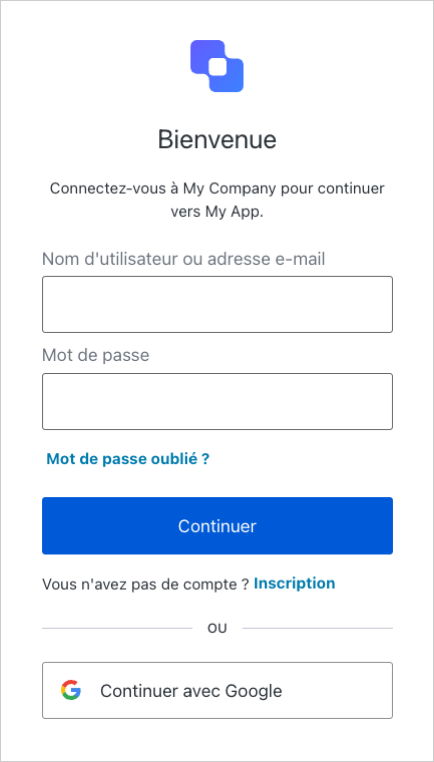
      Pointez votre navigateur sur `http:``//localhost:3000.` Suivez le lien **Log In (Connexion)** pour vous connecter ou vous inscrire à votre locataire Auth0.

      <Frame>
        <img src="https://mintlify.s3.us-west-1.amazonaws.com/auth0-docs-event-stream-action-templates/docs/images/fr-ca/cdy7uua7fh8z/5Lp4Zahxd2v6wSJmy9JaM4/2fc68529fe5299c1fc514e3f28a8c998/Login_Screen_-_French.png" alt="null" />
      </Frame>

      Une fois la connexion réussie, vous verrez l’image du profil de l’utilisateur et un menu déroulant à l’endroit où se trouvait le lien Log In (Connexion). Vous pouvez alors consulter la page de profil de l’utilisateur en cliquant sur le lien **Profile (Profil)**. Vous pouvez vous déconnecter en cliquant sur le lien **Logout (Déconnexion)** dans le menu déroulant.
    </Section>

    ## Étapes suivantes

    Beau travail! Si vous en êtes arrivé là, vous devriez avoir la connexion, la déconnexion et les informations de profil utilisateur actives dans votre application.

    Cela conclut notre tutoriel de démarrage rapide, mais il y a tellement plus à explorer. Pour en savoir plus sur ce que vous pouvez faire avec Auth0, consultez :

    * [Auth0 Dashboard](https://manage.auth0.com/#) : apprenez à configurer et gérer votre locataire et vos applications Auth0
    * [Trousse SDK auth0-java-mvc-common](https://github.com/auth0/auth0-java-mvc-common) : explorez en détail la trousse SDK utilisée dans ce tutoriel
    * [Auth0 Marketplace](https://marketplace.auth0.com/) : découvrez des intégrations que vous pouvez activer pour étendre les fonctionnalités d’Auth0
  </Content>

  <SideMenu sections={sections}>
    <SideMenuSectionItem id={sections[0].id}>
      <SignUpForm lang="fr" />
    </SideMenuSectionItem>

    <SideMenuSectionItem id={sections[1].id}>
      <SignUpForm lang="fr" />
    </SideMenuSectionItem>

    <SideMenuSectionItem id={sections[2].id}>
      <AuthCodeGroup>
        ```xml src/main/webapp/WEB-INF/web.xml lines theme={null}
        <!-- `src/main/webapp/WEB-INF/web.xml`-->

        <env-entry>
            <env-entry-name>auth0.domain</env-entry-name>
            <env-entry-type>java.lang.String</env-entry-type>
            <env-entry-value>{yourDomain}</env-entry-value>
        </env-entry>
        <env-entry>
            <env-entry-name>auth0.clientId</env-entry-name>
            <env-entry-type>java.lang.String</env-entry-type>
            <env-entry-value>{yourClientId}</env-entry-value>
        </env-entry>
        <env-entry>
            <env-entry-name>auth0.clientSecret</env-entry-name>
            <env-entry-type>java.lang.String</env-entry-type>
            <env-entry-value>{yourClientSecret}</env-entry-value>
        </env-entry>
        <env-entry>
            <env-entry-name>auth0.scope</env-entry-name>
            <env-entry-type>java.lang.String</env-entry-type>
            <env-entry-value>openid profile email</env-entry-value>
        </env-entry>
        ```

        ```java src/main/java/com/auth0/example/security/Auth0AuthenticationConfig.java lines  theme={null}
        // src/main/java/com/auth0/example/security/Auth0AuthenticationConfig.java

        @ApplicationScoped
        public class Auth0AuthenticationConfig {

            private String domain;
            private String clientId;
            private String clientSecret;
            private String scope;

            @PostConstruct
            public void init() {
                // Get authentication config values from env-entries in web.xml
                try {
                    Context env = (Context)new InitialContext().lookup("java:comp/env");

                    this.domain = (String) env.lookup("auth0.domain");
                    this.clientId = (String) env.lookup("auth0.clientId");
                    this.clientSecret = (String) env.lookup("auth0.clientSecret");
                    this.scope = (String) env.lookup("auth0.scope");
                } catch (NamingException ne) {
                    throw new IllegalArgumentException("Unable to lookup auth0 configuration properties from web.xml", ne);
                }

                if (this.domain == null || this.clientId == null || this.clientSecret == null || this.scope == null) {
                    throw new IllegalArgumentException("domain, clientId, clientSecret, and scope must be set in web.xml");
                }
            }

            public String getDomain() {
                 return domain;
            }

            public String getClientId() {
                 return clientId;
            }

            public String getClientSecret() {
                 return clientSecret;
            }

            public String getScope() {
                return scope;
            }
        }
        ```

        ```java src/main/java/com/auth0/example/web/LoginServlet.java lines  theme={null}
        // src/main/java/com/auth0/example/web/LoginServlet.java

        @WebServlet(urlPatterns = "/login")
        public class LoginServlet extends HttpServlet {
            private final Auth0AuthenticationConfig config;
            private final AuthenticationController authenticationController;

            @Inject
            LoginServlet(Auth0AuthenticationConfig config, AuthenticationController authenticationController) {
                this.config = config;
                this.authenticationController = authenticationController;
            }

            @Override
            public void doGet(HttpServletRequest request, HttpServletResponse response) throws ServletException, IOException {
                // URL where the application will receive the authorization code (e.g., http://localhost:3000/callback)
                String callbackUrl = String.format(
                        "%s://%s:%s/callback",
                        request.getScheme(),
                        request.getServerName(),
                        request.getServerPort()
                );

                // Create the authorization URL to redirect the user to, to begin the authentication flow.
                String authURL = authenticationController.buildAuthorizeUrl(request, response, callbackUrl)
                        .withScope(config.getScope())
                        .build();

                response.sendRedirect(authURL);
            }
        }
        ```

        ```java src/main/java/com/auth0/example/web/HomeServlet.java lines theme={null}
        // src/main/java/com/auth0/example/web/HomeServlet.java

        @WebServlet(urlPatterns = "")
        public class HomeServlet extends HttpServlet {

            @Override
            public void doGet(HttpServletRequest request, HttpServletResponse response) throws ServletException, IOException {
                Principal principal = request.getUserPrincipal();

                if (principal instanceof Auth0JwtPrincipal) {
                    Auth0JwtPrincipal auth0JwtPrincipal = (Auth0JwtPrincipal) principal;
                    request.setAttribute("profile", auth0JwtPrincipal.getIdToken().getClaims());
                }
                request.getRequestDispatcher("/WEB-INF/jsp/home.jsp").forward(request, response);
            }
        }
        ```

        ```java src/main/java/com/auth0/example/web/LogoutServlet.java lines  theme={null}
        // src/main/java/com/auth0/example/web/LogoutServlet.java

        @WebServlet(urlPatterns = "/logout")
        public class LogoutServlet extends HttpServlet {
            private final Auth0AuthenticationConfig config;

            @Inject
            LogoutServlet(Auth0AuthenticationConfig config) {
                this.config = config;
            }

            @Override
            protected void doGet(final HttpServletRequest request, final HttpServletResponse response) throws ServletException, IOException {
                clearSession(request);
                response.sendRedirect(getLogoutUrl(request));
            }

            private void clearSession(HttpServletRequest request) {
                if (request.getSession() != null) {
                    request.getSession().invalidate();
                }
            }

            private String getLogoutUrl(HttpServletRequest request) {
                String returnUrl = String.format("%s://%s", request.getScheme(), request.getServerName());
                int port = request.getServerPort();
                String scheme = request.getScheme();

                if (("http".equals(scheme) && port != 80) ||
                        ("https".equals(scheme) && port != 443)) {
                    returnUrl += ":" + port;
                }

                returnUrl += "/";

                // Build logout URL like:
                // https://{yourDomain}/v2/logout?client_id={yourClientId}&returnTo=http://localhost:3000/
                String logoutUrl = String.format(
                        "https://%s/v2/logout?client_id=%s&returnTo=%s",
                        config.getDomain(),
                        config.getClientId(),
                        returnUrl
                );

                return logoutUrl;
            }
        }
        ```
      </AuthCodeGroup>
    </SideMenuSectionItem>

    <SideMenuSectionItem id={sections[3].id}>
      <AuthCodeGroup>
        ```java src/main/java/com/auth0/example/security/Auth0AuthenticationConfig.java lines  theme={null}
        // src/main/java/com/auth0/example/security/Auth0AuthenticationConfig.java

        @ApplicationScoped
        public class Auth0AuthenticationConfig {

            private String domain;
            private String clientId;
            private String clientSecret;
            private String scope;

            @PostConstruct
            public void init() {
                // Get authentication config values from env-entries in web.xml
                try {
                    Context env = (Context)new InitialContext().lookup("java:comp/env");

                    this.domain = (String) env.lookup("auth0.domain");
                    this.clientId = (String) env.lookup("auth0.clientId");
                    this.clientSecret = (String) env.lookup("auth0.clientSecret");
                    this.scope = (String) env.lookup("auth0.scope");
                } catch (NamingException ne) {
                    throw new IllegalArgumentException("Unable to lookup auth0 configuration properties from web.xml", ne);
                }

                if (this.domain == null || this.clientId == null || this.clientSecret == null || this.scope == null) {
                    throw new IllegalArgumentException("domain, clientId, clientSecret, and scope must be set in web.xml");
                }
            }

            public String getDomain() {
                 return domain;
            }

            public String getClientId() {
                 return clientId;
            }

            public String getClientSecret() {
                 return clientSecret;
            }

            public String getScope() {
                return scope;
            }
        }
        ```

        ```xml src/main/webapp/WEB-INF/web.xml lines theme={null}
        <!-- `src/main/webapp/WEB-INF/web.xml`-->

        <env-entry>
            <env-entry-name>auth0.domain</env-entry-name>
            <env-entry-type>java.lang.String</env-entry-type>
            <env-entry-value>{yourDomain}</env-entry-value>
        </env-entry>
        <env-entry>
            <env-entry-name>auth0.clientId</env-entry-name>
            <env-entry-type>java.lang.String</env-entry-type>
            <env-entry-value>{yourClientId}</env-entry-value>
        </env-entry>
        <env-entry>
            <env-entry-name>auth0.clientSecret</env-entry-name>
            <env-entry-type>java.lang.String</env-entry-type>
            <env-entry-value>{yourClientSecret}</env-entry-value>
        </env-entry>
        <env-entry>
            <env-entry-name>auth0.scope</env-entry-name>
            <env-entry-type>java.lang.String</env-entry-type>
            <env-entry-value>openid profile email</env-entry-value>
        </env-entry>
        ```

        ```java src/main/java/com/auth0/example/web/LoginServlet.java lines  theme={null}
        // src/main/java/com/auth0/example/web/LoginServlet.java

        @WebServlet(urlPatterns = "/login")
        public class LoginServlet extends HttpServlet {
            private final Auth0AuthenticationConfig config;
            private final AuthenticationController authenticationController;

            @Inject
            LoginServlet(Auth0AuthenticationConfig config, AuthenticationController authenticationController) {
                this.config = config;
                this.authenticationController = authenticationController;
            }

            @Override
            public void doGet(HttpServletRequest request, HttpServletResponse response) throws ServletException, IOException {
                // URL where the application will receive the authorization code (e.g., http://localhost:3000/callback)
                String callbackUrl = String.format(
                        "%s://%s:%s/callback",
                        request.getScheme(),
                        request.getServerName(),
                        request.getServerPort()
                );

                // Create the authorization URL to redirect the user to, to begin the authentication flow.
                String authURL = authenticationController.buildAuthorizeUrl(request, response, callbackUrl)
                        .withScope(config.getScope())
                        .build();

                response.sendRedirect(authURL);
            }
        }
        ```

        ```java src/main/java/com/auth0/example/web/HomeServlet.java lines theme={null}
        // src/main/java/com/auth0/example/web/HomeServlet.java

        @WebServlet(urlPatterns = "")
        public class HomeServlet extends HttpServlet {

            @Override
            public void doGet(HttpServletRequest request, HttpServletResponse response) throws ServletException, IOException {
                Principal principal = request.getUserPrincipal();

                if (principal instanceof Auth0JwtPrincipal) {
                    Auth0JwtPrincipal auth0JwtPrincipal = (Auth0JwtPrincipal) principal;
                    request.setAttribute("profile", auth0JwtPrincipal.getIdToken().getClaims());
                }
                request.getRequestDispatcher("/WEB-INF/jsp/home.jsp").forward(request, response);
            }
        }
        ```

        ```java src/main/java/com/auth0/example/web/LogoutServlet.java lines  theme={null}
        // src/main/java/com/auth0/example/web/LogoutServlet.java

        @WebServlet(urlPatterns = "/logout")
        public class LogoutServlet extends HttpServlet {
            private final Auth0AuthenticationConfig config;

            @Inject
            LogoutServlet(Auth0AuthenticationConfig config) {
                this.config = config;
            }

            @Override
            protected void doGet(final HttpServletRequest request, final HttpServletResponse response) throws ServletException, IOException {
                clearSession(request);
                response.sendRedirect(getLogoutUrl(request));
            }

            private void clearSession(HttpServletRequest request) {
                if (request.getSession() != null) {
                    request.getSession().invalidate();
                }
            }

            private String getLogoutUrl(HttpServletRequest request) {
                String returnUrl = String.format("%s://%s", request.getScheme(), request.getServerName());
                int port = request.getServerPort();
                String scheme = request.getScheme();

                if (("http".equals(scheme) && port != 80) ||
                        ("https".equals(scheme) && port != 443)) {
                    returnUrl += ":" + port;
                }

                returnUrl += "/";

                // Build logout URL like:
                // https://{yourDomain}/v2/logout?client_id={yourClientId}&returnTo=http://localhost:3000/
                String logoutUrl = String.format(
                        "https://%s/v2/logout?client_id=%s&returnTo=%s",
                        config.getDomain(),
                        config.getClientId(),
                        returnUrl
                );

                return logoutUrl;
            }
        }
        ```
      </AuthCodeGroup>
    </SideMenuSectionItem>

    <SideMenuSectionItem id={sections[4].id}>
      <AuthCodeGroup>
        ```java src/main/java/com/auth0/example/web/LoginServlet.java lines  theme={null}
        // src/main/java/com/auth0/example/web/LoginServlet.java

        @WebServlet(urlPatterns = "/login")
        public class LoginServlet extends HttpServlet {
            private final Auth0AuthenticationConfig config;
            private final AuthenticationController authenticationController;

            @Inject
            LoginServlet(Auth0AuthenticationConfig config, AuthenticationController authenticationController) {
                this.config = config;
                this.authenticationController = authenticationController;
            }

            @Override
            public void doGet(HttpServletRequest request, HttpServletResponse response) throws ServletException, IOException {
                // URL where the application will receive the authorization code (e.g., http://localhost:3000/callback)
                String callbackUrl = String.format(
                        "%s://%s:%s/callback",
                        request.getScheme(),
                        request.getServerName(),
                        request.getServerPort()
                );

                // Create the authorization URL to redirect the user to, to begin the authentication flow.
                String authURL = authenticationController.buildAuthorizeUrl(request, response, callbackUrl)
                        .withScope(config.getScope())
                        .build();

                response.sendRedirect(authURL);
            }
        }
        ```

        ```xml src/main/webapp/WEB-INF/web.xml lines theme={null}
        <!-- `src/main/webapp/WEB-INF/web.xml`-->

        <env-entry>
            <env-entry-name>auth0.domain</env-entry-name>
            <env-entry-type>java.lang.String</env-entry-type>
            <env-entry-value>{yourDomain}</env-entry-value>
        </env-entry>
        <env-entry>
            <env-entry-name>auth0.clientId</env-entry-name>
            <env-entry-type>java.lang.String</env-entry-type>
            <env-entry-value>{yourClientId}</env-entry-value>
        </env-entry>
        <env-entry>
            <env-entry-name>auth0.clientSecret</env-entry-name>
            <env-entry-type>java.lang.String</env-entry-type>
            <env-entry-value>{yourClientSecret}</env-entry-value>
        </env-entry>
        <env-entry>
            <env-entry-name>auth0.scope</env-entry-name>
            <env-entry-type>java.lang.String</env-entry-type>
            <env-entry-value>openid profile email</env-entry-value>
        </env-entry>
        ```

        ```java src/main/java/com/auth0/example/security/Auth0AuthenticationConfig.java lines  theme={null}
        // src/main/java/com/auth0/example/security/Auth0AuthenticationConfig.java

        @ApplicationScoped
        public class Auth0AuthenticationConfig {

            private String domain;
            private String clientId;
            private String clientSecret;
            private String scope;

            @PostConstruct
            public void init() {
                // Get authentication config values from env-entries in web.xml
                try {
                    Context env = (Context)new InitialContext().lookup("java:comp/env");

                    this.domain = (String) env.lookup("auth0.domain");
                    this.clientId = (String) env.lookup("auth0.clientId");
                    this.clientSecret = (String) env.lookup("auth0.clientSecret");
                    this.scope = (String) env.lookup("auth0.scope");
                } catch (NamingException ne) {
                    throw new IllegalArgumentException("Unable to lookup auth0 configuration properties from web.xml", ne);
                }

                if (this.domain == null || this.clientId == null || this.clientSecret == null || this.scope == null) {
                    throw new IllegalArgumentException("domain, clientId, clientSecret, and scope must be set in web.xml");
                }
            }

            public String getDomain() {
                 return domain;
            }

            public String getClientId() {
                 return clientId;
            }

            public String getClientSecret() {
                 return clientSecret;
            }

            public String getScope() {
                return scope;
            }
        }
        ```

        ```java src/main/java/com/auth0/example/web/HomeServlet.java lines theme={null}
        // src/main/java/com/auth0/example/web/HomeServlet.java

        @WebServlet(urlPatterns = "")
        public class HomeServlet extends HttpServlet {

            @Override
            public void doGet(HttpServletRequest request, HttpServletResponse response) throws ServletException, IOException {
                Principal principal = request.getUserPrincipal();

                if (principal instanceof Auth0JwtPrincipal) {
                    Auth0JwtPrincipal auth0JwtPrincipal = (Auth0JwtPrincipal) principal;
                    request.setAttribute("profile", auth0JwtPrincipal.getIdToken().getClaims());
                }
                request.getRequestDispatcher("/WEB-INF/jsp/home.jsp").forward(request, response);
            }
        }
        ```

        ```java src/main/java/com/auth0/example/web/LogoutServlet.java lines  theme={null}
        // src/main/java/com/auth0/example/web/LogoutServlet.java

        @WebServlet(urlPatterns = "/logout")
        public class LogoutServlet extends HttpServlet {
            private final Auth0AuthenticationConfig config;

            @Inject
            LogoutServlet(Auth0AuthenticationConfig config) {
                this.config = config;
            }

            @Override
            protected void doGet(final HttpServletRequest request, final HttpServletResponse response) throws ServletException, IOException {
                clearSession(request);
                response.sendRedirect(getLogoutUrl(request));
            }

            private void clearSession(HttpServletRequest request) {
                if (request.getSession() != null) {
                    request.getSession().invalidate();
                }
            }

            private String getLogoutUrl(HttpServletRequest request) {
                String returnUrl = String.format("%s://%s", request.getScheme(), request.getServerName());
                int port = request.getServerPort();
                String scheme = request.getScheme();

                if (("http".equals(scheme) && port != 80) ||
                        ("https".equals(scheme) && port != 443)) {
                    returnUrl += ":" + port;
                }

                returnUrl += "/";

                // Build logout URL like:
                // https://{yourDomain}/v2/logout?client_id={yourClientId}&returnTo=http://localhost:3000/
                String logoutUrl = String.format(
                        "https://%s/v2/logout?client_id=%s&returnTo=%s",
                        config.getDomain(),
                        config.getClientId(),
                        returnUrl
                );

                return logoutUrl;
            }
        }
        ```
      </AuthCodeGroup>
    </SideMenuSectionItem>

    <SideMenuSectionItem id={sections[5].id}>
      <AuthCodeGroup>
        ```java src/main/java/com/auth0/example/web/HomeServlet.java lines theme={null}
        // src/main/java/com/auth0/example/web/HomeServlet.java

        @WebServlet(urlPatterns = "")
        public class HomeServlet extends HttpServlet {

            @Override
            public void doGet(HttpServletRequest request, HttpServletResponse response) throws ServletException, IOException {
                Principal principal = request.getUserPrincipal();

                if (principal instanceof Auth0JwtPrincipal) {
                    Auth0JwtPrincipal auth0JwtPrincipal = (Auth0JwtPrincipal) principal;
                    request.setAttribute("profile", auth0JwtPrincipal.getIdToken().getClaims());
                }
                request.getRequestDispatcher("/WEB-INF/jsp/home.jsp").forward(request, response);
            }
        }
        ```

        ```xml src/main/webapp/WEB-INF/web.xml lines theme={null}
        <!-- `src/main/webapp/WEB-INF/web.xml`-->

        <env-entry>
            <env-entry-name>auth0.domain</env-entry-name>
            <env-entry-type>java.lang.String</env-entry-type>
            <env-entry-value>{yourDomain}</env-entry-value>
        </env-entry>
        <env-entry>
            <env-entry-name>auth0.clientId</env-entry-name>
            <env-entry-type>java.lang.String</env-entry-type>
            <env-entry-value>{yourClientId}</env-entry-value>
        </env-entry>
        <env-entry>
            <env-entry-name>auth0.clientSecret</env-entry-name>
            <env-entry-type>java.lang.String</env-entry-type>
            <env-entry-value>{yourClientSecret}</env-entry-value>
        </env-entry>
        <env-entry>
            <env-entry-name>auth0.scope</env-entry-name>
            <env-entry-type>java.lang.String</env-entry-type>
            <env-entry-value>openid profile email</env-entry-value>
        </env-entry>
        ```

        ```java src/main/java/com/auth0/example/security/Auth0AuthenticationConfig.java lines  theme={null}
        // src/main/java/com/auth0/example/security/Auth0AuthenticationConfig.java

        @ApplicationScoped
        public class Auth0AuthenticationConfig {

            private String domain;
            private String clientId;
            private String clientSecret;
            private String scope;

            @PostConstruct
            public void init() {
                // Get authentication config values from env-entries in web.xml
                try {
                    Context env = (Context)new InitialContext().lookup("java:comp/env");

                    this.domain = (String) env.lookup("auth0.domain");
                    this.clientId = (String) env.lookup("auth0.clientId");
                    this.clientSecret = (String) env.lookup("auth0.clientSecret");
                    this.scope = (String) env.lookup("auth0.scope");
                } catch (NamingException ne) {
                    throw new IllegalArgumentException("Unable to lookup auth0 configuration properties from web.xml", ne);
                }

                if (this.domain == null || this.clientId == null || this.clientSecret == null || this.scope == null) {
                    throw new IllegalArgumentException("domain, clientId, clientSecret, and scope must be set in web.xml");
                }
            }

            public String getDomain() {
                 return domain;
            }

            public String getClientId() {
                 return clientId;
            }

            public String getClientSecret() {
                 return clientSecret;
            }

            public String getScope() {
                return scope;
            }
        }
        ```

        ```java src/main/java/com/auth0/example/web/LoginServlet.java lines  theme={null}
        // src/main/java/com/auth0/example/web/LoginServlet.java

        @WebServlet(urlPatterns = "/login")
        public class LoginServlet extends HttpServlet {
            private final Auth0AuthenticationConfig config;
            private final AuthenticationController authenticationController;

            @Inject
            LoginServlet(Auth0AuthenticationConfig config, AuthenticationController authenticationController) {
                this.config = config;
                this.authenticationController = authenticationController;
            }

            @Override
            public void doGet(HttpServletRequest request, HttpServletResponse response) throws ServletException, IOException {
                // URL where the application will receive the authorization code (e.g., http://localhost:3000/callback)
                String callbackUrl = String.format(
                        "%s://%s:%s/callback",
                        request.getScheme(),
                        request.getServerName(),
                        request.getServerPort()
                );

                // Create the authorization URL to redirect the user to, to begin the authentication flow.
                String authURL = authenticationController.buildAuthorizeUrl(request, response, callbackUrl)
                        .withScope(config.getScope())
                        .build();

                response.sendRedirect(authURL);
            }
        }
        ```

        ```java src/main/java/com/auth0/example/web/LogoutServlet.java lines  theme={null}
        // src/main/java/com/auth0/example/web/LogoutServlet.java

        @WebServlet(urlPatterns = "/logout")
        public class LogoutServlet extends HttpServlet {
            private final Auth0AuthenticationConfig config;

            @Inject
            LogoutServlet(Auth0AuthenticationConfig config) {
                this.config = config;
            }

            @Override
            protected void doGet(final HttpServletRequest request, final HttpServletResponse response) throws ServletException, IOException {
                clearSession(request);
                response.sendRedirect(getLogoutUrl(request));
            }

            private void clearSession(HttpServletRequest request) {
                if (request.getSession() != null) {
                    request.getSession().invalidate();
                }
            }

            private String getLogoutUrl(HttpServletRequest request) {
                String returnUrl = String.format("%s://%s", request.getScheme(), request.getServerName());
                int port = request.getServerPort();
                String scheme = request.getScheme();

                if (("http".equals(scheme) && port != 80) ||
                        ("https".equals(scheme) && port != 443)) {
                    returnUrl += ":" + port;
                }

                returnUrl += "/";

                // Build logout URL like:
                // https://{yourDomain}/v2/logout?client_id={yourClientId}&returnTo=http://localhost:3000/
                String logoutUrl = String.format(
                        "https://%s/v2/logout?client_id=%s&returnTo=%s",
                        config.getDomain(),
                        config.getClientId(),
                        returnUrl
                );

                return logoutUrl;
            }
        }
        ```
      </AuthCodeGroup>
    </SideMenuSectionItem>

    <SideMenuSectionItem id={sections[6].id}>
      <AuthCodeGroup>
        ```java src/main/java/com/auth0/example/web/LogoutServlet.java lines  theme={null}
        // src/main/java/com/auth0/example/web/LogoutServlet.java

        @WebServlet(urlPatterns = "/logout")
        public class LogoutServlet extends HttpServlet {
            private final Auth0AuthenticationConfig config;

            @Inject
            LogoutServlet(Auth0AuthenticationConfig config) {
                this.config = config;
            }

            @Override
            protected void doGet(final HttpServletRequest request, final HttpServletResponse response) throws ServletException, IOException {
                clearSession(request);
                response.sendRedirect(getLogoutUrl(request));
            }

            private void clearSession(HttpServletRequest request) {
                if (request.getSession() != null) {
                    request.getSession().invalidate();
                }
            }

            private String getLogoutUrl(HttpServletRequest request) {
                String returnUrl = String.format("%s://%s", request.getScheme(), request.getServerName());
                int port = request.getServerPort();
                String scheme = request.getScheme();

                if (("http".equals(scheme) && port != 80) ||
                        ("https".equals(scheme) && port != 443)) {
                    returnUrl += ":" + port;
                }

                returnUrl += "/";

                // Build logout URL like:
                // https://{yourDomain}/v2/logout?client_id={yourClientId}&returnTo=http://localhost:3000/
                String logoutUrl = String.format(
                        "https://%s/v2/logout?client_id=%s&returnTo=%s",
                        config.getDomain(),
                        config.getClientId(),
                        returnUrl
                );

                return logoutUrl;
            }
        }
        ```

        ```xml src/main/webapp/WEB-INF/web.xml lines theme={null}
        <!-- `src/main/webapp/WEB-INF/web.xml`-->

        <env-entry>
            <env-entry-name>auth0.domain</env-entry-name>
            <env-entry-type>java.lang.String</env-entry-type>
            <env-entry-value>{yourDomain}</env-entry-value>
        </env-entry>
        <env-entry>
            <env-entry-name>auth0.clientId</env-entry-name>
            <env-entry-type>java.lang.String</env-entry-type>
            <env-entry-value>{yourClientId}</env-entry-value>
        </env-entry>
        <env-entry>
            <env-entry-name>auth0.clientSecret</env-entry-name>
            <env-entry-type>java.lang.String</env-entry-type>
            <env-entry-value>{yourClientSecret}</env-entry-value>
        </env-entry>
        <env-entry>
            <env-entry-name>auth0.scope</env-entry-name>
            <env-entry-type>java.lang.String</env-entry-type>
            <env-entry-value>openid profile email</env-entry-value>
        </env-entry>
        ```

        ```java src/main/java/com/auth0/example/security/Auth0AuthenticationConfig.java lines  theme={null}
        // src/main/java/com/auth0/example/security/Auth0AuthenticationConfig.java

        @ApplicationScoped
        public class Auth0AuthenticationConfig {

            private String domain;
            private String clientId;
            private String clientSecret;
            private String scope;

            @PostConstruct
            public void init() {
                // Get authentication config values from env-entries in web.xml
                try {
                    Context env = (Context)new InitialContext().lookup("java:comp/env");

                    this.domain = (String) env.lookup("auth0.domain");
                    this.clientId = (String) env.lookup("auth0.clientId");
                    this.clientSecret = (String) env.lookup("auth0.clientSecret");
                    this.scope = (String) env.lookup("auth0.scope");
                } catch (NamingException ne) {
                    throw new IllegalArgumentException("Unable to lookup auth0 configuration properties from web.xml", ne);
                }

                if (this.domain == null || this.clientId == null || this.clientSecret == null || this.scope == null) {
                    throw new IllegalArgumentException("domain, clientId, clientSecret, and scope must be set in web.xml");
                }
            }

            public String getDomain() {
                 return domain;
            }

            public String getClientId() {
                 return clientId;
            }

            public String getClientSecret() {
                 return clientSecret;
            }

            public String getScope() {
                return scope;
            }
        }
        ```

        ```java src/main/java/com/auth0/example/web/LoginServlet.java lines  theme={null}
        // src/main/java/com/auth0/example/web/LoginServlet.java

        @WebServlet(urlPatterns = "/login")
        public class LoginServlet extends HttpServlet {
            private final Auth0AuthenticationConfig config;
            private final AuthenticationController authenticationController;

            @Inject
            LoginServlet(Auth0AuthenticationConfig config, AuthenticationController authenticationController) {
                this.config = config;
                this.authenticationController = authenticationController;
            }

            @Override
            public void doGet(HttpServletRequest request, HttpServletResponse response) throws ServletException, IOException {
                // URL where the application will receive the authorization code (e.g., http://localhost:3000/callback)
                String callbackUrl = String.format(
                        "%s://%s:%s/callback",
                        request.getScheme(),
                        request.getServerName(),
                        request.getServerPort()
                );

                // Create the authorization URL to redirect the user to, to begin the authentication flow.
                String authURL = authenticationController.buildAuthorizeUrl(request, response, callbackUrl)
                        .withScope(config.getScope())
                        .build();

                response.sendRedirect(authURL);
            }
        }
        ```

        ```java src/main/java/com/auth0/example/web/HomeServlet.java lines theme={null}
        // src/main/java/com/auth0/example/web/HomeServlet.java

        @WebServlet(urlPatterns = "")
        public class HomeServlet extends HttpServlet {

            @Override
            public void doGet(HttpServletRequest request, HttpServletResponse response) throws ServletException, IOException {
                Principal principal = request.getUserPrincipal();

                if (principal instanceof Auth0JwtPrincipal) {
                    Auth0JwtPrincipal auth0JwtPrincipal = (Auth0JwtPrincipal) principal;
                    request.setAttribute("profile", auth0JwtPrincipal.getIdToken().getClaims());
                }
                request.getRequestDispatcher("/WEB-INF/jsp/home.jsp").forward(request, response);
            }
        }
        ```
      </AuthCodeGroup>
    </SideMenuSectionItem>

    <SideMenuSectionItem id={sections[7].id}>
      <SignUpForm lang="fr" />
    </SideMenuSectionItem>
  </SideMenu>
</Recipe>