> ## Documentation Index
> Fetch the complete documentation index at: https://auth0-docs-event-stream-action-templates.mintlify.site/llms.txt
> Use this file to discover all available pages before exploring further.
> Learn how to use variables in Forms for Actions.
# Variables and helper functions
Variables allow you to access data contained in Forms and Flows to create custom business logic and automations.
Some basic considerations to using variables are:
* Variables are surrounded by curly brackets `{{ variable }}`.
* If a variable doesn't exist or can't be resolved, it has the same effect as an `undefined` variable.
* You can use nullish operators to handle `null` or `undefined` variables, for example:`{{fields.foo ?? fields.bar}}`.
## Available variables
You can use different types of variables to reference and transform data you gather from customers with Forms and Flows.
| Variable | Syntax | Where | Description |
| ------------------- | ----------------- | ------------- | ---------------------------------------------------------------- |
| Context | `{{context.*}}` | Forms / Flows | Reference context data of the current transaction |
| Form fields | `{{fields.*}}` | Forms / Flows | Reference data from your form fields and hidden fields |
| Shared variables | `{{vars.*}}` | Forms / Flows | Reference data stored as shared variables |
| Flow actions output | `{{actions.*}}` | Flows | Reference data from the output response of previous flow actions |
| Helper functions | `{{functions.*}}` | Forms / Flows | Helper functions to transform data |
### Context variables
Forms and flows automatically inherit context variables from the current transaction. You can access the following context variables:
* The `user` object, with access to the following properties:
* `user.user_id`
* `user.username`
* `user.name`
* `user.given_name`
* `user.family_name`
* `user.nickname`
* `user.email`
* `user.email_verified`
* `user.phone_number`
* `user.phone_verified`
* `user.picture`
* `user.user_metadata`
* `user.app_metadata`
* `user.created_at`
* `user.updated_at`
* `user.last_password_reset`
* `user.identities`
* The `organization` object, with access to the following properties:
* `organization.id`
* `organization.name`
* `organization.display_name`
* `organization.metadata`
* The `client` object, with access to the following properties:
* `client.client_id`
* `client.name`
* The `tenant` object, with access to the following property:
* `tenant.name`
* The `transaction` object, with access to the following property:
* `transaction.state`
* `transaction.correlation_id`
* The `custom_domain` object, with access to the following property:
* `custome_domain.domain`
* `custome_domain.domain_metadata`
```json lines expandable theme={null}
{
"user": {
"user_id": "auth0|658409...",
"name": "ana@travel0.com",
"nickname": "ana",
"email": "ana@travel0.com",
"email_verified": true,
"picture": "https://s.gravatar.com/avatar/8eb1b522f6...",
"user_metadata": {},
"app_metadata": {},
"created_at": "2023-12-21T09:46:40.487Z",
"updated_at": "2024-05-07T10:44:26.271Z",
"last_password_reset": "2023-12-21T09:49:08.932Z",
"identities": [
{
"user_id": "6584...",
"isSocial": false,
"provider": "auth0",
"connection": "Username-Password-Authentication"
}
]
},
"client": {
"client_id": "xpeg5...",
"name": "My App"
},
"tenant": {
"name": "tenant-testing"
},
"transaction": {
"state": "hKFo2SBId2M0..."
},
"custom_domain": {
"domain": "example.com",
"domain_metadata": {
"key": "value"
}
}
}
```
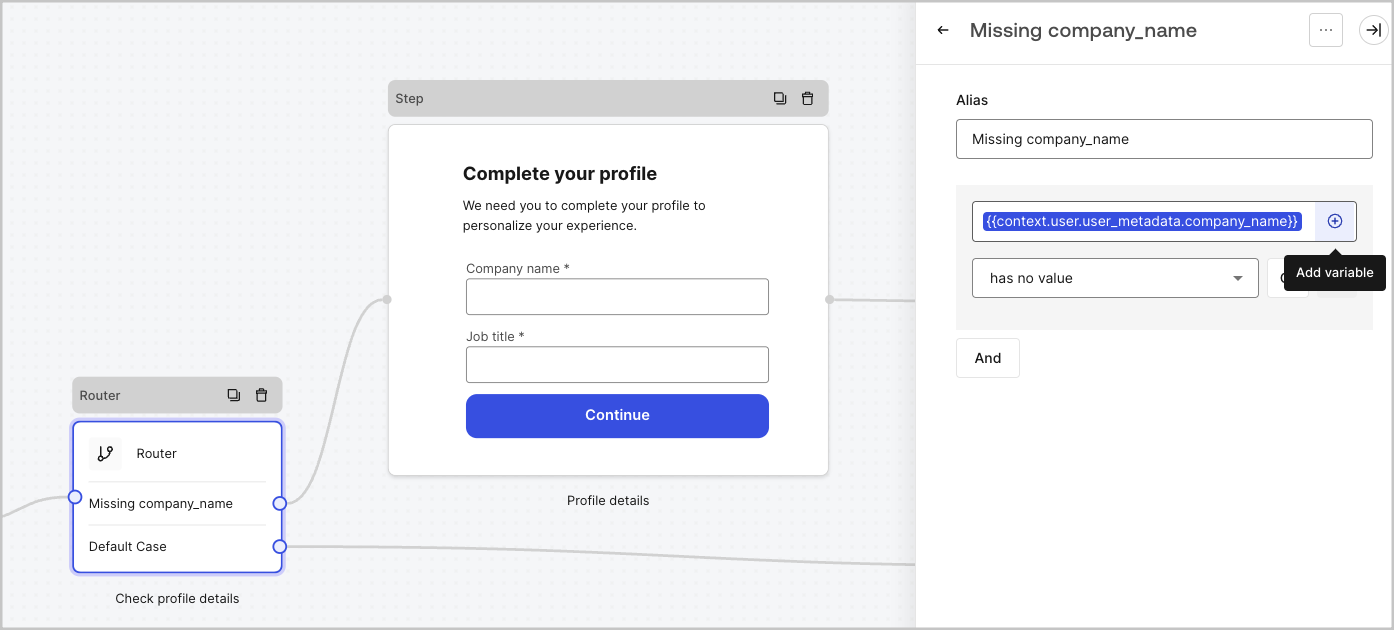
For example: `{{context.user.user_id}}` references the `user_id` of the `user` object.
 ### Form fields variables
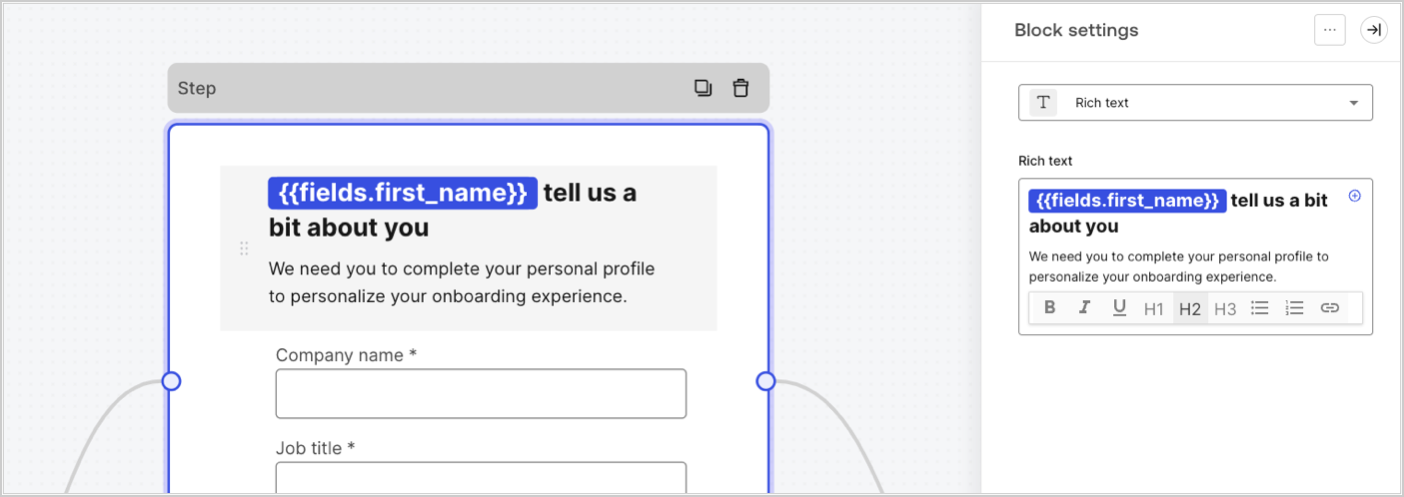
Field variables contain data collected from the user from input fields in the form and data from hidden fields. The data of each field varies depending on the field type. For example: `{{fields.first_name}}` references the input value of a field with the ID `first_name`.
### Form fields variables
Field variables contain data collected from the user from input fields in the form and data from hidden fields. The data of each field varies depending on the field type. For example: `{{fields.first_name}}` references the input value of a field with the ID `first_name`.
 ### Flow output actions variables
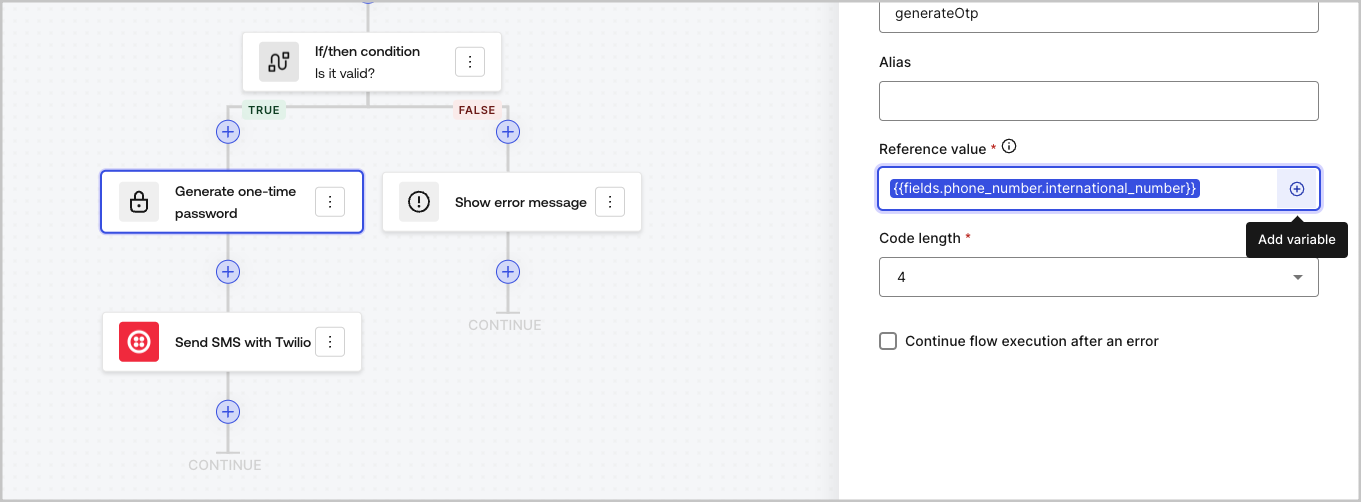
When a flow action is executed, it generates an output object response that can be referenced in subsequent actions. For example: `{{actions.generate_otp.code}}` references the output code of the action with ID `generate_otp`.
### Flow output actions variables
When a flow action is executed, it generates an output object response that can be referenced in subsequent actions. For example: `{{actions.generate_otp.code}}` references the output code of the action with ID `generate_otp`.
 ### Shared variables
You can store variables to be shared with subsequent flows or even with form components in the same transaction. Shared variables are ephemeral and are associated with a specific form journey. Their values cannot be accessed outside of that journey. For example: `{{vars.external_id}}` references the value of a shared variable with ID `external_id`.
### Shared variables
You can store variables to be shared with subsequent flows or even with form components in the same transaction. Shared variables are ephemeral and are associated with a specific form journey. Their values cannot be accessed outside of that journey. For example: `{{vars.external_id}}` references the value of a shared variable with ID `external_id`.
 Shared variables:
* are internal (server-side) and not exposed to the browser (client-side).
* can be resolved and exposed to the browser if you referenced a shared variable in the form component.
* might have sensitive information, so take care when you access shared variable to avoid any unnecessary or unintentional exposure.
### Helper functions
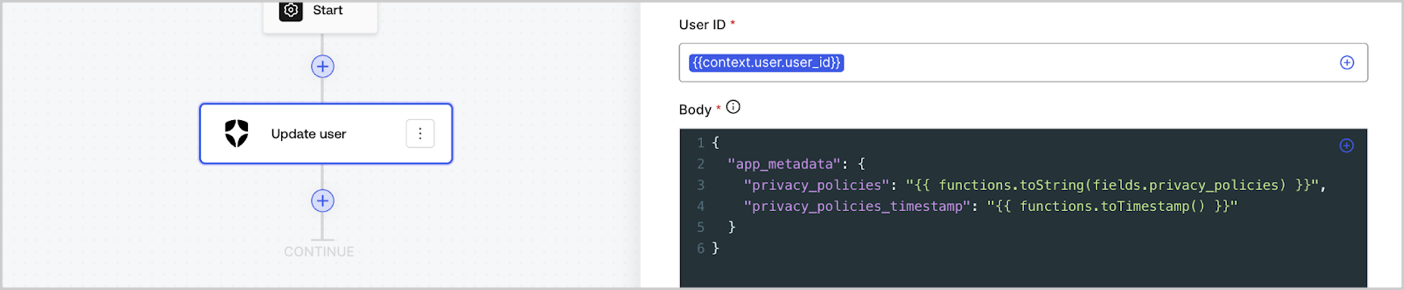
Helper functions let you transform data and perform simple operations. For example: `{{functions.toString(fields.privacy_policies)}}` transform the value of the field with ID `privacy_policies` using the `toString()` function.
Shared variables:
* are internal (server-side) and not exposed to the browser (client-side).
* can be resolved and exposed to the browser if you referenced a shared variable in the form component.
* might have sensitive information, so take care when you access shared variable to avoid any unnecessary or unintentional exposure.
### Helper functions
Helper functions let you transform data and perform simple operations. For example: `{{functions.toString(fields.privacy_policies)}}` transform the value of the field with ID `privacy_policies` using the `toString()` function.
 The available helper functions are:
| Function | Description | Example |
| ---------------------------------------- | ------------------------------------------------------------------------------------------------------------------------------------------------------------------------------------------------------------------------------------------------------------------------ | ---------------------------------------------------------------------------------------------------------------- |
| `toArray(value)` | Converts value to an array. | `{{ functions.toArray('abc') }} // ['abc']` |
| `toBoolean(value)` | Converts value to a boolean value. | `{{ functions.toBoolean(1) }} // true<br /><br />\{\{ functions.toBoolean(0) }} // false` |
| `length(value)` | Returns the length of the parameter value. | `{{ functions.length('auth0') }} // 5` |
| `mask(value)` | Masks a value to avoid be exposed in Executions. | `{{ functions.mask('my_awesome_secret') }} // ███` |
| `toNumber(value)` | Converts value to a number. | `{{ functions.toNumber('123') }} // 123` |
| `random(min, max, [boolean])` | Returns a random number between the inclusive min and max. | `{{ functions.random(0, 6) }} // 4 <br /><br />\{\{ functions.random(0, 6, true) }} // 3.8523497...` |
| `slice(value, start, end)` | Returns a section of a value array or string between the start and end indexes. | `{{ functions.slice( 'example', 3, 5) }} // 'mp'` |
| `toString(value)` | Converts value to a string. | `{{ functions.toString(123) }} // '123'` |
| `substring(value, start, end)` | Returns a section of a value between the start and end indexes. Read about the [differences of slice and substring functions](https://developer.mozilla.org/en-US/docs/Web/JavaScript/Reference/Global_Objects/String/substring#differences_between_substring_and_slice) | `{{ functions.substring( 'example’', 3, 5) }} // 'mp'` |
| `toTimestamp()` | Returns the current UNIX timestamp. | `{{ functions.toTimestamp() }} // 1628761483` |
| `toTimestamp(date)` | Returns the provided date in UNIX time. | `{{ functions.toTimestamp('2021-04-30T10:02:50.876Z') }} // 1619776970` |
| `toTimestamp(date)` | Returns the provided date in UNIX time. | `{{ functions.toTimestamp('2021-04-30T10:02:50.876Z') }} // 1619776970` |
| `toLowerCase(value)` | Returns a new string transformed to lowercase. | `{{ functions.toLowerCase('JohnDoe 1234') }} // johndoe 1234` |
| `toUpperCase(value)` | Returns a new string transformed to uppercase. | `{{ functions.toUpperCase('JohnDoe 1234') }} // JOHNDOE 1234` |
| `replaceAll(value, string, replacement)` | Returns a new string with all matches of a pattern replaced by a replacement. | `{{ functions.replaceAll('2021-04-30', '-', '/') }} // 2021/04/30` |
| `replace(value, string, replacement)` | Returns a new string with all matches of a pattern replaced by a replacement. If pattern is a string, only the first occurence will be replaced. | `{{ functions.replace('2021-04-30', '-', '/') }} // 2021/04-30` |
| `split(value, separator, limit?)` | Returns an ordered list of substrings divided by the separator. | `{{ functions.split('2021-04-30', '-') }} // ['2021', '04', '30']` |
| `now()` | Returns the current date in ISO 8601 format. | `{{ functions.now() }} // 2021-04-30T10:31:28.576Z` |
| `includes(collection, item, fromIndex?)` | Returns whether an array includes a certain value among its entries. | `{{ functions.includes(['auth0', 'identity', 'authentication'], 'identity') }} // true` |
| `indexOf(collection, item, fromIndex?)` | Returns the first index at which a given element can be found in the array, or -1 if it is not present. | `{{ functions.indexOf(['auth0', 'identity', 'authentication'], 'identity') }} // 1` |
| `merge(base, value)` | Returns a merged array, object or concatenates a string depending on the base data type. | `{{ functions.merge(['auth0', 'identity'], ['authentication']) }} // ['auth0', 'identity', 'authentication']` |
| `md5(value)` | Returns a MD5 hashed value. | `{{ functions.md5('auth0') }} // 7bbb597...` |
| `sha1(value)` | Returns a SHA1 hashed value. | `{{ functions.sha1('auth0') }} // b4ec5339...` |
| `sha256(value)` | Returns a SHA256 hashed value. | `{{ functions.sha256('auth0') }} // d9082bdc...` |
| `sha512(value)` | Returns a SHA512 hashed value. | `{{ functions.sha512('auth0') }} // c0d588069d...` |
| `uuid()` | Returns a random v4 UUID. | `{{ functions.uuid() }} // 36b8f84d-df4e-4d49-b662-bcde71a8764` |
## Variables best practices
### Use meaningful IDs
When you add a Form field or a Flow action, the ID is automatically generated.
Update the ID to a more descriptive value so you can identify the information it contains. For example, if you create a Form field that stores the user’s first name, update the ID to `first_name`.
### Be mindful when updating existing IDs
If a variable is already in use and you need to modify the ID, identify where you have referenced it and update the ID accordingly to avoid undefined or empty values.
### Check Flow executions
If you see an unexpected variable value, use the [**Executions**](/docs/customize/forms/flows/flow-execution-and-debugger) view to troubleshoot the variable.
### Use the autocomplete menu
The autocomplete menu helps you locate and properly reference existing variables.
The available helper functions are:
| Function | Description | Example |
| ---------------------------------------- | ------------------------------------------------------------------------------------------------------------------------------------------------------------------------------------------------------------------------------------------------------------------------ | ---------------------------------------------------------------------------------------------------------------- |
| `toArray(value)` | Converts value to an array. | `{{ functions.toArray('abc') }} // ['abc']` |
| `toBoolean(value)` | Converts value to a boolean value. | `{{ functions.toBoolean(1) }} // true<br /><br />\{\{ functions.toBoolean(0) }} // false` |
| `length(value)` | Returns the length of the parameter value. | `{{ functions.length('auth0') }} // 5` |
| `mask(value)` | Masks a value to avoid be exposed in Executions. | `{{ functions.mask('my_awesome_secret') }} // ███` |
| `toNumber(value)` | Converts value to a number. | `{{ functions.toNumber('123') }} // 123` |
| `random(min, max, [boolean])` | Returns a random number between the inclusive min and max. | `{{ functions.random(0, 6) }} // 4 <br /><br />\{\{ functions.random(0, 6, true) }} // 3.8523497...` |
| `slice(value, start, end)` | Returns a section of a value array or string between the start and end indexes. | `{{ functions.slice( 'example', 3, 5) }} // 'mp'` |
| `toString(value)` | Converts value to a string. | `{{ functions.toString(123) }} // '123'` |
| `substring(value, start, end)` | Returns a section of a value between the start and end indexes. Read about the [differences of slice and substring functions](https://developer.mozilla.org/en-US/docs/Web/JavaScript/Reference/Global_Objects/String/substring#differences_between_substring_and_slice) | `{{ functions.substring( 'example’', 3, 5) }} // 'mp'` |
| `toTimestamp()` | Returns the current UNIX timestamp. | `{{ functions.toTimestamp() }} // 1628761483` |
| `toTimestamp(date)` | Returns the provided date in UNIX time. | `{{ functions.toTimestamp('2021-04-30T10:02:50.876Z') }} // 1619776970` |
| `toTimestamp(date)` | Returns the provided date in UNIX time. | `{{ functions.toTimestamp('2021-04-30T10:02:50.876Z') }} // 1619776970` |
| `toLowerCase(value)` | Returns a new string transformed to lowercase. | `{{ functions.toLowerCase('JohnDoe 1234') }} // johndoe 1234` |
| `toUpperCase(value)` | Returns a new string transformed to uppercase. | `{{ functions.toUpperCase('JohnDoe 1234') }} // JOHNDOE 1234` |
| `replaceAll(value, string, replacement)` | Returns a new string with all matches of a pattern replaced by a replacement. | `{{ functions.replaceAll('2021-04-30', '-', '/') }} // 2021/04/30` |
| `replace(value, string, replacement)` | Returns a new string with all matches of a pattern replaced by a replacement. If pattern is a string, only the first occurence will be replaced. | `{{ functions.replace('2021-04-30', '-', '/') }} // 2021/04-30` |
| `split(value, separator, limit?)` | Returns an ordered list of substrings divided by the separator. | `{{ functions.split('2021-04-30', '-') }} // ['2021', '04', '30']` |
| `now()` | Returns the current date in ISO 8601 format. | `{{ functions.now() }} // 2021-04-30T10:31:28.576Z` |
| `includes(collection, item, fromIndex?)` | Returns whether an array includes a certain value among its entries. | `{{ functions.includes(['auth0', 'identity', 'authentication'], 'identity') }} // true` |
| `indexOf(collection, item, fromIndex?)` | Returns the first index at which a given element can be found in the array, or -1 if it is not present. | `{{ functions.indexOf(['auth0', 'identity', 'authentication'], 'identity') }} // 1` |
| `merge(base, value)` | Returns a merged array, object or concatenates a string depending on the base data type. | `{{ functions.merge(['auth0', 'identity'], ['authentication']) }} // ['auth0', 'identity', 'authentication']` |
| `md5(value)` | Returns a MD5 hashed value. | `{{ functions.md5('auth0') }} // 7bbb597...` |
| `sha1(value)` | Returns a SHA1 hashed value. | `{{ functions.sha1('auth0') }} // b4ec5339...` |
| `sha256(value)` | Returns a SHA256 hashed value. | `{{ functions.sha256('auth0') }} // d9082bdc...` |
| `sha512(value)` | Returns a SHA512 hashed value. | `{{ functions.sha512('auth0') }} // c0d588069d...` |
| `uuid()` | Returns a random v4 UUID. | `{{ functions.uuid() }} // 36b8f84d-df4e-4d49-b662-bcde71a8764` |
## Variables best practices
### Use meaningful IDs
When you add a Form field or a Flow action, the ID is automatically generated.
Update the ID to a more descriptive value so you can identify the information it contains. For example, if you create a Form field that stores the user’s first name, update the ID to `first_name`.
### Be mindful when updating existing IDs
If a variable is already in use and you need to modify the ID, identify where you have referenced it and update the ID accordingly to avoid undefined or empty values.
### Check Flow executions
If you see an unexpected variable value, use the [**Executions**](/docs/customize/forms/flows/flow-execution-and-debugger) view to troubleshoot the variable.
### Use the autocomplete menu
The autocomplete menu helps you locate and properly reference existing variables.